The standard advice for hanging a television is simple: find the studs, and bolt into them. The trouble is that the walls of real homes do not always cooperate. The studs may be in the wrong place for the screen, the wall may be brick or plaster, or the framing may be steel instead of wood. People then reach for a bag of anchors, and that is where most mounting disasters begin.
This guide explains what each kind of fastener can and cannot do, how to match the fastener to the wall, how to calculate a safe margin, and when a wall mount is the wrong answer. A television is heavy, expensive and sometimes above a sofa or a child. The goal is a mount you can trust, not a lucky one.
Why studs matter, and what a drywall anchor really holds
Drywall is a sandwich of gypsum between paper, usually half an inch thick, and it has little strength in pulling out. A fastener in drywall alone holds by spreading the load over a small area behind the board, and the gypsum crumbles when overloaded. A stud is a solid piece of framing, and a screw in a stud holds by the wood fibers gripping the thread. That is why a mount with two lag screws into studs holds far more than the same mount on any drywall anchor.
Ordinary plastic expansion anchors are meant for light items such as a small picture or a clock, and they carry a few pounds each. Even anchors that claim 50 or 75 pounds have ratings measured in ideal conditions, in new drywall, with a straight pull, and a TV mount applies a leverage load as well, because the weight hangs away from the wall. The tilt and swing of a mount multiplies the force on the top fasteners. This is why a rating that looks adequate on paper can fail in practice.
Treat the number on the package as a ceiling that you should stay well below. A common rule among installers is to use a safety factor of at least four, meaning that the combined rating of the fasteners should be four times the weight of the TV and mount. If a TV and its mount weigh 50 pounds, the fasteners should be rated for at least 200 pounds in total in that wall material. If you cannot meet that margin, change the plan.
Toggle bolts and strap toggles in hollow walls
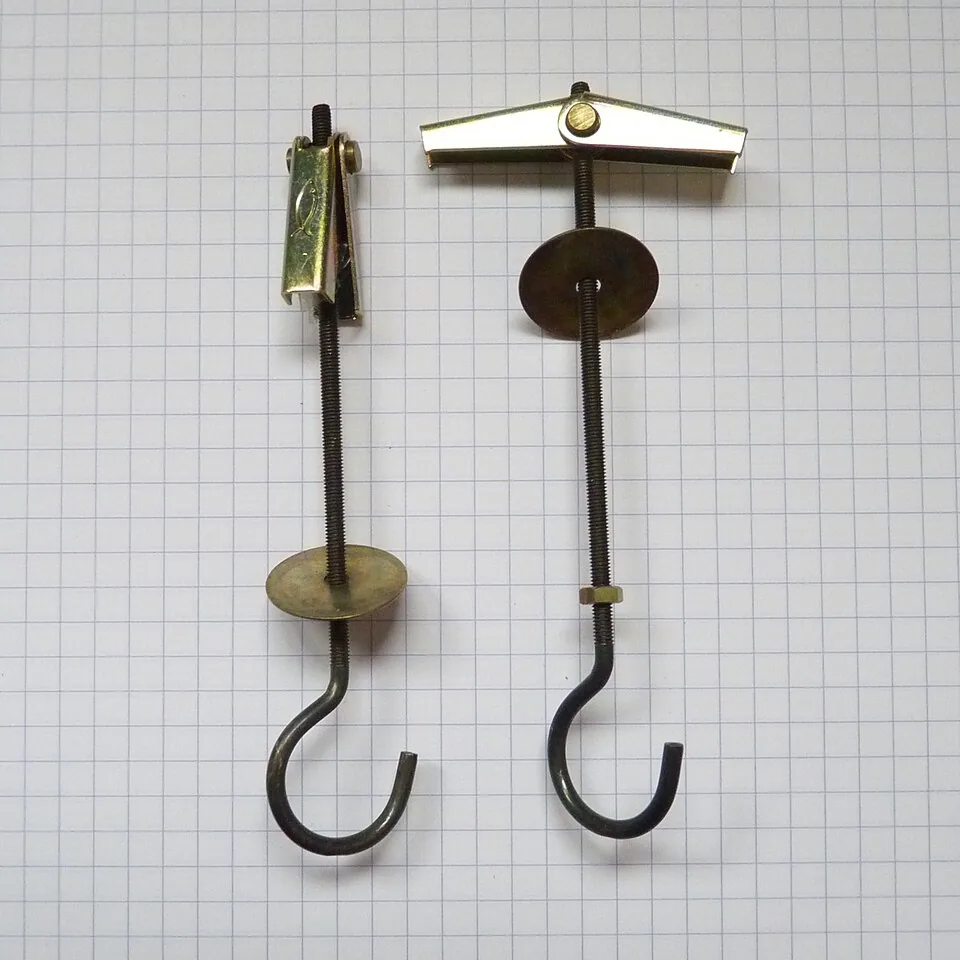
Toggle bolts are the main option for hollow drywall. A spring loaded or strap type toggle passes through a hole in the board and opens behind it, so the load spreads across a metal wing against the back of the drywall. A good quality toggle of one quarter inch diameter has a rated shear strength of a few hundred pounds in half inch drywall, far above a plastic anchor, though ratings vary by maker and by material, so check the product sheet.
Even with toggles, the drywall is the weak link, and the weak point is the board's pull out strength. For a larger TV, use the toggles on a wood backer board, such as a piece of three quarter inch plywood that spans two or more studs, or at least a wide plate, which spreads the load. The ideal is to screw the backer into studs where they exist, and use toggles for the remaining points. This hybrid reduces the share borne by the drywall.
Use as many toggles as the mount has holes, drill the exact diameter the maker specifies, and keep them level. Do not overtighten, since crushing the drywall behind the head weakens the grip. For a small TV on a fixed, low profile mount, with a combined weight under about 25 pounds, a set of four toggle bolts can be sound. For anything heavier, a larger screen, or a mount that extends, seek a stud, a backer or another method.
| Wall type | Suitable fastener | Notes |
|---|---|---|
| Drywall over wood studs | Lag screws into studs | First choice; the only choice for a large TV |
| Hollow drywall, no stud | Heavy toggle bolts with a backer | Light TVs only, large safety margin |
| Metal studs | Toggle bolts or rated metal stud fasteners | Wood cannot be screwed in; check gauge |
| Brick, concrete or block | Sleeve or wedge anchors, masonry screws | Use a hammer drill and a masonry bit |
| Plaster and lath | Screw into the studs behind it | Plaster alone is brittle; find framing |
Metal studs
Many apartment and commercial style walls use thin steel studs. A wood screw has no hold in them, and a standard lag screw can strip out. The common solutions are toggle bolts that pass through the stud flange and open behind it, or self drilling screws designed for metal studs, used with a mounting plate. The steel is thin, often 25 gauge, and the weight rating of each fastener is modest.
If you have a metal stud wall, spread the load over more than one stud with a backer board of plywood or a steel plate, and use the biggest bolts that fit. A magnet or a stud finder with a metal setting helps to find the studs, which are usually 16 or 24 inches apart. Do not assume that the studs are in the same place as in a wood wall, because the layout varies.
Where possible, ask the building management about the construction and any rules for mounting. Some leases forbid heavy fixings in party walls, and a mistake in a metal framed wall can damage wiring or plumbing behind it. Our guide to TV mount types explains which mount spreads the load best for your wall.
Brick, concrete and block
Solid masonry is the strongest wall for a TV, if you use the right anchors. Use a hammer drill with a carbide masonry bit, drill to the depth the anchor needs, clean out the dust with a brush or air, and set a sleeve anchor, a wedge anchor or a masonry screw. These hold by expanding in the dense material, and a single quarter inch anchor can carry hundreds of pounds in good concrete.
Avoid putting the anchor in a mortar joint, which is softer and can crumble, and drill into the brick itself, away from the edges. In hollow concrete block, the cores limit the hold of a standard anchor, and you need a sleeve or a toggle designed for hollow block. If the wall is old, soft or crumbling brick, test a fastener first and consider whether another mounting method is wiser.
Plaster over brick or block can hide the surface, and a standard drill bit will meet hard material suddenly. Mark the position carefully, and drill a small pilot first to see what lies behind. Wear eye protection and a dust mask, because masonry dust is hazardous, and keep a vacuum at the drill for a cleaner job.
Backer boards and floating a mount between studs
When the studs are in the wrong place for the TV, a backer board is the best way to bridge the gap. A sheet of three quarter inch plywood, cut wide enough to land on two studs and large enough for the mount, is screwed to the studs with long structural screws. The mount then bolts to the plywood anywhere on its face. The board can be painted to match the wall, and it spreads the load over the framing.
This is how many installers deal with a screen that is centered between studs. The extra thickness of the plywood, about three quarters of an inch, pushes the TV forward, so check that the cable box, the hinge and the clearance still work. Use a mount with a slim profile, and run cables behind the board with a recessed outlet kit, as explained in our guide on hiding TV wires.
If you cannot reach a stud at all, a backer board hung on toggle bolts is a compromise and should be reserved for light loads. It does not turn a hollow wall into a solid one, and the toggles still rely on the drywall. When in doubt, add another toggle, or choose a different solution altogether.
When not to mount at all
Some walls should not hold a television. Thin partition walls, old lath and plaster with loose keys, damp walls, walls with unknown pipes and wires behind them, and any wall that flexes when you press it, are poor candidates. A heavy screen on a swing arm on any of these is a risk to the screen and to anyone below it. If you have doubts, a wall that cannot hold the load is a reason to choose a different solution.
The alternatives are workable. A TV stand or console sits on the floor, with no wall load at all, and our guide to TV stand size shows how to choose one. A floor stand or a mount on a pole is a middle solution that stands on the floor and keeps the screen at eye level, and a media console with a built in mast does the same. A leaning shelf unit or a bracket on a sturdy cabinet can also work for a small screen.
Renters have another reason. Drilling a dozen holes in a rented wall may violate the lease, and some landlords charge for patching. A stand needs no holes, and many renters find the result just as good. Whichever way you go, anchor the stand to the wall if it could tip, following the advice in our guide to anchoring furniture to the wall.
Safety around children and pets
A television that falls is a hazard, and the risk is highest where small children play. Even a well mounted set should have its cables tidy and out of reach, since a child pulling a cord can tug the screen. Keep the mount's tilt or swing arm folded when it is not in use, and check the safety screws or locking tabs that stop the screen lifting off the plate. If the TV is on a stand, anchor both the stand and, where the maker allows, the screen.
Pets are a quieter risk. A cat that climbs a console or a dog that runs into a floor stand can tip a lightly built piece, and a mount that is fine for a decade can loosen when a swing arm is pushed and pulled daily. Look at the mount every few months, tighten loose bolts and replace anything that has bent. If a bolt hole has been enlarged, move the plate or add a backer board, because a worn hole will not hold again.
Installation habits that prevent failures
Check the weight of the television and the mount, and compare with the rating of the mount, the fasteners and the wall. Check the VESA pattern, the standard hole spacing on the back of the screen, so the mount matches. Use a stud finder, a level and a pencil, and mark the holes before drilling. Locate wires and pipes first, with a detector, because a drill through a cable or a pipe is a serious mistake.
Install the wall plate first, and test it by pulling down firmly with your body weight before the TV goes on. Lift the TV with a helper, since a large set is awkward and easy to drop, and make sure that the hooks or the safety screws are engaged. Check the tightness of every bolt after a week and again after a month, since new fasteners can settle.
Finally, think about the height. The center of the screen should sit near seated eye level, as discussed in our guide to how high a TV should be mounted, and the wall loads change with a tilting mount. A fixed mount at the right height is usually the safest, and a full motion arm on a hollow wall is the riskiest.
Frequently asked questions
How much weight can a toggle bolt hold in drywall?
Ratings vary widely by size and brand, and depend on the thickness of the drywall. Quarter inch toggles are rated for far more than plastic anchors, but a TV load is a leverage load and a safety margin is needed. Use the maker's figures and keep the total well below them.
Can I mount a TV on drywall with no studs at all?
For a small, light TV on a low profile fixed mount, with heavy toggles and a wide plate, it can be done. For a large TV or a swing arm, it is not advisable. The better route is a backer board on studs, or a stand.
What if the studs are not where I want the TV?
Use a plywood backer board spanning two studs, then mount the plate to the board. Or use a mount with a wide plate that spans two studs and lets the screen slide sideways. Moving the TV a few inches off center is often better than a weak mount.
Can I use adhesive strips for a TV?
No. Adhesive strips are for light items, and the weight and the leverage of a TV are far beyond their rating. A television that falls can injure someone, and it will certainly be damaged.
Is it safe to mount a TV above a fireplace on brick?
Brick can hold the load, but heat and height are other concerns. Check the temperature at the wall and consider the viewing angle before you drill. These are covered in TV above a fireplace pros and cons.
The bottom line
Find studs first, and use a backer board to reach them if the screen needs to sit between them. In masonry, use proper anchors and a hammer drill. In hollow walls, use heavy toggles only for light screens, and never use plastic anchors.
If the wall cannot carry the load with a wide margin, use a stand or a floor mount instead. A television on a console is not a defeat, and it is safer than a mount that depends on a few small anchors in thin board.