
Amazon affiliate links - we earn a commission.Affiliate disclosure

Buying guide · 13 min read · Updated 2026-11-21

Best TV Wall Mounts (2026)

Six TV wall mounts compared on weight limit, VESA range, arm extension and stud needs, so you can hang a screen safely and at a comfortable angle.

Elena Hart, Lead Home EditorBy Elena HartLead Home Editor6 picks comparedSpec-sheet verified
Best TV Wall Mounts

At a glance

Our top picks

Side by side

Spec comparison

A wall mount decides where your TV sits, how far it can move and whether it stays on the wall for years. The right mount matches the screen's weight, its hole pattern and the wall behind it.

Buyers choose between fixed, tilting and full motion designs, then check weight limits, stud spacing and how far the screen needs to reach. The wrong choice shows up as glare, a gap behind the screen or a loose bracket.

Before you buy

6 Criteria to Look For Before Buying a TV Wall Mount

  1. 01

    Weight limit and margin

    The mount's weight limit should be well above the TV's weight, ideally 25 percent or more. The Perlegear at 150 pounds and monTEK at 165 pounds suit big screens, while the USX at 99 pounds fits mid size sets. Remember that a soundbar or a streaming stick adds a few pounds. A mount that is only just rated is a common mistake. Weigh the TV on a bathroom scale if the manual is missing, then add the soundbar. Many TV manuals list the weight with and without the stand, and the mount needs the number without the stand.

  2. 02

    VESA pattern

    VESA is the hole pattern on the back of the TV, measured in millimeters, such as 200 by 200 or 400 by 400. The mount must support the pattern, and the monTEK lists support from 200 by 100. A TV with a curved or recessed back may need spacers. Check the manual before you buy. Many TVs also have a flat back that sits proud of the VESA holes, and a few have a recessed back where long bolts or spacers are needed. The mount's hardware bag should include several bolt lengths, and it is worth checking that your TV manual does not call for a specific screw size.

  3. 03

    Motion type

    Fixed mounts hold the TV flat, tilt mounts angle it down and full motion mounts swivel and extend. The Mounting Dream tilts up to 8 degrees, while the Perlegear and ECHOGEAR articulate. Choose tilt for a high position and full motion for a corner or an open plan room. Corners, open plan rooms and rooms with two seating areas reward the extra reach of a full motion arm.

  4. 04

    Stud type and spacing

    Most walls have studs at 16 inches on center, some at 24. The Mounting Dream fits 16 and 18 inch studs. Wood studs are best, while metal studs and plaster need special hardware. If studs are not available, a studless system like the HangSmart is an option, with care. A stud finder with a deep scan mode is worth the small cost, because drywall thickness varies. Mark both edges of the stud and drill in the center, since a bolt near the edge can split the wood and weaken the hold.

  5. 05

    Extension and profile

    Full motion mounts extend 15 to 16 inches, as the monTEK does. Low profile mounts keep the TV closer to the wall. Consider cable access, and think about whether you need to reach ports behind the screen. A longer arm helps in corners, but it also puts more leverage on the wall plate, which is why the stud spacing matters.

  6. 06

    Certification and installation

    UL listing, as on the Perlegear and ECHOGEAR, shows that the bracket was certified to a safety standard. Installation needs a stud finder, a level and a helper. Tighten bolts firmly, and recheck them after a few months. A second person to hold the TV while you hook it makes the job safer.

Detailed reviews

The 6 best tv wall mounts, explained

01
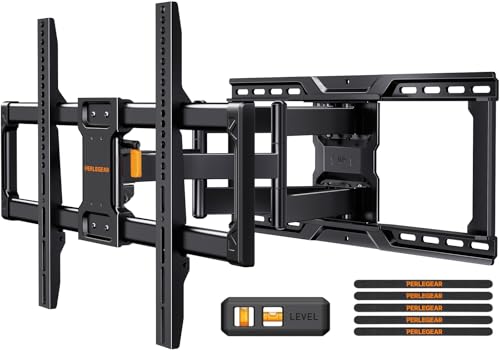
Perlegear Full Motion Mount for 45 to 95 Inch TVs, 150 lb, UL Listed
45 to 95 in TVsUp to 150 lbUL listedFull motion
Check price on Amazon
Best for: Large TVs from 65 to 95 inches that need to swivel and extend.

Perlegear covers the widest and heaviest range of any full motion mount here: 45 to 95 inch TVs up to 150 pounds. The listing notes UL listing and pre assembled arms, which cuts the time spent putting the bracket together. Steel construction gives it the stiffness needed for big, heavy screens.

The full motion arms let a large TV swivel toward a sofa and extend away from the wall, which is useful in a corner or an open plan room. Against the monTEK at 165 pounds, the Perlegear has a lower limit but a lighter, simpler body. For most modern 65 to 85 inch TVs, 150 pounds is plenty of margin.

Installation needs two people and a stud finder. Wood studs at 16 inch spacing are the target, and the lag bolts must go into the studs, not just drywall. Pull the arms out once a year and check the bolts. For a large living room TV, it is the most dependable all round choice. Compared with the 99 pound USX, it costs more but gives you headroom for the next TV upgrade, which is a practical reason to buy once.

What works

  • UL listed for peace of mind
  • Handles TVs up to 150 pounds
  • Pre assembled arms save time
  • Fits 45 to 95 inch screens

Watch out for

  • Heavy bracket needs two installers
  • Full motion adds a gap behind the TV when folded

Specs

TV size
45 to 95 in
Weight limit
Up to 150 lb
Certification
UL listed
Motion
Full motion, pre assembled arms
Material
High strength steel
02
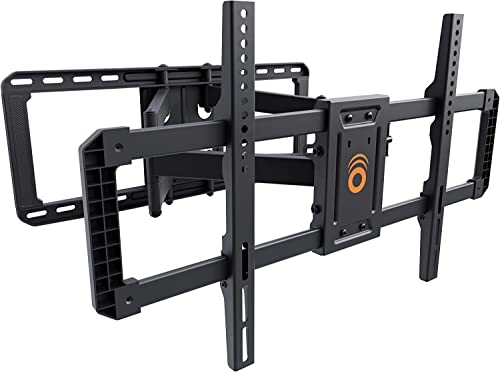
ECHOGEAR MaxMotion Full Motion Mount for 42 to 90 Inch TVs
42 to 90 in TVsUp to 125 lbUL listed30 minute install
Check price on Amazon
Best for: Mainstream 55 to 75 inch TVs in drywall rooms.

ECHOGEAR emphasizes a quick installation, which the listing says takes under 30 minutes with the included hardware. It is UL listed and designed to fit almost any VESA pattern, with a 125 pound weight limit for 42 to 90 inch TVs.

The mount swivels, tilts and extends, which is typical for the type, and the brand is known for a straightforward design. Compared with the Perlegear, it has a slightly lower weight limit and a narrower range, so it suits mainstream TVs rather than the heaviest models.

The quick install claim depends on stud location and wall type, so do not expect it in a plaster wall. Use a stud finder, a level and a socket wrench. A good rule is to mount the center of the screen at eye level when seated, about 42 inches from the floor in most living rooms. In a rented apartment, the ECHOGEAR is a sensible choice because the install is quick and the holes are limited to the bracket. If you move, patch the holes with a lightweight spackle.

What works

  • UL listed
  • Installs in about 30 minutes per the listing
  • Fits almost any VESA pattern
  • Swivel, tilt and extend

Watch out for

  • Lower weight limit than the Perlegear
  • Not for plaster or metal studs without extra hardware

Specs

TV size
42 to 90 in
Weight limit
Up to 125 lb
Certification
UL listed
Motion
Swivel, tilt, extend
VESA
Fits almost any pattern
03
monTEK Heavy Duty Full Motion Mount for 37 to 90 Inch TVs, 165 lb
37 to 90 in TVsUp to 165 lb16 in extensionTool free tilt
Check price on Amazon
Best for: Heavy TVs and large screens that need a high weight limit.

The monTEK is the strongest mount in this group, with a 165 pound limit and dual articulating arms that extend about 16 inches. It supports VESA patterns from 200 by 100 millimeters, and the tilt can be adjusted without tools.

The extra strength suits older plasma TVs, heavy 85 inch sets and TVs with a soundbar attached. Compared with the Perlegear, the monTEK has a higher limit but a similar range of motion.

The tradeoff is bulk: a heavy duty bracket is heavier and takes up more space when folded. It also demands solid studs, and the lag bolts should be tight. If your TV weighs more than 110 pounds, this is the mount to choose. If you plan to add a heavy soundbar to the bottom of the TV, the extra margin means the arms will not sag over the years. It also suits a wall with a long span between studs, where you can spread the load across two studs.

What works

  • 165 pound weight limit
  • Arms extend about 16 inches
  • Tool free tilt adjustment
  • Wide VESA support

Watch out for

  • Bulky and heavy to lift
  • Needs sturdy studs

Specs

TV size
37 to 90 in
Weight limit
Up to 165 lb
Extension
About 16 in
VESA
200x100 mm and larger
Tilt
Tool free
04
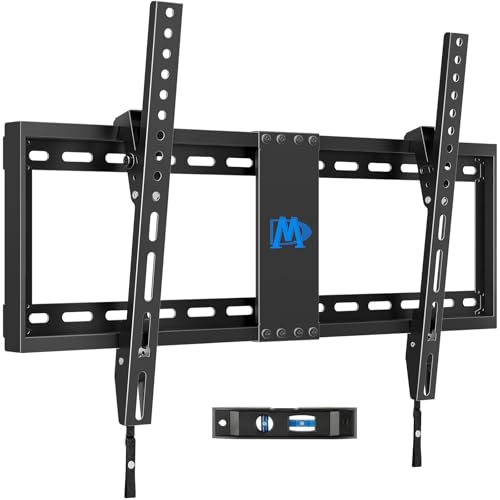
Mounting Dream Tilting Mount for 37 to 90 Inch TVs, 132 lb
37 to 90 in TVsUp to 132 lbLow profileTilts up to 8 degrees
Check price on Amazon
Best for: TVs mounted in one position, such as above a console or fireplace.

Mounting Dream's tilting mount holds the TV close to the wall, which gives a cleaner look than a full motion bracket. It supports 37 to 90 inch TVs up to 132 pounds, tilts forward up to 8 degrees and fits studs at 16 and 18 inch spacing.

A tilting mount is the right choice when the TV is mounted high, such as above a fireplace, because it reduces glare and aims the screen down. It does not swivel, so it suits a room where the sofa faces the TV directly.

Because it sits close to the wall, access to ports can be tight. Connect cables before you hang the TV. For a simple, stable mount, it is a smart choice. Above a fireplace, check the heat rating of the wall and keep the TV at least a few inches above the mantel, because heat rises and can shorten the life of the screen. Compared with the full motion mounts, it offers a flatter profile, which many people prefer for the look.

What works

  • Low profile close to the wall
  • Tilts up to 8 degrees
  • 132 pound limit
  • Fits 16 and 18 inch studs

Watch out for

  • No swivel or extension
  • Tight access to ports once mounted

Specs

TV size
37 to 90 in
Weight limit
Up to 132 lb
Profile
Low, close to wall
Tilt
Up to 8 degrees
Stud spacing
Fits 16 and 18 in studs
05
USX MOUNT Full Motion Mount for 32 to 70 Inch TVs, 99 lb
32 to 70 in TVsUp to 99 lbDual armsTilt -12 to +5
Check price on Amazon
Best for: Mid size TVs under 70 inches that need swivel.

USX Mount offers a full motion bracket for 32 to 70 inch TVs up to 99 pounds. The dual articulating arms and cold rolled steel body give it a conventional build, and the tilt range is minus 12 to plus 5 degrees.

It is a good fit for a mid size TV in a bedroom or a modest living room. Compared with the Perlegear, the weight and size limits are lower, but the mount is lighter and easier to handle.

Check that the TV's weight is below 99 pounds and that its VESA pattern fits. Most 55 inch TVs weigh well under that, which leaves margin. It is a straightforward, economical bracket. Because the arms are shorter than on the monTEK, it works better in a bedroom corner than across a large open room. If you ever move to a bigger TV, plan to replace the bracket rather than stretch its limits.

What works

  • Full motion with dual arms
  • Tilt range from minus 12 to plus 5 degrees
  • Cold rolled steel
  • Lighter than heavy duty brackets

Watch out for

  • 99 pound limit rules out the largest TVs
  • Smaller size range

Specs

TV size
32 to 70 in
Weight limit
Up to 99 lb
Tilt
-12 to +5 degrees
Arms
Dual articulating
Material
Cold rolled steel
06
HangSmart No Stud TV Mount for 19 to 100 Inch TVs, 150 lb
No stud needed19 to 100 in TVsUp to 150 lbDIY kit
Check price on Amazon
Best for: Walls where studs do not line up and the TV is moderate in weight.

HangSmart is built for homes where the studs are not where you need them. The listing describes a patented, studless drywall system for TVs from 19 to 100 inches, with a 150 pound listed load. It is a DIY kit aimed at people who cannot or do not want to find studs.

That convenience comes with caution. Any drywall mount is only as strong as the wall, so follow the instructions closely, avoid hollow or damaged drywall and keep the TV closer to the lower end of the weight range. Compared with the Perlegear, it offers less movement and a different installation risk.

Use it for a mid size TV in a spot where studs are inconvenient. Measure carefully and load the bracket gradually before you let go of the TV. Compared with the stud mounted brackets above, it asks more of the wall, so check for pipes and wires before drilling and use the template. If the TV is above 80 pounds, a stud mount is the wiser choice.

What works

  • No stud needed for installation
  • Wide size range up to 100 inches
  • DIY kit with a patented system
  • Suits awkward wall layouts

Watch out for

  • Depends on the quality of the drywall
  • No swivel or extension

Specs

TV size
19 to 100 in
Weight limit
Up to 150 lb listed
Install
No stud, drywall system
Type
Fixed, patented system
Audience
DIY and renters

Spec decoder

What the listing measurements really mean

The numbers brands lead with, translated into what they tell you about fit, comfort and wear at home.

VESA

VESA is the standard spacing of the four mounting holes on the TV. It is given in millimeters, width by height.

Watch forThe monTEK lists support from 200 by 100, so check your TV.

Weight capacity

This is the maximum TV weight the mount is rated to carry. Aim for a margin.

Watch forThe USX at 99 pounds is lower than the Perlegear at 150.

Articulating arm

An articulating arm has joints that let the TV pull out and swivel. It lets you angle the screen to a sofa.

Watch forThe monTEK arms extend about 16 inches.

UL listed

UL listing means the product was certified to a safety standard. It is not a guarantee but a good sign.

Watch forThe Perlegear and ECHOGEAR list it.

Studless

A studless mount attaches to drywall with anchors. It is only as strong as the wall.

Watch forThe HangSmart needs good drywall.

Methodology

How We Evaluated These TV Wall Mounts

Capacity and range

We compared weight limits and TV sizes. The monTEK at 165 pounds and the Perlegear at 150 pounds lead. Margin matters.

Motion and fit

We looked at tilt, swivel and extension. The Mounting Dream tilts up to 8 degrees, and the full motion models articulate. Fit depends on VESA.

Installation

We reviewed instructions and hardware. The ECHOGEAR lists a quick install, and the HangSmart avoids studs. Installation is where problems begin.

Safety

We looked for UL listing and build. The Perlegear and ECHOGEAR scored for certification.

Ownership

We considered cable access and adjustments. Owner feedback patterns informed our advice on checking bolts.

Decision guide

How to Choose the Right TV Wall Mounts

By TV Size and Weight

SituationPickWhy
85 to 95 inch TVPerlegear Full MotionSupports up to 95 inches and 150 pounds
Very heavy TVmonTEK Heavy Duty165 pound limit
65 to 75 inch TVECHOGEAR MaxMotion42 to 90 inches with fast install
Under 70 inch TVUSX Full Motion99 pound limit and swivel
TV above a fireplaceMounting Dream TiltTilts up to 8 degrees
Studs not availableHangSmart No StudStudless system

By Budget

TierPickWhy
Lowest tierUSX Full MotionSimple full motion bracket
Low tierMounting Dream TiltLow profile tilting
Middle tierECHOGEAR MaxMotionUL listed and quick install
Upper middle tierPerlegearBig TV range
Higher tiermonTEKHeavy duty
Top tierHangSmartStudless system

Tilt vs Full Motion

Tilt

The Mounting Dream holds the TV close and angles it down. It suits a TV above eye level and a fixed seating position.

Full motion

The Perlegear, ECHOGEAR, monTEK and USX swivel and extend. They suit corners, open rooms and several seating areas.

Choose tilt for a clean look and full motion for flexibility.

Stud vs Studless

PreferencePickWhy
Strongest holdPerlegear or monTEKLag bolts into studs
No studsHangSmartDrywall system
Studs at 18 inchesMounting DreamFits 16 and 18 inch studs
Quick installECHOGEARUnder 30 minutes listed

For Corner Rooms Specifically

Look for

A full motion mount with long extension and a wide swivel. Avoid fixed mounts.

In this comparison

The Perlegear and monTEK extend far enough for corners.

When to Spend More

Spend more if

Your TV is large or heavy. The Perlegear and monTEK justify the cost.

Save if

Your TV is small. The USX and Mounting Dream are enough.

Ownership

Maintenance schedule

The upkeep that decides whether a piece still looks good in year five.

TaskIntervalWhy it matters
Check boltsTwice a yearBolts loosen over time. Tighten them.
Inspect armsYearlyLook for sagging or play.
Clean jointsYearlyDust can cause squeaks.
Check levelYearlyTVs can tilt. Adjust.
Test cablesAs neededMake sure cables are not pinched.

FAQ

Frequently Asked Questions

How high should I mount a TV?

Center the screen at eye level when seated, about 42 inches from the floor in most living rooms. If you sit on a low sofa, mount a little lower, and if you stand often in the room, a bit higher.

Do I need studs?

For heavy TVs, yes. Studless systems are for lighter loads. If a stud is hard to find, a magnetic stud finder tracks the screws in the drywall.

What is VESA?

It is the hole pattern on the back of the TV. The pattern is printed in the TV's manual and on a sticker, and many manufacturers list it on their website.

Can I mount above a fireplace?

Yes, with a tilt mount and attention to heat. Heat from the fireplace can damage a screen, so keep a gap.

How much weight margin?

Aim for at least 25 percent below the limit. If your TV is a heavy older model, add more margin.

Can I install it myself?

Yes with a helper and tools. A second person and a level make the job faster and safer.

Bottom line

The short version

Browse more tv wall mountson Amazon →
Elena Hart, Lead Home Editor

About the author

Elena Hart

Lead Home Editor, SweetLivingRoom

Elena Hart leads SweetLivingRoom's buying guides, turning product dimensions, material specs and owner feedback into clear verdicts on sofas, rugs, lighting, storage and decor.

More from Elena →

Keep reading

Related guides