
Amazon affiliate links - we earn a commission.Affiliate disclosure

Buying guide · 14 min read · Updated 2026-11-28

Best TVs Under $300 (2026)

Six smart TVs under $300 from 43 to 65 inches, from QLED and Mini LED panels to Roku and Fire TV models, compared on panel type, HDR, size, ports and sound.

Elena Hart, Lead Home EditorBy Elena HartLead Home Editor6 picks comparedSpec-sheet verified
Best TVs Under $300

At a glance

Our top picks

Side by side

Spec comparison

A budget TV can be a very good TV for the way most people watch. A 4K panel, a smart platform and an HDR label are now standard even at low prices, so the real differences are size, panel type, brightness, the smart system and the quality of the speakers.

This guide looks at TVs that fit under a $300 cap, from 43 to 65 inches, and we favour the upper band of it. Listing prices move, and the cap reflects Amazon listing prices when this guide was last updated. We say plainly where a budget TV compromises, because HDR and sound are where the gaps show.

Before you buy

6 Criteria to Look For Before Buying a TV Under $300

  1. 01

    Size and viewing distance

    A common guide is a viewing distance of about 1.2 to 1.6 times the screen diagonal for 4K, which is roughly 5 to 6 feet for 43 inches, 6.5 to 7.5 feet for 50 inches and 8 to 9 feet for 65 inches. A screen too big for the room wearies the eyes, and one too small loses impact. Measure the distance from your seat to the TV before choosing. The size also depends on the room's layout: a deep room can take a larger set, while a short, wide room may feel crowded. Always add the width of the TV stand to your measurement before buying, and allow room for ventilation behind the set.

  2. 02

    Panel type

    A standard LED panel is the cheapest, a QLED adds Quantum Dot colour and a Mini LED backlight offers finer brightness control. None at this price matches OLED black levels. The TCL and Roku 50 are QLED, and the LG is Mini LED. Panel type also changes viewing angle: many budget LED panels lose contrast when you sit off to the side, so check the room layout. A matte or low-reflection screen helps in a bright living room.

  3. 03

    HDR support

    HDR10 is universal, while Dolby Vision and HDR10+ are extra. At this price, HDR is mostly a colour boost because peak brightness is limited. The TCL lists the widest HDR support. Do not pay extra just for a format label. A TV with modest peak brightness cannot show HDR highlights the way a premium set does, so the benefit is mostly colour and tone mapping.

  4. 04

    Smart platform

    Fire TV, Roku and LG each have a different interface, app store and voice assistant. Pick the one you already use, because switching has a learning cost. Roku is simple and Fire TV integrates with Alexa. Check the apps you use, such as your streaming services and live TV, are supported. Voice control on the remote is handy, but privacy settings are worth reviewing.

  5. 05

    Ports and gaming

    Check the number of HDMI ports and whether one supports ARC for a soundbar. Budget TVs often have a 60 Hz panel and few HDMI 2.1 features. Gamers should check the listing for refresh rate and input lag. If you plan to connect a console, a soundbar and a streaming box, count the ports. Many budget sets have three HDMI ports and only one with ARC.

  6. 06

    Sound

    Built-in speakers on slim budget TVs are thin and weak on dialogue. Budget a soundbar as part of the purchase. The TCL's Dolby Atmos decoding helps if you add one. Dialogue clarity is the biggest weakness of slim TV speakers, so look for a dialogue enhancement setting. A basic soundbar is a relatively inexpensive fix.

Detailed reviews

The 6 best tvs under $300, explained

01
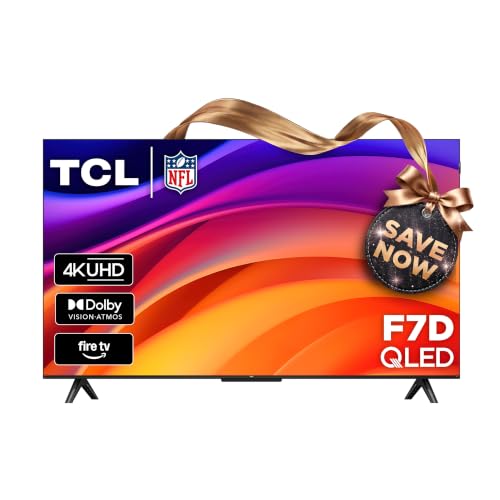
TCL 43 in F7D Series QLED 4K Smart Fire TV With Dolby Vision, HDR10+ and Dolby Atmos
43 inQLED 4KDolby VisionFire TV
Check price on Amazon
Best for: Bedrooms and small living rooms that want strong HDR support in a compact size.

The TCL F7D is a 43 inch 4K QLED with Quantum Dot colour, HDR Pro+ support for Dolby Vision, HDR10+, HDR10 and HLG, and Dolby Atmos and DTS decoding on a Fire TV platform. Quantum Dot layers widen the colour range compared with a standard LED panel, which gives a more vivid picture in a lit room. The wide HDR support means it can read most streaming formats.

The trade-off is brightness and contrast. A budget QLED rarely reaches the peak brightness of a premium set, and without strong local dimming blacks look grey in a dark room, so HDR is more of a colour boost than a true highlight effect. Compared with the LG, the TCL offers broader HDR support but does not use a Mini LED backlight.

In practice, a 43 inch screen suits a seat 5 to 6 feet away, so it is a sensible bedroom or small living room set. Use the Fire TV voice remote, add a soundbar for better audio, and use the TV's game or movie picture mode. Keep the vents clear and update the software when prompted. Owners of budget sets often say that switching off motion smoothing and choosing a movie or filmmaker mode gives a more natural picture than the default vivid mode.

What works

  • QLED Quantum Dot colour widens the colour range
  • Dolby Vision and HDR10+ cover most streaming formats
  • Dolby Atmos and DTS decoding for a soundbar
  • Fire TV voice remote and live TV

Watch out for

  • 43 inches is small for a large room
  • Budget QLED has modest peak brightness
  • Built-in speakers are thin

Specs

Size
43 in
Panel
QLED, Quantum Dot colour
HDR
Dolby Vision, HDR10+, HDR10, HLG
Audio
Dolby Atmos and DTS support
Platform
Fire TV with voice remote
02
LG 43 in QNED73B Mini LED 4K Smart TV With a7 AI Processor and Dynamic QNED Color
43 inMini LEDa7 AI processorDynamic QNED Color
Check price on Amazon
Best for: Bedrooms that want better backlight control and a well-known brand.

The LG QNED73B is a 43 inch 4K TV with a Mini LED backlight, an a7 AI processor and Dynamic QNED colour, listed as an Amazon exclusive for 2026. Mini LED uses many small lights behind the panel, which allows finer control of brightness than a standard edge-lit TV, though a set at this price will have far fewer zones than a premium model. LG's processor handles upscaling and picture tuning.

The compromise is that Mini LED at this price is a modest implementation. Contrast improves over a plain LED panel, but you will not get the deep black of an OLED. Compared with the TCL, the LG sits at the top of the pricing ladder in this guide and lists less HDR format detail.

In practice, use the set in a room with controlled light, calibrate with the picture mode for movies and use the LG remote's pointer if included. A 43 inch size suits a bedroom. If you plan to wall mount it, check the VESA pattern in the manual and use a mount rated for the weight.

What works

  • Mini LED backlight improves contrast control
  • a7 AI processor handles upscaling
  • Well-known brand with a mature smart platform
  • Compact 43 inch size

Watch out for

  • Mini LED here has modest zone count
  • Highest rung on the pricing ladder in this guide
  • HDR formats are less clearly listed than the TCL

Specs

Size
43 in
Backlight
Mini LED
Processor
a7 AI Processor
Colour
Dynamic QNED Color
Platform
LG smart TV
03
Insignia 65 in Class F50 Series LED 4K UHD Smart Fire TV With Alexa Voice Remote
65 in4K UHDHDR10Fire TV
Check price on Amazon
Best for: Larger living rooms where screen size matters most.

The Insignia F50 is a 65 inch class 4K LED TV with HDR10, an Alexa voice remote and Fire TV. At this size, it gives you a big screen at a budget price, with four times the pixels of a 1080p set and access to streaming apps and free live channels. A 65 inch screen suits a larger living room and a seat 8 to 9 feet back.

The trade-off is picture quality. Stretching a basic LED panel to 65 inches magnifies its limits, including modest brightness, narrower viewing angles and weaker contrast than a QLED. Compared with the TCL, the Insignia is bigger but less colourful.

In practice, check that your wall or stand supports the screen, use a soundbar for audio and place it where light does not hit the panel. It is the choice if size matters more than finesse. A 65 inch screen needs a wide stand or a wall mount, so measure the furniture before ordering.

What works

  • 65 inch screen at a budget price
  • 4K resolution with HDR10 support
  • Fire TV with Alexa voice remote
  • Free live TV without cable

Watch out for

  • Basic LED panel has limited contrast and brightness
  • Narrower viewing angles than premium sets
  • Built-in speakers are thin

Specs

Size
65 in class
Resolution
4K UHD (2160p)
HDR
HDR10
Platform
Fire TV with Alexa remote
Live TV
Stream live TV without cable
04
Roku 50 in Select Series 2026 4K QLED Smart TV With Voice Remote
50 inQLED 4KRoku OSVoice remote
Check price on Amazon
Best for: Households that want a simple, fast interface and a mid-size QLED screen.

The Roku Select 50 inch is a 4K QLED TV on the Roku platform with a voice remote and fast Wi-Fi. Roku's home screen is simple and quick, which suits households that want to turn on and watch. The QLED panel adds colour range compared with the plain LED version.

The compromise is features. The listing gives fewer HDR and audio format details than the TCL, and the Roku platform has its own limits. Compared with the Roku 43 inch Select, this model has a QLED panel and a larger screen, at a higher rung.

In practice, a 50 inch screen suits a seat 6.5 to 7.5 feet away. Use the Roku app as a remote, and add a soundbar for better dialogue. The Roku remote's headphone jack, where included, is handy for late-night viewing.

What works

  • Simple, fast Roku interface
  • 4K QLED colour on a 50 inch panel
  • Voice remote included
  • Good size for a medium room

Watch out for

  • Fewer listed HDR and audio details
  • Budget QLED has modest brightness
  • Thin built-in speakers

Specs

Size
50 in
Panel
4K QLED
Platform
Roku smart TV
Remote
Voice remote
Year
2026
05
Insignia 50 in Class F50 Series LED 4K UHD Smart Fire TV, Alexa Voice Remote
50 in4K UHDHDR10Fire TV
Check price on Amazon
Best for: Bedrooms and small living rooms on a tight budget.

The Insignia 50 inch F50 is a 4K LED TV with HDR10, Fire TV and an Alexa remote, the middle size of the family. It offers the same platform as the 65 inch at a more room-friendly size, and a lower rung of the pricing ladder.

The trade-off is the same: a basic LED panel with modest contrast. Compared with the Roku QLED, the Insignia has a plainer panel and costs less.

In practice, it suits a bedroom or small living room. Add a soundbar for better sound. If you only watch casually, the plain panel may be all you need.

What works

  • 4K with HDR10 at a low rung
  • Fire TV with Alexa remote
  • 50 inch size suits many rooms
  • Free live TV

Watch out for

  • Basic LED panel contrast
  • Thin speakers
  • Narrower viewing angles

Specs

Size
50 in class
Resolution
4K UHD
HDR
HDR10
Platform
Fire TV
Remote
Alexa voice remote
06
Roku 43 in Select Series 2026 4K HDR Smart TV, Flat Screen LED, Voice Remote
43 in4K HDRRoku OSVoice remote
Check price on Amazon
Best for: Secondary rooms that want a simple smart TV.

The Roku Select 43 inch is a 4K HDR LED TV with a voice remote and a fast Wi-Fi platform. It is the most compact Roku in this guide, suited to a bedroom or a kitchen counter.

The trade-off is panel type. It uses an LED panel, not QLED, so colours are less vivid than the 50 inch. Compared with the TCL 43, the Roku is simpler and less feature-rich.

In practice, use it as a secondary TV. Add a soundbar if you want better audio. Use it in a room where daylight does not hit the screen.

What works

  • Roku interface is simple and fast
  • 4K with HDR support
  • Compact 43 inch size
  • Voice remote

Watch out for

  • LED panel, not QLED
  • Thin speakers
  • Few format details listed

Specs

Size
43 in
Resolution
4K
HDR
HDR support
Platform
Roku
Panel
LED

Spec decoder

What the listing measurements really mean

The numbers brands lead with, translated into what they tell you about fit, comfort and wear at home.

QLED

QLED adds a Quantum Dot layer to an LED backlight, which widens colour range. It is not the same as OLED.

Watch forThe TCL and Roku 50 are QLED. Colour range does not equal brightness.

Mini LED

Mini LED uses many tiny backlights for finer brightness control. More zones mean better contrast.

Watch forThe LG uses it, but zone counts at this price are modest. Zone count is rarely listed at this price.

HDR10+

HDR10+ is a dynamic HDR format that adjusts brightness scene by scene. It is common on Samsung and TCL sets.

Watch forThe TCL lists it. Content support varies by service.

Dolby Vision

Dolby Vision is a premium dynamic HDR format. It needs a compatible TV and content.

Watch forThe TCL lists it. Both TV and source must support it.

HDMI ARC

ARC sends TV audio to a soundbar through one HDMI cable. It simplifies setup.

Watch forCheck that one port supports it. Some TVs share ARC with other HDMI inputs.

Methodology

How We Evaluated These TVs Under $300

Panel and HDR

We evaluated panel type and HDR format support from the listings. The TCL's wide HDR support and QLED panel stood out. We treated brightness as limited at this price. We did not claim to measure brightness or contrast ourselves.

Size and fit

We compared sizes against common viewing distances. 43 inches suit bedrooms and 65 inches suit large rooms. Room fit mattered as much as screen quality.

Smart platform

We noted the smart platform for each TV. Roku, Fire TV and LG differ in interface. We also noted which platforms offer free live TV.

Owner feedback patterns

We looked at recurring themes in owner feedback, such as thin sound and slow menus. We never count stars. These patterns shaped our cons. Weak sound and limited viewing angles were the recurring complaints.

Budget band

We favoured the upper band of the $300 cap and excluded small 32 inch models and sets above it. Prices move, so check before buying. Large premium TVs in the pool were excluded as above the cap.

Decision guide

How to Choose the Right TVs Under $300

By Room

SituationPickWhy
BedroomTCL 43 in F7DQLED and Dolby Vision
Large living roomInsignia 65 inBiggest screen
Medium roomRoku 50 in SelectQLED and simple interface
Small roomLG 43 inMini LED
Secondary roomRoku 43 inSimple smart TV

By Budget

TierPickWhat you get
LowerInsignia 50 in4K Fire TV
Lower-midRoku 43 in4K Roku
MidInsignia 65 inLargest screen
Upper-midRoku 50 in QLEDQLED 50 inch
Top of capTCL F7D and LG QNEDQLED or Mini LED

QLED vs Standard LED

QLED (TCL, Roku 50)

Wider colour range and a more vivid picture. Costs more and brightness is still modest.

Standard LED (Insignia, Roku 43)

Lowest price and good enough for casual viewing. Colours are plainer and contrast is weaker.

Choose QLED for colour and LED for the lowest price.

By Platform

PlatformPickWhy
RokuRoku 50 in SelectSimple and fast
Fire TVTCL F7DAlexa and live TV
Fire TV bigInsignia 65 inLarge screen
LGLG QNEDMature platform
Fire TV budgetInsignia 50 inLowest cost

For Movie Nights Specifically

Look for

HDR support, a dark room and a soundbar. Check for wide viewing angles if seating is off-axis.

In this comparison

The TCL and LG suit movies best.

When to Spend More

Spend more if

You want OLED black levels, high peak brightness or a 120 Hz panel for gaming. Those cost more than this cap.

Save if

You want a good everyday smart TV. These TVs do that.

Ownership

Maintenance schedule

The upkeep that decides whether a piece still looks good in year five.

TaskIntervalWhy it matters
Dust the screenMonthlyUse a dry microfibre cloth. Avoid sprays. Never spray liquid directly on the screen.
Update softwareEvery few monthsUpdates fix bugs and add features. Some updates add features and improve security.
Check ventsEvery 6 monthsDust blocks airflow. A soft brush works. Keep vents free of dust to avoid heat build-up.
Recheck picture modeAfter updatesUpdates can reset picture modes. Choose a movie mode and turn off motion smoothing.
Check the standEvery 6 monthsStands loosen. Tighten screws. A loose stand can wobble or tip.

FAQ

Frequently Asked Questions

Is 4K worth it at this price?

Yes. Most streaming is 4K now and it costs little extra. Most streaming services stream in 4K now.

Is QLED better than LED?

It widens colour range. It is not as good as OLED. The difference is most visible in bright rooms.

Do I need a soundbar?

Budget TV speakers are thin. A soundbar improves dialogue and bass. Even a basic soundbar improves dialogue.

How big a TV do I need?

A common guide is 1.2 to 1.6 times the diagonal for viewing distance. A bigger TV in a small room can tire the eyes.

Which smart platform is best?

Roku is simple, Fire TV works well with Alexa and LG is mature. Choose the one you already know.

What does a $300 cap buy?

A 4K smart TV in the 43 to 65 inch range. Premium panels cost more. Prices move, so check before buying.

Bottom line

The short version

Browse more tvs under $300on Amazon →
Elena Hart, Lead Home Editor

About the author

Elena Hart

Lead Home Editor, SweetLivingRoom

Elena Hart leads SweetLivingRoom's buying guides, turning product dimensions, material specs and owner feedback into clear verdicts on sofas, rugs, lighting, storage and decor.

More from Elena →

Keep reading

Related guides