
Amazon affiliate links - we earn a commission.Affiliate disclosure

Buying guide · 13 min read · Updated 2026-11-28

Best TVs Under $200 (2026)

Five smart TVs under $200 compared by screen size, resolution, smart platform and picture features, with honest notes on what budget panels do and do not do.

Elena Hart, Lead Home EditorBy Elena HartLead Home Editor5 picks comparedSpec-sheet verified
Best TVs Under $200

At a glance

Our top picks

Side by side

Spec comparison

PieceScreenResolutionHDRPlatform
INSIGNIA 55 in Class F50 Series 4K UHD Smart Fire TV, Alexa Voice RemoteBest OverallINSIGNIA 55 in Class F50 Series 4K UHD Smart Fire TV, Alexa Voice Remote55 in class LED4K UHD, 2160pHDR10Fire TV with Alexa voice remote
Roku 43 in Select Series 4K HDR Smart TV, Voice RemoteBest Roku PlatformRoku 43 in Select Series 4K HDR Smart TV, Voice Remote43 in LED4K, 2160pHDR support per listingRoku TV with voice remote
INSIGNIA 50 in Class F50 Series 4K UHD Smart Fire TVBest Mid Size 4KINSIGNIA 50 in Class F50 Series 4K UHD Smart Fire TV50 in class LED4K UHD, 2160pHDR10Fire TV with Alexa voice remote
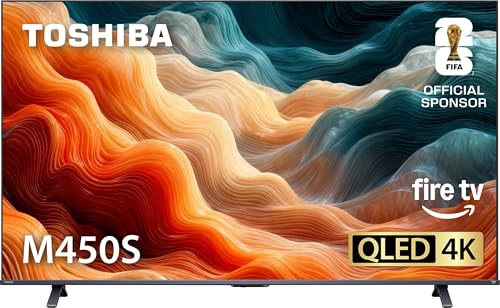
TOSHIBA 43 in Class M450 Series QLED 4K UHD Smart Fire TVBest ColourTOSHIBA 43 in Class M450 Series QLED 4K UHD Smart Fire TV43 in class QLED4K UHDn/aFire TV with Alexa voice remote
Hisense 32 in Class QD4 Series Hi-QLED HD Smart VIDAA TVBest Small ScreenHisense 32 in Class QD4 Series Hi-QLED HD Smart VIDAA TV32 in class Hi-QLEDHDn/aVIDAA OS with free content

A TV under this cap is a screen and a streaming platform in one box. You get a sharp enough picture for movies and shows, built in apps and a simple remote, and you give up the extras that cost more, such as local dimming, high peak brightness and fast gaming features.

Price caps move, and the cap in this guide reflects listing prices when the guide was last updated. We favoured the upper band of the cap, where the extra spend buys a bigger screen, 4K resolution or a better colour panel. Each pick says plainly what the listing states and where a budget set will fall short.

Before you buy

6 Criteria to Look For Before Buying a TV Under $200

  1. 01

    Screen size and distance

    Screen size matters more than any other spec for how a TV feels. A common rule is to sit about 1.2 to 2 times the diagonal away for 4K, which puts a 55 in set at about 5.5 to 9 ft. A 43 in set suits 4 to 7 ft, and a 32 in set suits 3 to 5 ft. Many buyers choose too small a TV and regret it. Measure your room before you shop. The Insignia 55 in is the one to choose if the sofa sits at the far end of a deep room.

  2. 02

    Resolution

    4K UHD has four times the pixels of Full HD and shows its benefit on screens above about 40 in. A 32 in HD set looks fine at a close distance, but a 50 in HD set would look soft. The Insignia and Roku sets listed here are 4K, while the Hisense 32 in is HD. Streaming content is mostly 4K ready, so 4K is a sensible default above 40 in.

  3. 03

    HDR and panel quality

    HDR10 is a signal format that a TV can accept, and the effect depends on the panel's peak brightness and local dimming. Budget panels often accept HDR10 but cannot show it with punch. QLED, like the Toshiba and Hisense, adds colour volume but does not fix black level. Do not pay extra for an HDR badge on a budget set.

  4. 04

    Smart platform

    Fire TV, Roku and VIDAA differ in speed, app support and advertising. Roku is simple and neutral, Fire TV pushes Amazon content and includes Alexa, and VIDAA has fewer apps. Check that your key apps are supported. A weak platform can be bypassed with a streaming stick. Smart platforms also age, so a set that is easy to update is worth more than one that is quick on day one.

  5. 05

    Sound and ports

    Slim TVs have small speakers and thin sound, so plan for a soundbar. Check the HDMI ports, including an ARC or eARC port for a soundbar, and the number of inputs for consoles and boxes. The Toshiba lists power audio processing, which helps a little. Budget sets rarely have many ports. Check the listing for an optical output if your soundbar needs one.

  6. 06

    Gaming and motion

    Budget TVs rarely list high refresh rates, variable refresh rate or low latency modes. Check the listing for a game mode if you play. A 60 Hz panel suits casual play. Motion smoothing can cause lag, so turn it off. Console players should check the HDMI section of the manual before buying.

Detailed reviews

The 5 best tvs under $200, explained

01
INSIGNIA 55 in Class F50 Series 4K UHD Smart Fire TV, Alexa Voice Remote
55 in screen4K UHDHDR10Fire TV
Check price on Amazon
Best for: Living rooms that want the largest 4K screen with a simple Fire TV platform.

Insignia's 55 in F50 Series is the biggest screen in this lineup, a 4K panel with HDR10 and a Fire TV interface built in. The listing says 4K gives four times the resolution of Full HD, and HDR10 adds a wider range of colour and contrast from the brightest whites to the darkest areas, though the real effect depends on the panel's brightness. The Alexa voice remote lets you search across apps and switch inputs by voice.

It ranks first because screen size is the part of a TV you notice every day, and 55 in is a good fit for a living room with a viewing distance of about 7 to 9 ft. The tradeoff is that a budget LED set has modest peak brightness and weak local dimming, so blacks look greyer in a dark room than on a pricier set, and HDR is more a format tag than a showpiece. Compared with the 50 in F50, it adds screen area for a small step up in tier.

Setup is quick: mount or stand it, connect to Wi-Fi and sign in. The stand legs on a wide TV sit near the edges, so check your TV table width before ordering. Expect the sound to be thin, and consider a soundbar. Keep the vents clear and leave a gap behind the set.

What works

  • 55 in 4K screen is the largest in the lineup
  • HDR10 support for compatible streaming content
  • Fire TV with an Alexa voice remote
  • Free and live channels without a cable box

Watch out for

  • Peak brightness and blacks are modest on a budget panel
  • Thin built in sound suits a soundbar
  • Wide stand legs need a wide enough table

Specs

Screen
55 in class LED
Resolution
4K UHD, 2160p
HDR
HDR10
Platform
Fire TV with Alexa voice remote
Live TV
Free and live channels without cable
02
Roku 43 in Select Series 4K HDR Smart TV, Voice Remote
43 in screen4KHDRRoku OS
Check price on Amazon
Best for: Bedrooms and small living rooms that want a simple, fast Roku interface.

Roku's own Select Series 43 in is a 4K HDR set that runs the Roku operating system, with fast Wi-Fi and a home screen that is simple to navigate. The listing stresses quick app launches and an uncluttered remote, which is what Roku does well: a flat, readable interface that older relatives can use without help. At 43 in it suits a bedroom, a den or a small living room where a 55 in screen would dominate.

The tradeoff is size and brightness. A 43 in panel is small for a main living room unless you sit 5 to 6 ft away, and the HDR claim on a budget panel means support for the signal, not high peak brightness. Compared with the Insignia, it has a cleaner software experience and a smaller picture. Compared with the Toshiba, it lacks the QLED colour treatment, so colours are less saturated.

Roku includes free ad supported channels and a universal search. Use an Ethernet cable if your Wi-Fi is weak, and turn off motion smoothing for movies if you dislike the soap opera look. It is a good choice for a bedroom or a guest room.

What works

  • Roku OS is simple, fast and easy for every age
  • 4K resolution with HDR support on a 43 in screen
  • Voice remote and quick setup
  • Compact size suits a bedroom or den

Watch out for

  • 43 in is small for a main living room
  • HDR is limited by a budget panel
  • No QLED colour treatment

Specs

Screen
43 in LED
Resolution
4K, 2160p
HDR
HDR support per listing
Platform
Roku TV with voice remote
Setup
Setup that takes minutes
03
INSIGNIA 50 in Class F50 Series 4K UHD Smart Fire TV
50 in screen4K UHDHDR10Fire TV
Check price on Amazon
Best for: Medium living rooms and family rooms that want 4K at a mid size.

The 50 in F50 is the middle sibling of the Insignia range, with the same 4K resolution, HDR10 and Fire TV platform as the 55 in set. It suits a medium living room where a 55 in screen would feel large, or a family room with a viewing distance of about 6 to 8 ft. The Alexa voice remote lets you switch inputs and search for shows by voice.

It ranks third because it offers less screen than the 55 in at a similar tier. The tradeoff is the usual budget panel behaviour: blacks look greyer in a dark room, and viewing angles narrow, so colours wash out when you sit off to the side. Compared with the Roku 43 in, it gives a bigger picture and a Fire interface that pushes Amazon content, which some buyers dislike. The sound is basic.

Place it on a stable stand and leave space behind for ventilation. If you plan to wall mount, check the VESA pattern in the listing and buy a mount rated for the weight. A soundbar is a sensible companion, and a TV like this pairs well with one.

What works

  • 50 in 4K screen suits a medium room
  • HDR10 support for compatible content
  • Fire TV with an Alexa voice remote
  • Live and free channels without a cable box

Watch out for

  • Blacks look grey in a dark room
  • Narrow viewing angles wash out colour off axis
  • Fire interface highlights Amazon content

Specs

Screen
50 in class LED
Resolution
4K UHD, 2160p
HDR
HDR10
Platform
Fire TV with Alexa voice remote
Live TV
Streaming and live channels without cable
04
TOSHIBA 43 in Class M450 Series QLED 4K UHD Smart Fire TV
43 in screenQLED4K UHDFire TV
Check price on Amazon
Best for: Smaller rooms where richer QLED colour matters more than screen size.

Toshiba's 43 in M450 Series uses a QLED panel, which adds a quantum dot layer for richer, more saturated colour than a standard LED TV. The listing highlights the REGZA ZRi Gen3 AI engine for picture processing and a power audio mode for sound, and the set runs Fire TV with a voice remote. For a buyer who cares about vivid colour in a smaller screen, this is the pick.

The tradeoff is that QLED on a budget TV improves colour more than contrast, so blacks and highlights are still modest, and a 43 in screen limits the cinematic feel. Compared with the Roku 43 in, it offers a more colourful picture and a different software interface. Compared with the Insignia, it trades screen size for colour.

AI picture modes can oversaturate, so try the standard or movie mode first, and turn off any eco brightness feature that dims the screen. Place it away from windows that cause glare. It is a good fit for a bedroom or a kitchen counter where colour matters and space is limited.

What works

  • QLED panel gives richer colour than a standard LED
  • REGZA AI engine tunes the picture
  • Fire TV with an Alexa voice remote
  • 43 in size fits a bedroom or den

Watch out for

  • QLED improves colour more than contrast or black level
  • 43 in screen is small for a main living room
  • AI picture modes can oversaturate colours

Specs

Screen
43 in class QLED
Resolution
4K UHD
Colour
REGZA QLED colour
Processing
REGZA Engine ZRi Gen3 AI engine
Platform
Fire TV with Alexa voice remote
05
Hisense 32 in Class QD4 Series Hi-QLED HD Smart VIDAA TV
32 in screenHDHi-QLEDVIDAA OS
Check price on Amazon
Best for: Small bedrooms, kitchens and dorms that need a compact HD TV.

Hisense's 32 in QD4 Series is the smallest screen here, an HD panel with Hi-QLED colour, DTS Virtual:X audio processing and the VIDAA operating system. The listing says all content is available for free through the platform and that the set works with Alexa. A 32 in TV is the right size for a small bedroom, a kitchen, a dorm or a spot where the screen sits on a shelf.

It ranks last only because 32 in is a niche size. The tradeoff is that an HD panel is fine at this size and a close distance, but it will look soft if you try to use it as a main living room TV, and VIDAA offers fewer apps than Fire TV or Roku. Compared with the Roku 43 in, it is smaller and lower in resolution, but its colour treatment is richer than a plain LED.

Check that the apps you need are available on VIDAA before you buy. Use the screen at a distance of about 4 to 5 ft. It is the right choice for a small room that needs a simple TV.

What works

  • Compact 32 in size suits small rooms and shelves
  • Hi-QLED colour treatment on a small panel
  • DTS Virtual:X audio processing and Alexa support
  • Free content on the VIDAA platform

Watch out for

  • HD resolution looks soft on larger viewing distances
  • VIDAA offers fewer apps than Fire TV or Roku
  • Too small for a main living room

Specs

Screen
32 in class Hi-QLED
Resolution
HD
Colour
Hi-QLED colour
Platform
VIDAA OS with free content
Audio
DTS Virtual:X, works with Alexa

Spec decoder

What the listing measurements really mean

The numbers brands lead with, translated into what they tell you about fit, comfort and wear at home.

4K UHD

A resolution of 3840 by 2160 pixels, four times Full HD.

Watch forThe Insignia and Roku sets list 4K, while the Hisense 32 in is HD.

QLED

A quantum dot layer added to an LED backlight to improve colour range.

Watch forThe Toshiba and Hisense list it, but it does not improve black levels.

HDR10

A high dynamic range format that carries wider brightness and colour information.

Watch forThe Insignia lists HDR10, but a budget panel may not show its full effect.

Fire TV

Amazon's smart TV platform with Alexa voice control and a content focused home screen.

Watch forThe Insignia and Toshiba run it, and ads and Amazon content feature prominently.

VIDAA

Hisense's smart TV operating system, with free content and its own app store.

Watch forThe Hisense uses it, so check the apps you need.

Methodology

How We Evaluated These TVs Under $200

Screen and resolution

We compared sizes and resolutions, from the 55 in 4K Insignia to the 32 in HD Hisense. We note that these are published specifications and editorial judgements, not measurements.

Panel and colour

We read the colour technology claims, including the Toshiba's QLED and the Hisense's Hi-QLED. We treated HDR10 as a signal format, not a promise of punchy highlights.

Smart platform

We compared Fire TV, Roku and VIDAA for speed and app support. We drew on owner feedback patterns about interface speed and advertising. Updates and ads can change the experience over time.

Sound and ports

We considered the audio features, such as REGZA Power Audio and DTS Virtual:X, and flagged that thin sound benefits from a soundbar.

Value and fit

We compared the price tiers inside the cap and what each TV offers. We did not republish ratings or review counts. Sets with the most useful screen for a typical room ranked higher.

Decision guide

How to Choose the Right TVs Under $200

By Room Size

SituationPickWhy
Main living roomInsignia 55 inLargest 4K screen
Medium living roomInsignia 50 inMid size 4K
Bedroom or denRoku 43 inSimple and compact
Small room or kitchenHisense 32 inCompact HD

By Budget

TierPickWhat you get
Lower within capHisense 32 inA small HD smart TV
MidToshiba 43 in QLEDRicher colour
Upper midRoku 43 in4K with Roku OS
Top of the capInsignia 55 in or 50 inLarger 4K Fire TV screens

Fire TV vs Roku

Fire TV

The Insignia and Toshiba add Alexa voice and an Amazon focused home screen, but ads and content promotion are common.

Roku

The Roku set offers a simple, neutral interface and fast apps, but no built in Alexa control on the listing.

Choose Fire TV for Alexa and Roku for simplicity.

By Picture Priority

SituationPickWhy
Biggest screenInsignia 55 inMost area
Richest colourToshiba QLEDQuantum dot layer
Simplest interfaceRoku 43 inClean home screen
Compact sizeHisense 32 inSmall footprint

For a Soundbar Setup Specifically

Look for

An HDMI ARC port and a stand that leaves room for a soundbar below the screen.

In this comparison

The Insignia and Roku sets suit a soundbar well, and the Toshiba has better built in audio processing.

When to Spend More

Spend more if

You want local dimming, high peak brightness or gaming features, which sit above this cap.

Save if

You want a simple smart TV for a bedroom or a casual living room.

Ownership

Maintenance schedule

The upkeep that decides whether a piece still looks good in year five.

TaskIntervalWhy it matters
Dust the screenWeeklyUse a dry microfibre cloth. Do not spray cleaner directly on the panel. Fingerprints show most under bright light in a dark room.
Update the softwareMonthlyUpdates fix bugs and improve app support. Enable automatic updates if available.
Check ventilationEvery 6 monthsKeep vents clear of dust and walls. Heat shortens a TV's life. Dust built up behind the set is the usual culprit.
Tidy cablesYearlyCheck HDMI plugs are seated and the cables are not bent sharply.
Reset the pictureAs neededA factory reset can fix lag and odd settings. Back up app logins first.

FAQ

Frequently Asked Questions

Is 4K worth it under 200?

For screens above about 40 in, yes. 4K sets are now common at this tier and give a sharper picture. For a 32 in set, HD is fine. Always compare the screen size, since a bigger HD set can look softer than a smaller 4K set.

What size TV should I buy?

Choose the largest screen that fits your room. As a rule, sit about 1.2 to 2 times the diagonal away for 4K. A 55 in set suits a main living room.

Do budget TVs have good sound?

Not usually. Slim speakers sound thin, so plan on a soundbar. Check the listing for an ARC port. A basic soundbar makes a bigger difference than any picture setting.

Fire TV or Roku?

Roku is simple and neutral. Fire TV adds Alexa and Amazon content. Both run the main streaming apps.

Are these good for gaming?

They suit casual play at 60 Hz. For fast games, check for a game mode and low latency. Budget sets rarely list advanced gaming features.

Can I wall mount these TVs?

Yes, most use a VESA pattern. Check the pattern and weight in the listing and buy a rated mount.

Bottom line

The short version

Browse more tvs under $200on Amazon →
Elena Hart, Lead Home Editor

About the author

Elena Hart

Lead Home Editor, SweetLivingRoom

Elena Hart leads SweetLivingRoom's buying guides, turning product dimensions, material specs and owner feedback into clear verdicts on sofas, rugs, lighting, storage and decor.

More from Elena →

Keep reading

Related guides