

Amazon affiliate links - we earn a commission.Affiliate disclosure

Buying guide · 12 min read · Updated 2026-11-21

Best TVs for Gaming (2026)

Six gaming TVs: an OLED with a gaming pack, 144Hz and 165Hz Mini-LED sets and a value QLED. Refresh rate, VRR, HDMI ports and what the labels really mean.

Elena Hart, Lead Home EditorBy Elena HartLead Home Editor6 picks comparedSpec-sheet verified
Best TVs for Gaming

At a glance

Our top picks

Side by side

Spec comparison

A gaming TV is a normal TV with a few features that matter more to players: a high refresh rate, variable refresh rate, a low-latency game mode and HDMI ports that can carry those signals. Everything else is the same picture quality you would want for movies.

Marketing makes the labels confusing, since refresh rates, motion rates and processing claims are all quoted in the same breath. This guide ranks sets by the features that affect play, and flags the places where the listing gives a headline number without the detail behind it.

Before you buy

6 Criteria to Look For Before Buying a TV for Gaming

  1. 01

    Refresh rate and VRR

    Refresh rate is how often the screen updates, and VRR matches it to the game's frame rate to avoid tearing. Consoles top out at 120Hz, so 144Hz and 165Hz panels only help PC players. Look for VRR support, such as FreeSync or HDMI VRR, and confirm which ports carry it.

  2. 02

    Input lag and game mode

    Input lag is the delay between pressing a button and seeing the result. A game mode switches off heavy processing. Under about 20 milliseconds feels responsive for most players, but listings rarely state a figure. Check the settings guide for ALLM, which switches game mode automatically.

  3. 03

    HDMI ports

    Many TVs have only two ports that take 4K at 120Hz, and one may double as the ARC port for a soundbar. Count your devices, such as a console, a PC and a soundbar, before you buy. A switch can add ports but adds a failure point.

  4. 04

    Panel type

    OLED gives the cleanest motion and blacks, and carries a small burn-in risk with static HUDs. Mini-LED is brighter and safer for static content. Plain QLED is the budget option. Match the panel to how you play and how bright the room is.

  5. 05

    Brightness and reflections

    Gaming often happens in a lit room. A bright panel with an anti-reflection coating, like the Hisense U7, copes with daylight. An OLED is best in a dim room. Reflections from a lamp can be as annoying as low brightness.

  6. 06

    Sound and size

    A 55 inch screen suits 5 to 7 feet, and a 65 inch screen suits 7 to 10 feet. Thin TVs have thin speakers, so a headset or a soundbar is likely. A built-in woofer, as on the U6 Pro, helps modestly.

Detailed reviews

The 6 best tvs for gaming, explained

01
Samsung 65in S90H OLED 4K Smart TV, Glare Free, Gaming Pack
65in OLEDGlare FreeGaming packNQ4 AI Gen3
Check price on Amazon
Best for: Console players who want OLED contrast and fast pixel response in a dimmer room.

The Samsung S90H is a 65 inch OLED with a Glare Free treatment, the NQ4 AI Gen3 processor and what the maker calls an Ultimate Gaming Pack. OLED pixels switch in a fraction of a millisecond, which gives the cleanest motion of any panel type in this guide.

The tradeoff is that OLED carries a small burn-in risk with static content, such as a health bar left on screen for hours, and it is less bright over large areas than Mini-LED. Compared with the Hisense U7, the S90H wins on blacks and motion clarity but costs a higher tier and loses on sheer brightness. Compared with the TCL T7, it is a different class of picture.

The compact listing does not spell out the refresh rate or port count of the gaming pack, so check the full page for HDMI 2.1 ports and 4K 120Hz support before you buy. Use game mode, and vary what you play to spread wear. It suits console players who want the best contrast and motion in a dim room.

What works

  • OLED pixels switch very fast, giving clean motion with little visible blur
  • Self-lit pixels deliver true blacks, which helps dark games and horror titles
  • Glare Free treatment reduces reflections when the room has lamps or windows
  • Dedicated gaming pack groups game mode, VRR and low-latency options in one place

Watch out for

  • Static HUD elements carry a small burn-in risk if left on for many hours
  • Less bright over large areas than Mini-LED, so a very sunny room is harder
  • Compact data does not list port count or refresh rate, so check the full page

Specs

Screen size
65 in, 4K UHD
Panel
OLED HDR+ with Glare Free
Processor
NQ4 AI Gen3
Gaming
Ultimate Gaming Pack
Platform
Samsung Vision AI, Tizen
02
Hisense 65in U7 Mini-LED ULED 4K Google TV, Native 165Hz, Anti-Reflection
65in 4KMini-LED ProNative 165HzAnti-reflection
Check price on Amazon
Best for: PC gamers and day-time players who want a high native refresh rate and an anti-reflection screen.

The Hisense U7 is a 65 inch Mini-LED 4K TV with a native 165Hz refresh rate, an anti-reflection panel and Google TV. The 165Hz figure is the highest native refresh rate in this guide, which matters most to PC players who can push high frame rates to a TV.

The tradeoff is that most consoles output at most 120Hz, so the extra frames only help with a capable PC. Compared with the Samsung OLED, the U7 is brighter but has less perfect blacks. Compared with the 144Hz TCL QM6K, it adds the higher refresh and an anti-reflection screen, so it handles a lit room better.

The anti-reflection panel helps if you game in the afternoon with sun in the room. Check the HDMI ports to see which ones handle 4K at 120Hz, since TVs often limit those to two ports. It suits PC gamers and players who game in a lit room.

What works

  • Native 165Hz is the highest refresh rate in the group, ideal for PC gaming
  • Mini-LED backlighting keeps contrast strong and brightness high with lamps on
  • Anti-reflection screen cuts glare from windows during daytime play
  • Google TV platform offers wide app support and built-in casting

Watch out for

  • Consoles top out at 120Hz, so the extra frames only help a capable PC
  • Not OLED, so blacks are less perfect in a dark room than on the Samsung
  • Port count for 4K 120Hz input is not stated in the compact data

Specs

Screen size
65 in, 4K UHD
Backlight
Mini-LED Pro
Refresh rate
Native 165Hz
Screen
Anti-reflection, glare-free
Platform
Google TV
03
Hisense 65in E7 Cinema Series Hi-QLED Mini-LED 4K Fire TV, Native 144Hz
65in 4KMini-LEDNative 144HzDolby Vision
Check price on Amazon
Best for: Households that split time between movies and console games on one TV.

The Hisense E7 is a 65 inch Hi-QLED Mini-LED with a native 144Hz game mode, Dolby Vision and Dolby Atmos, running Fire TV. The cinema label signals that it is aimed at movie watching as well as play.

The tradeoff is the platform. Fire TV serves ads and favors Amazon content, which some players find intrusive when they only want to launch a console. Compared with the U7, the E7 has a lower stated refresh rate at 144Hz and no anti-reflection claim in the compact data. Compared with the TCL QM6K, it adds Dolby Vision and Dolby Atmos support.

A native 144Hz game mode keeps motion fluid during play. Use the console's HDMI input and set the TV to game mode. It suits a household that uses the TV for both films and a console.

What works

  • Mini-LED backlight gives strong contrast for both films and dark games
  • Native 144Hz game mode keeps fast motion fluid during play
  • Dolby Vision and Dolby Atmos make it a strong all-round media TV
  • Fire TV provides Alexa voice control and a wide range of apps

Watch out for

  • Fire TV home screen carries ads that some players find intrusive
  • Lower stated refresh rate than the 165Hz Hisense U7
  • Anti-reflection screen is not claimed in the compact data

Specs

Screen size
65 in, 4K UHD
Backlight
Hi-QLED Mini-LED
Refresh rate
Native 144Hz game mode
HDR
Dolby Vision, Dolby Atmos
Platform
Fire TV
04
TCL 55in QM6K QD-Mini LED 4K Google TV, 144Hz, Halo Control
55in 4KQD-Mini LED144HzHalo Control
Check price on Amazon
Best for: Bedroom and small-room gamers who want Mini-LED and 144Hz in a 55 inch size.

The TCL QM6K is a 55 inch QD-Mini LED 4K TV with a 144Hz panel, the Halo Control System that the maker says reduces blooming, and Google TV. The listing positions it as affordable premium performance for sports, gaming and streaming.

The tradeoff is size. At 55 inches it is smaller than the 65 inch rivals, which suits a desk-distance or a bedroom setup but looks small from a living room sofa. Compared with the Hisense U6 Pro, it uses Google TV rather than Fire TV and lists a quantum dot layer. Compared with the TCL T7, it adds Mini-LED and a higher refresh rate.

The Halo Control claim is relevant to gaming, because bright HUD elements on dark backgrounds are where blooming shows. Use game mode, and place the TV at a comfortable distance of 5 to 7 feet. It is the middle-tier choice for a bedroom or small-room gamer.

What works

  • QD-Mini LED backlight combines quantum dot color with local dimming
  • 144Hz panel supports smooth motion for console and PC play
  • Halo Control System targets blooming around bright game HUD elements
  • 55 inch size fits a desk-distance or small-room setup comfortably

Watch out for

  • Smaller than the 65 inch sets, so it feels less immersive from a sofa
  • Peak brightness and zone count are not stated in the compact data
  • Google TV home screen shows recommendations and promoted content

Specs

Screen size
55 in, 4K UHD
Backlight
QD-Mini LED
Refresh rate
144Hz
Dimming
TCL Halo Control System
Platform
Google TV
05
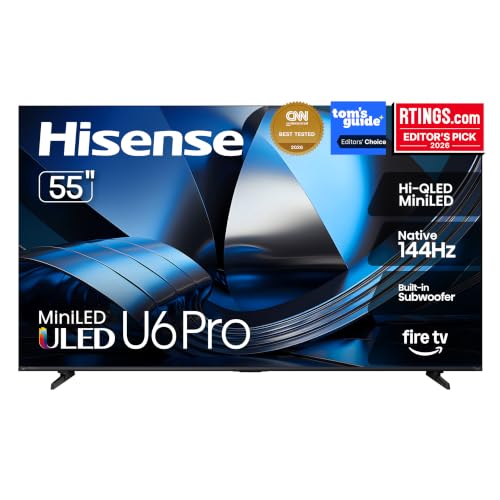
Hisense 55in U6 Pro Mini-LED ULED 4K Fire TV, Native 144Hz, Subwoofer
55in 4KMini-LEDNative 144HzSubwoofer
Check price on Amazon
Best for: Small-room gamers who want better built-in bass without adding a soundbar.

The Hisense U6 Pro is a 55 inch Mini-LED 4K TV with a native 144Hz panel, a built-in subwoofer and Fire TV. The subwoofer is the distinguishing feature: gaming audio benefits from bass, and thin TVs normally lack it.

The tradeoff is that a built-in subwoofer in a thin TV is modest, and it cannot match a separate soundbar or a headset. Compared with the TCL QM6K, it has a built-in woofer but uses Fire TV with ads. Compared with the E7 at 65 inches, it is smaller and has a simpler feature list.

Audio matters for game immersion, and the woofer helps with explosions and engines. If you game with a headset, the benefit is smaller. It suits a bedroom or a small den where adding a soundbar is not wanted.

What works

  • Built-in subwoofer gives gaming audio more body than a typical thin TV
  • Mini-LED backlight with native 144Hz suits both films and fast games
  • 55 inch size fits a bedroom or a small den without crowding the room
  • Fire TV platform has wide app support and Alexa voice control

Watch out for

  • A built-in woofer in a thin TV is modest compared with a separate soundbar
  • Fire TV home screen carries ads that some gamers find intrusive
  • Peak brightness and dimming zones are not stated in the compact data

Specs

Screen size
55 in, 4K UHD
Backlight
Hi-QLED Mini-LED
Refresh rate
Native 144Hz
Audio
Built-in subwoofer
Platform
Fire TV
06
TCL 55in T7 Series 4K 120Hz QLED Google TV, Dolby Vision, Atmos
55in 4K120HzQLEDDolby Vision
Check price on Amazon
Best for: Budget-conscious console players who want a 120Hz panel and a solid HDR feature set.

The TCL T7 is a 55 inch 4K QLED with a 120Hz panel, Dolby Vision, HDR10+ and Dolby Atmos on Google TV. The 120Hz panel matches the maximum output of current consoles, which is what most players need.

The tradeoff is the backlight. This is a QLED without Mini-LED local dimming, so dark scenes look grayer than on the Hisense or the Samsung. Compared with the TCL QM6K, it is a tier below, with a lower refresh and no Mini-LED. Compared with the other sets, it is the one that makes sense for a budget-conscious console player.

A 120Hz panel works with a console's 4K 120Hz mode if the HDMI input supports it, so check which port to use. It suits a first console TV or a secondary room.

What works

  • 120Hz panel matches the highest output of current consoles at a modest tier
  • Dolby Vision, HDR10+ and Dolby Atmos cover the main premium formats
  • Quantum dot color gives lively images in games and streaming apps
  • Google TV platform offers casting and a wide choice of apps

Watch out for

  • No Mini-LED local dimming, so dark scenes look grayer than the Hisense sets
  • 120Hz is lower than the 144Hz and 165Hz sets, which matters for PC play
  • Only some HDMI ports may handle 4K at 120Hz, which needs checking

Specs

Screen size
55 in, 4K UHD
Refresh rate
120Hz panel
Panel
QLED
HDR
Dolby Vision, HDR10+, Atmos
Platform
Google TV

Spec decoder

What the listing measurements really mean

The numbers brands lead with, translated into what they tell you about fit, comfort and wear at home.

Native refresh rate

The true number of times per second the panel updates, without interpolation tricks.

Watch forThe Hisense U7 lists native 165Hz, but consoles only use up to 120Hz.

VRR

Variable refresh rate, which matches the display to the game's frame rate to avoid tearing.

Watch forCheck which HDMI ports support it, since not all do.

ALLM

Auto low latency mode, which switches the TV to game mode when a console is detected.

Watch forThe compact listings do not state ALLM, so confirm it on the full page.

Motion rate

A marketing figure for how motion is handled. It is not the same as native refresh rate.

Watch forDo not compare a motion rate with a native 144Hz figure.

OLED burn-in

Uneven wear caused by static images shown for many hours.

Watch forThe Samsung S90H is OLED, so vary your games and use the pixel refresh feature.

Methodology

How We Evaluated These TVs for Gaming

Gaming features first

We read stated refresh rates, such as the Hisense U7's native 165Hz and the TCL T7's 120Hz, and noted gaming packs and VRR claims. We excluded monitors from the data because the topic is TVs. We did not measure any set.

Panel type

We compared OLED, Mini-LED and QLED panels and the tradeoffs of each for games. The Samsung leads on contrast and motion, the Hisense sets lead on brightness, and the TCL T7 leads on cost.

Honest gaps

Few listings state port counts, input lag or ALLM. We flagged that gap for each set rather than guess figures. A buyer should check the full spec page for HDMI 2.1 ports.

Room and size

We covered 55 and 65 inch sizes and noted viewing distances. Small-room players get the TCL QM6K, Hisense U6 Pro and T7, and large-room players get the Samsung and the 65 inch Hisense sets.

Platform and sound

We compared Tizen, Google TV and Fire TV and noted built-in audio. Owner feedback patterns on ads shaped these notes. The built-in woofer on the U6 Pro earned a modest plus.

Decision guide

How to Choose the Right TVs for Gaming

By Platform

SituationPickWhy
PlayStation or Xbox in a dim roomSamsung S90H OLEDOLED contrast and fast pixels
PC at high frame ratesHisense U7 65inNative 165Hz
Console and moviesHisense E7 65in144Hz game mode and Dolby Vision
Switch and casual playTCL T7 55in120Hz at a modest tier

By Budget

SituationPickWhy
Lowest relative priceTCL T7120Hz QLED at the lowest tier
Low to mid tierTCL QM6K or Hisense U6 ProMini-LED at 55 inches
Mid tierHisense E7 or U765 inch Mini-LED with high refresh
Upper tierSamsung S90HOLED with a gaming pack

OLED vs Mini-LED

OLED

The Samsung S90H has perfect blacks and fast pixels. It suits dim rooms and story-driven games, with a small burn-in risk from static HUDs.

Mini-LED

The Hisense and TCL sets are brighter and safer for static content. They suit lit rooms and long sessions.

Pick OLED for a dark room and cinematic games. Pick Mini-LED for a lit room and long competitive sessions.

By Room Size

SituationPickWhy
Desk or bedroom, 5 to 7 feetTCL QM6K or U6 Pro 55in55 inch Mini-LED
Living room, 7 to 10 feetHisense U7 or E7 65in65 inch Mini-LED
Dedicated game roomSamsung S90H 65inOLED with a gaming pack
Small budget roomTCL T7 55inLowest tier

For Console Gaming Specifically

Look for

At least one HDMI port that takes 4K at 120Hz, VRR, ALLM and a game mode with low input lag. Keep the console on the right port and enable the console's own 120Hz setting.

In this comparison

All six list a 120Hz or higher panel. The listings are silent on port counts and input lag, so check the full spec page before buying.

When to Spend More

Spend more if

You want OLED contrast, four HDMI 2.1 ports, a lower stated input lag or a premium processor. The next tier up adds these features.

Save if

You play casually, use a console at 60Hz or 120Hz and have a lit room where plain QLED is enough.

Ownership

Maintenance schedule

The upkeep that decides whether a piece still looks good in year five.

TaskIntervalWhy it matters
Check HDMI ports and cablesAt setupOnly some ports carry 4K at 120Hz. Use a certified Ultra High Speed cable for 48 Gbps signals.
Update the softwareMonthlyUpdates fix VRR bugs and game mode issues. Turn on automatic updates if available.
Run pixel refresh on OLEDAs promptedOLED sets run a compensation cycle in standby. Let it finish and do not unplug the TV right after use.
Dust vents and screenMonthlyGaming sessions run warm. Dusty vents trap heat, so a quick vacuum helps.
Vary contentOngoingOn OLED, long static HUDs cause uneven wear. Mix games and videos and lower the HUD brightness.

FAQ

Frequently Asked Questions

Do I need 144Hz or 165Hz for console gaming?

No. Current consoles output up to 120Hz. A 144Hz or 165Hz panel only helps a PC that can output those frame rates.

Is OLED safe for gaming?

Yes, with sensible use. Burn-in needs static images shown for many hours. Varied play, built-in protection and normal brightness keep the risk low.

What is VRR?

Variable refresh rate. It lets the TV match the game's frame rate, which reduces tearing and stutter.

Do I need HDMI 2.1?

For 4K at 120Hz on a console or PC, yes. Check how many ports support it, since many TVs have only two.

Should I use a TV or a monitor?

A TV suits couch play and a big screen. A monitor suits a desk and very high frame rates. The topic here is TVs.

Does input lag matter?

It matters most for competitive games. Game mode reduces it, and most modern TVs are fine for casual play.

Bottom line

The short version

Browse more tvs for gamingon Amazon →
Elena Hart, Lead Home Editor

About the author

Elena Hart

Lead Home Editor, SweetLivingRoom

Elena Hart leads SweetLivingRoom's buying guides, turning product dimensions, material specs and owner feedback into clear verdicts on sofas, rugs, lighting, storage and decor.

More from Elena →

Keep reading

Related guides