
Amazon affiliate links - we earn a commission.Affiliate disclosure

Buying guide · 13 min read · Updated 2026-11-21

Best Soundbars for TV (2026)

Six soundbars for TV compared on channels, Dolby Atmos, dialogue clarity and subwoofer setup, so you can pick the right bar for your living room.

Elena Hart, Lead Home EditorBy Elena HartLead Home Editor6 picks comparedSpec-sheet verified
Best Soundbars for TV

At a glance

Our top picks

Side by side

Spec comparison

Modern flat TVs have thin cabinets and downward facing speakers, which is why dialogue sounds muddy and explosions sound flat. A soundbar adds a proper speaker array and, in many cases, a subwoofer, so voices and effects come through clearly.

The right bar depends on your room, your TV's ports and how much sound you want. Channel count, Dolby Atmos support, subwoofer type and simple setup matter more than peak wattage claims.

Before you buy

6 Criteria to Look For Before Buying a Soundbar for TV

  1. 01

    Channels and speaker layout

    Channels are written like 2.0, 3.1 or 5.1.2. The first number is main speakers, the second is subwoofers and the third is height speakers. The Samsung is 2.0 with a built in sub, the Fire TV Soundbar Plus is 3.1, the ULTIMEA is 5.1 and the Sonos Arc Ultra is 9.1.4. More channels suit larger rooms but need more placement. If you want to add rear speakers later, check that the bar supports them before you buy. A bigger channel count helps most when the room is wider than about 14 feet.

  2. 02

    Dolby Atmos and ceiling height

    Atmos bars bounce sound off the ceiling. The effect works best with a flat ceiling about 8 to 10 feet high. A vaulted ceiling weakens it. In small bars like the Beam Gen 2, Atmos is largely virtualized. A small room with a low ceiling may sound better with a simpler 3.1 bar than with Atmos height drivers.

  3. 03

    Subwoofer type

    Built in subwoofers, as on the Samsung and Fire TV bars, save space but limit bass. A wireless subwoofer gives deeper low end. Place it near a wall and away from cabinets that rattle. Hard floors and bare walls make bass boomy, so a rug can help as much as a bigger subwoofer.

  4. 04

    HDMI eARC and ports

    eARC carries the best audio from your TV. Check that your TV has an eARC port, and use it. ARC and optical work for simpler setups, as on the Bose. If your TV lacks eARC, use ARC or optical, which still handle common formats.

  5. 05

    Dialogue clarity

    Speech modes and center channels help. The Sonos Arc Ultra uses AI Speech Enhancement, the ULTIMEA uses VoiceMX and the Bose focuses on speech. If you often replay lines, prioritize this. Speech modes can sound processed at high settings, so try a low or medium level first and adjust over a week.

  6. 06

    Size and placement

    Measure your TV stand and the gap under the screen. A long bar like the Arc Ultra needs width. The bar must not block the TV's remote sensor. Allow two inches under the TV for a bar, and measure the stand's depth.

Detailed reviews

The 6 best soundbars for tv, explained

01
Sonos Arc Ultra Soundbar, 9.1.4 Dolby Atmos, Speech Enhancement
9.1.4 AtmosSound MotionSpeech EnhancementAlexa
Check price on Amazon
Best for: Larger living rooms where one bar must handle movies and music.

Sonos describes the Arc Ultra as an all new acoustic architecture built around Sound Motion technology and a 9.1.4 spatial audio layout. That includes upward firing drivers for Dolby Atmos, which can make rain, helicopters and music feel like they come from above. Speech Enhancement uses AI to detect dialogue and lift it above the rest of the mix.

It costs more than any other bar here, and it earns that by being the most complete single bar. Compared with the Sonos Beam Gen 2, the Arc Ultra is wider, deeper in bass and has more height channels, which makes it better for a larger living room.

It connects through HDMI eARC and joins your Wi Fi for streaming music and multi room playback. Plan for a TV stand or a wall mount with enough width, because it is long, and make sure your ceiling is flat if you want the Atmos effect. For a family room that doubles as a music room, it is the benchmark. If you stream music, the Wi Fi connection lets you group it with other Sonos speakers around the house. Compared with the 5.1 ULTIMEA, you trade rear speakers for a single box that is far less fussy to live with.

What works

  • 9.1.4 Dolby Atmos spatial audio
  • AI Speech Enhancement for dialogue
  • Wi Fi streaming and multi room
  • Alexa built in

Watch out for

  • Highest cost tier in the group
  • Atmos benefit depends on a flat ceiling

Specs

Channels
9.1.4 spatial audio
Surround format
Dolby Atmos
Dialogue
AI Speech Enhancement
Connection
HDMI eARC and Wi Fi
Voice
Alexa built in
02
Sonos Beam Gen 2 Soundbar with Dolby Atmos and 5 Drivers
5 driversDolby AtmosAlexaCompact
Check price on Amazon
Best for: Small and medium rooms that want a compact, upgradeable bar.

The Beam Gen 2 is the compact Sonos. The listing describes a five driver array with a 3D surround effect and Dolby Atmos support, and it streams music, radio and podcasts. It is smaller and less expensive than the Arc Ultra.

It suits a bedroom or a smaller living room where a long bar would dominate. The bass is good for its size but still limited, and you can add a Sonos subwoofer later if you want more low end. The Atmos effect is a virtualized one in a bar this small.

It is easy to set up, and it uses the Sonos app for room tuning. If you watch with a family and want clear speech, it is a strong choice. Compare it with the Bose TV Speaker if you prefer a simpler device. Next to the Arc Ultra, it is a few inches shorter and lighter, which helps on a narrow stand. A Sonos subwoofer can be added later if you want deeper bass.

What works

  • Compact five driver design
  • Dolby Atmos support
  • Streams music and joins multi room
  • Expandable with a subwoofer

Watch out for

  • Bass limited without a subwoofer
  • Atmos effect is virtualized in a small bar

Specs

Drivers
5 driver array
Surround
Dolby Atmos with 3D effect
Connection
HDMI eARC and Wi Fi
Streaming
Music, radio and podcasts
Voice
Alexa
03
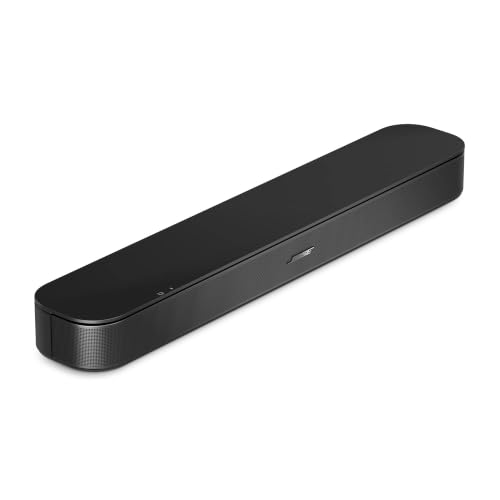
Bose TV Speaker 2nd Gen Compact Soundbar with Bluetooth and ARC
CompactBluetoothHDMI ARCDialogue mode
Check price on Amazon
Best for: Small rooms and viewers who want clearer dialogue with minimal setup.

Bose built the TV Speaker around one idea: hear the dialogue. The listing calls it the simplest setup, with plug and play operation over HDMI ARC or an optical cable, plus Bluetooth for streaming from a phone. The second generation adds a refined design.

It is small enough for a narrow stand or a bedroom, and it lacks a subwoofer. Bass is modest, but the speech mode keeps conversations clear, which is the main complaint with modern TVs. It suits anyone who wants an easy upgrade for a smaller TV.

Compared with the Samsung B Series, the Bose is smaller and more focused on dialogue, while the Samsung adds a subwoofer. For a bedroom or a den, it is a quiet success. Pair it with a rug and curtains to soften reflections, which often matters more in a bedroom than a bigger bar would. Its Bluetooth link also lets you play a podcast from a phone without turning the TV on.

What works

  • Plug and play setup
  • Compact for small stands
  • Bluetooth for phone audio
  • Speech focus for dialogue

Watch out for

  • No subwoofer, so bass is modest
  • Less surround than a larger bar

Specs

Type
Compact single bar
Connection
HDMI ARC and Bluetooth
Focus
Clear dialogue
Setup
Plug and play
Size
Compact for small TV stands
04
Samsung B Series HW-B400F 2.0 Channel Soundbar with Subwoofer
2.0 channelBuilt in subwooferOne remote2025 model
Check price on Amazon
Best for: First soundbar buyers who want more bass and simple control.

Samsung's B Series bar is a 2.0 channel design with a built in subwoofer, which means the bass is integrated into the bar rather than a separate box. The listing emphasizes using your TV remote to control key functions, so the setup is simple.

It fits a modest TV and a modest budget. The built in sub gives better low end than a bar without one, but it will not shake the room like a separate subwoofer. Compared with the Bose, it adds that bass at a similar scale.

There is no Dolby Atmos or wireless rear speakers here, so think of it as a clear step up from TV speakers. It is a sensible first soundbar. If you later want a bigger system, Samsung's ecosystem lets you add speakers in some lines, but check compatibility.

What works

  • Built in subwoofer
  • Works with the TV remote
  • Simple 2.0 design
  • Affordable tier

Watch out for

  • No Atmos or rear speakers
  • Bass is limited by a built in sub

Specs

Channels
2.0 channel
Bass
Built in subwoofer
Control
Works with TV remote
Model year
2025
Use
TV audio upgrade
05
ULTIMEA Poseidon M60 5.1 Channel Dolby Atmos Soundbar, 300W
5.1 channelDolby Atmos300W peakWireless sub
Check price on Amazon
Best for: Movie rooms that want real rear speakers and a subwoofer.

ULTIMEA's Poseidon M60 packs a 5.1 channel system with Dolby Atmos, a 300 watt peak output and a six driver design. The listing notes VoiceMX dialogue enhancement, BassMX and an app for control.

It is the most surround focused value pick, with a subwoofer and rear speakers in the box. A 5.1 system gives real rear sound, unlike virtualized bars, but it means more placement work and more cables.

Peak wattage is a marketing number, so do not expect twice the loudness of a lower figure. Compared with the Sonos Arc Ultra, it gives more physical speakers and less polish. Plan outlets for the rear speakers. Run the rear speaker cables along the baseboard or use cord covers to keep the room tidy.

What works

  • 5.1 channel with rear speakers
  • Dolby Atmos support
  • VoiceMX dialogue enhancement
  • App control

Watch out for

  • Rear speakers add cables
  • Peak wattage figure is a marketing number

Specs

Channels
5.1 channel
Output
300W peak, 6 drivers
Format
Dolby Atmos
Voice tech
VoiceMX
Control
App
06
Amazon Fire TV Soundbar Plus 3.1 Channel with Dolby Atmos
3.1 channelDolby AtmosBuilt in subCenter channel
Check price on Amazon
Best for: Fire TV households that want a center channel and Atmos.

Amazon's Fire TV Soundbar Plus is a 3.1 channel design with a built in subwoofer and Dolby Atmos support. The dedicated center channel sharpens dialogue.

It fits a living room that already uses Fire TV, with simple setup and voice control. A 3.1 layout with a center channel is better for speech than a plain stereo bar.

Compared with the Samsung B Series, it adds Atmos and a center speaker. It is a good middle option. Check that your TV has eARC. If you use another streaming device, check that the bar works with your TV's eARC.

What works

  • 3.1 channel with a center speaker
  • Dolby Atmos support
  • Built in subwoofer
  • Simple Fire TV setup

Watch out for

  • Best with Fire TV devices
  • Atmos is limited in a slim bar

Specs

Channels
3.1 channel
Bass
Built in subwoofer
Format
Dolby Atmos
Dialogue
Dedicated center channel
Ecosystem
Fire TV

Spec decoder

What the listing measurements really mean

The numbers brands lead with, translated into what they tell you about fit, comfort and wear at home.

Channels

Channel notation lists main speakers, then subwoofers, then height speakers. It tells you at a glance how the bar is laid out.

Watch forThe ULTIMEA is 5.1 with rear speakers, while the Sonos Arc Ultra is 9.1.4 inside a single bar.

Dolby Atmos

Atmos adds height effects using upward firing drivers or processing. It works best with a flat, standard height ceiling.

Watch forThe Sonos Beam Gen 2 simulates much of the effect in a compact bar, so expect a gentler result than the Arc Ultra.

HDMI eARC

eARC is the HDMI input on your TV that sends high quality audio to the bar. It supports the best formats, including Atmos.

Watch forThe Fire TV Soundbar Plus and the Sonos bars connect this way, so check the label on your TV's HDMI ports.

Peak wattage

Peak watts describe a brief maximum, not continuous output. They are a marketing figure and do not predict loudness.

Watch forThe ULTIMEA lists 300 watts peak, which says little compared with the Samsung's built in sub.

Virtual surround

Virtual surround uses processing to widen the sound without rear speakers. It is subtle and depends on the room.

Watch forThe Samsung and Bose bars rely on stereo imaging and processing, not real rear channels.

Methodology

How We Evaluated These Soundbars for TV

Sound layout

We compared channel counts and speaker arrays. The Sonos Arc Ultra at 9.1.4 and the ULTIMEA at 5.1 represent the ambitious end, while the Samsung at 2.0 with a built in sub is the simple end. A layout that suits the room scored higher than one that merely has the biggest number.

Dialogue clarity

We looked for speech modes and center channels. Sonos Speech Enhancement, the ULTIMEA's VoiceMX and the Fire TV Soundbar Plus center channel all target dialogue. Dialogue is the most common reason people buy a bar, so it carries real weight.

Bass and subwoofer

We reviewed whether bass is built in, wireless or absent. The Samsung and Fire TV bars include built in subs, while the Bose has none. We noted that a built in sub cannot match a separate one in a large room.

Connectivity

We checked HDMI eARC, Wi Fi, Bluetooth and app control. Sonos offers eARC and Wi Fi streaming, the Bose offers ARC and Bluetooth, and the ULTIMEA offers an app. A bar that fits your TV's ports and your habits scored higher.

Setup and ownership

We considered cables, placement and updates. Owner feedback patterns shaped our advice about firmware and room placement. A bar that is easy to place and tune will be used correctly.

Decision guide

How to Choose the Right Soundbars for TV

By Room Size

SituationPickWhy
Large living roomSonos Arc Ultra9.1.4 Atmos
Small roomSonos Beam Gen 2Compact
BedroomBose TV SpeakerCompact dialogue
StarterSamsung B400FBuilt in sub
Movie roomULTIMEA M605.1 with rears
Fire TV homeFire TV Soundbar Plus3.1

By Budget

TierPickWhy
Lowest tierSamsung B400FBuilt in sub
Low tierFire TV Soundbar Plus3.1 Atmos
Middle tierULTIMEA M605.1
Upper middle tierBose TV SpeakerDialogue
Higher tierSonos Beam Gen 2Compact
Top tierSonos Arc Ultra9.1.4

Single Bar vs Surround System

Single bar

The Sonos, Bose, Samsung and Fire TV bars are one box that sits under the TV. Setup is simple, and the surround effect is virtual. They suit most living rooms and keep cables to a minimum.

Surround system

The ULTIMEA M60 adds rear speakers and a subwoofer for real rear sound. It is more immersive for movies, but needs outlets and placement for the rear speakers.

Choose single for simplicity.

Wi Fi vs Bluetooth

PreferencePickWhy
Wi Fi streamingSonos Arc UltraMulti room
Compact Wi FiSonos BeamStreaming
BluetoothBose TV SpeakerPhone audio
App controlULTIMEAApp

For Dialogue Specifically

Look for

A speech mode, a center channel and a bar that sits below the screen without blocking it. Avoid bars that rely only on bass boost to feel loud. Test dialogue at low volume at night.

In this comparison

The Sonos Arc Ultra uses AI Speech Enhancement, and the Bose TV Speaker is built around dialogue. The Fire TV Soundbar Plus adds a dedicated center channel at a lower tier.

When to Spend More

Spend more if

You listen to music as much as TV, or your room is large. The Sonos Arc Ultra and Beam Gen 2 add streaming and room tuning that cheaper bars lack.

Save if

You mainly watch TV and want clearer speech. The Samsung B Series and Fire TV Soundbar Plus deliver a clear upgrade at lower tiers.

Ownership

Maintenance schedule

The upkeep that decides whether a piece still looks good in year five.

TaskIntervalWhy it matters
Update firmwareMonthlyUpdates fix bugs and sometimes add features. Sonos and Samsung bars update through an app or the TV.
Dust the grilleMonthlyDust dulls the sound and clogs fabric grilles. Use a soft brush or a vacuum on low.
Check HDMI cable seatingTwice a yearA loose cable causes dropouts and lost audio formats. Reseat the plug and keep the cable clear of the port strain.
Retune the room settingsYearly or after moving furnitureRoom acoustics change with furniture and rugs. Retuning in the app restores balance.
Replace remote batteriesYearlyWeak batteries cause missed commands. Keep spares on hand.

FAQ

Frequently Asked Questions

Do I need a subwoofer with a soundbar?

If you want strong bass for movies, yes. Built in subwoofers like the Samsung's add some low end but cannot match a separate one. A compact bar like the Bose is best for dialogue and light music. If your room is under 150 square feet, a compact bar without a sub is often enough.

What is eARC and do I need it?

eARC is an HDMI feature that carries uncompressed and Atmos audio from the TV to the bar. You need it for the best formats. Check the port labels on your TV and use the one marked eARC or ARC.

Is Dolby Atmos worth it in a soundbar?

It is worth it if your ceiling is flat and a standard height, and the bar has upward firing drivers. In small bars it is largely virtual. For dialogue and general TV, a good stereo or 3.1 bar matters more. A flat ceiling that is not far above 8 feet gives the strongest result.

Can I wall mount a soundbar?

Most bars include a template and brackets. Mount it below the TV and keep the TV's remote sensor clear. Check the bar's weight and your wall type.

Bluetooth or Wi Fi streaming?

Wi Fi gives better quality and multi room support, as on the Sonos bars. Bluetooth is simpler and fine for phone audio, as on the Bose. Choose based on how you listen.

How loud should a soundbar be?

It should be loud enough to fill the room without distortion. Peak wattage does not predict this. Pick a bar sized for your room and use a night mode late in the evening.

Bottom line

The short version

Browse more soundbars for tvon Amazon →
Elena Hart, Lead Home Editor

About the author

Elena Hart

Lead Home Editor, SweetLivingRoom

Elena Hart leads SweetLivingRoom's buying guides, turning product dimensions, material specs and owner feedback into clear verdicts on sofas, rugs, lighting, storage and decor.

More from Elena →

Keep reading

Related guides