
Amazon affiliate links - we earn a commission.Affiliate disclosure

Buying guide · 14 min read · Updated 2026-11-26

Best TV Wall Mounts Under $50 (2026)

TV wall mounts under $50 compared on VESA range, weight rating, tilt or swivel, wall gap and stud needs, with notes on the safety checks before you hang a TV.

Elena Hart, Lead Home EditorBy Elena HartLead Home Editor7 picks comparedSpec-sheet verified
Best TV Wall Mounts Under $50

At a glance

Our top picks

Side by side

Spec comparison

A TV wall mount is the one part of a living room setup where a cheap product has to be treated with care, because a failure drops a screen. Under a modest budget, the safe approach is to match three numbers: the mount's VESA range, its weight rating and the number of studs you can reach, and then to buy no more motion than you need.

The cap reflects listing prices on the day we updated the guide, and prices move often. We favoured mounts that state VESA range, weight rating and a standard such as UL listing. We have not handled any of these mounts, so our judgments rest on specifications and patterns in owner feedback. Always follow the mount's instructions, find the studs, and use a second person to lift the TV.

Before you buy

6 Criteria to Look For Before Buying a TV Wall Mount Under $50

  1. 01

    What the cap buys

    At this cap you can buy a standard-rated mount from a recognised line, with a stated VESA range and weight rating. The USX lists UL listing and 132 pounds, and the IWORKBOARD and Mounting Dream add tilt. Heavier or fancier mounts cost more.

  2. 02

    VESA and TV size

    VESA is the pattern of four holes on the back of the TV, such as 400 by 400 millimetres. The mount's range must include your TV's pattern. TV size alone is not enough. Check the TV's back or manual.

  3. 03

    Weight rating and margin

    The mount's rating must exceed your TV's weight, and a margin of 30 percent is wise. A 55 inch TV weighs about 40 to 60 pounds and a 75 inch TV 80 to 100 pounds. A mount rated for 99 pounds suits most TVs up to 65 inches.

  4. 04

    Fixed, tilting or full motion

    Fixed mounts are strongest and slimmest. Tilting mounts cut glare for a TV above eye level. Full motion mounts add reach and swivel, with a weaker structure and a higher load on the wall.

  5. 05

    Studs and wall type

    A TV mount belongs in studs. Drywall alone cannot hold a heavy TV, and anchors are a last resort. The Mounting Dream supports 16, 18 and 24 inch stud spacing, and the HangSmart is a no-stud design for special cases.

  6. 06

    Cables and access

    Plan the cables and ports before the TV goes up, since a TV close to the wall leaves little space. A gap of 1.5 to 2 inches suits slim plugs, and thick plugs need a right-angle adapter. Leave slack.

Detailed reviews

The 7 best tv wall mounts under $50, explained

01
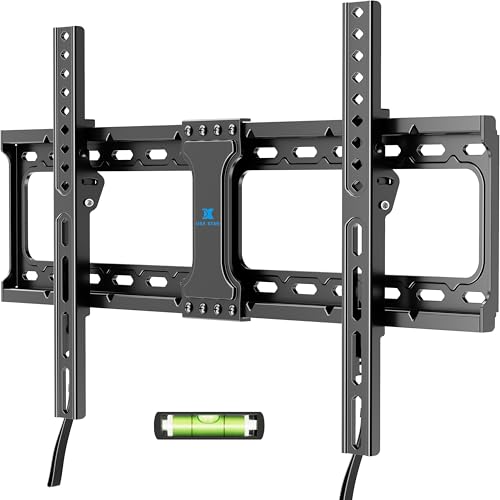
USX STAR Fixed TV Wall Mount for 37 to 86 Inch TVs, UL Listed, 132 lb, VESA up to 600x400
37 to 86 in TVs132 lbUL Listed
Check price on Amazon
Best for: A TV hung at eye level where tilt and swivel are not needed.

This fixed mount lists a UL listing, a 132 pound weight rating and a VESA range of 150 by 100 up to 600 by 400 millimetres, which covers most TVs from 37 to 86 inches. The TV sits about 1.28 inches from the wall, and quick disconnect pull straps help you lift the TV off the bracket. A fixed mount is the simplest and strongest design, with no moving arm to fail.

The tradeoff is that a fixed mount does not move: you cannot tilt to cut glare, and you cannot reach the ports behind the TV once it is up unless you plan the cables first. Compared with the Mounting Dream tilting mount, the USX is simpler but less adjustable. A large TV needs two or more studs, and the compact data does not give the plate width.

Connect the cables and set up the inputs before hanging the TV. Use a stud finder and mark the studs, and check that the mount's holes line up with at least two. Tighten the lag bolts firmly and check the safety catch after a few weeks.

What works

  • UL listing and a 132 pound rating are stated
  • VESA range up to 600x400 covers most TVs to 86 inches
  • 1.28 inch gap keeps the TV close to the wall
  • Pull straps make lifting the TV off easier

Watch out for

  • No tilt or swivel, so glare cannot be adjusted
  • Ports are hard to reach once the TV is up

Specs

TV size
37 to 86 in
Weight rating
132 lb
VESA
150x100 to 600x400 mm
Gap
1.28 in from the wall
Type
Fixed, with quick release straps
02
IWORKBOARD Tilting TV Wall Mount for 24 to 65 Inch TVs, up to 99 lb, 1.97 in profile, plus or minus 10 degree tilt
24 to 65 in TVs99 lb10 degree tilt
Check price on Amazon
Best for: A TV above eye level, such as over a fireplace or a console, where glare matters.

This tilting mount fits TVs from 24 to 65 inches weighing up to 99 pounds, with a smooth tilt of plus or minus 10 degrees that lets you angle the screen down to reduce glare from a window or a lamp. The profile holds the TV just 1.97 inches from the wall, and the steel construction is described as exceeding safety standards. Tilt is the single most useful adjustment for a TV hung above eye level.

The tradeoff is that a tilting mount costs a little more than a fixed one for a small gain, and the compact data does not state a UL listing or the VESA range. Compared with the USX, the IWORKBOARD tilts but carries a lower weight rating. A 99 pound limit suits most 55 to 65 inch TVs, but check your TV's weight.

Set the tilt after the TV is hung and tighten the tilt bolts so the angle holds. Level the TV with the adjustment slots. Keep the cables slack so tilt does not strain the ports.

What works

  • Plus or minus 10 degree tilt cuts glare
  • 99 pound rating suits most TVs up to 65 inches
  • 1.97 inch profile keeps the TV near the wall
  • Fourth cheapest of twelve in the data set

Watch out for

  • Compact data does not state a UL listing or VESA range
  • Lower weight rating than the USX STAR

Specs

TV size
24 to 65 in
Weight rating
99 lb
Tilt
Plus or minus 10 degrees
Gap
1.97 in
Cost position
Fourth cheapest of 12
03
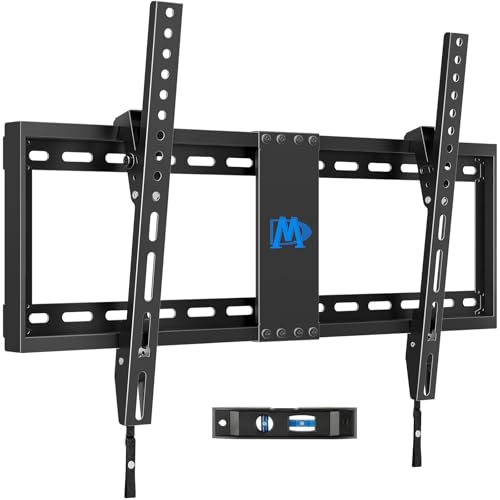
Mounting Dream Tilting TV Wall Mount for 37 to 90 Inch TVs, up to 132 lb, 1.5 in profile
37 to 90 in TVs132 lb1.5 in gap
Check price on Amazon
Best for: A big TV that needs a little tilt and a flush look.

This tilting mount handles TVs from 37 to 90 inches up to 132 pounds with a maximum VESA of 600 by 400 millimetres, and a low profile that holds the TV only 1.5 inches from the wall. It tilts forward up to 8 degrees for a better viewing angle. It supports 16, 18 and 24 inch stud spacing, which is helpful for typical home walls.

The compromise is that 8 degrees of tilt is less than the IWORKBOARD's 10, and the mount is a common item in our general TV mount guides. Compared with the USX, it adds tilt for the same weight rating. Large TVs are heavy, so plan two people and secure the lag bolts into studs.

Check the wall stud spacing against the plate before you buy. Use a level and mark all holes before drilling. Tighten the tilt bolts after setting the angle.

What works

  • Rated for 37 to 90 inch TVs up to 132 pounds
  • 1.5 inch profile is among the slimmest here
  • Supports 16, 18 and 24 inch stud spacing
  • Tilts forward up to 8 degrees

Watch out for

  • 8 degrees of tilt is modest
  • Also appears in our general TV mount guides

Specs

TV size
37 to 90 in
Weight rating
132 lb
VESA
Up to 600x400 mm
Tilt
Up to 8 degrees
Gap
1.5 in
04
IWORKBOARD Full Motion TV Wall Mount for 32 to 70 Inch TVs, dual arms, tilt +5/-12, swivel 45 degrees
32 to 70 in TVsFull motionDual arms
Check price on Amazon
Best for: A TV in a corner or a room where the screen needs to face two seating areas.

This full motion mount has dual articulating arms 30 percent thicker than earlier versions, a VESA range from 75 by 75 to 400 by 400 millimetres, tilt from plus 5 to minus 12 degrees and swivel of 45 degrees each way. It also levels the screen by plus or minus 4 degrees after installation. A full motion mount lets you angle the TV toward a seating area or pull it away from a corner.

The tradeoff is that an arm is a lever, so the load on the wall is greater than for a fixed mount, and the compact data does not state a weight rating. Compared with the Perlegear, it supports larger TVs but offers no stated pounds. Full motion mounts need studs on both sides of the plate.

Measure the pull-out distance and check the TV clears corners. Check the arm joints for tightness every few months. Never use the mount as a shelf or hang anything on the TV.

What works

  • Dual articulating arms are described as thicker
  • Tilt from +5 to -12 degrees and swivel of 45 degrees
  • VESA range from 75x75 to 400x400 covers most mid-size TVs
  • Post-install levelling of plus or minus 4 degrees

Watch out for

  • Compact data gives no weight rating
  • Arm adds leverage and more load on the wall

Specs

TV size
32 to 70 in
VESA
75x75 to 400x400 mm
Tilt
+5 to -12 degrees
Swivel
Plus or minus 45 degrees
Cost position
Eighth of 12
05
Perlegear Full Motion TV Wall Mount for 26 to 50 Inch TVs up to 55 lb, extend, swivel, tilt, level
26 to 50 in TVs55 lbFull motion
Check price on Amazon
Best for: A smaller TV in a bedroom or a corner that needs full movement.

This full motion mount is designed for smaller TVs, 26 to 50 inches and up to 55 pounds, with tilt from minus 10 to plus 8 degrees and swivel of up to 90 degrees each way, plus extension and levelling. The wider wall plate is described as better at spreading load across studs, and the steel is high-grade. It suits a bedroom or a small living room.

The compromise is the 55 pound limit, which rules out most TVs over 50 inches, and a swivel of 90 degrees each way is generous but also a lever. Compared with the IWORKBOARD full motion, the Perlegear states its rating, which is reassuring. Check the TV's weight with the stand removed.

Mark the studs and use the supplied lag bolts. Keep the cables loose at the extension. Check the arm for sag after a few weeks.

What works

  • 55 pound rating is stated
  • Swivel up to 90 degrees each way
  • Tilt from -10 to +8 degrees
  • Wider wall plate spreads load across studs

Watch out for

  • 55 pound limit rules out most TVs over 50 inches
  • Full motion arm is a lever on the wall

Specs

TV size
26 to 50 in
Weight rating
55 lb
Tilt
-10 to +8 degrees
Swivel
Plus or minus 90 degrees
Cost position
Seventh of 12
06
USX STAR Corner TV Wall Mount, long arm full motion for 32 to 65 Inch TVs, UL Listed, 80 lb, 29 in extension
32 to 65 in TVs80 lb29 in extension
Check price on Amazon
Best for: A corner TV that needs to swing out toward a seating area.

This long-arm full motion mount is built for corners, with a 29 inch extension that pulls the TV out so you can watch from across the room, and an 80 pound rating for TVs from 32 to 65 inches. It is UL listed, and the steel is precision cut and welded. A long arm lets a TV mounted in a corner face a sofa across the room.

The tradeoff is the leverage: a 29 inch arm with a TV on the end puts a strong turning force on the wall, and the mount is only as safe as the studs behind it. Compared with the Perlegear, the USX has a longer reach and a UL listing, but is also a heavier duty to install. Check that corner studs are accessible.

Plan the install with a second person and a stud finder, and locate the studs before drilling. Retract the arm when not in use. Check the bolts monthly for the first few months.

What works

  • 29 inch extension reaches seating across a room
  • UL listing and 80 pound rating are stated
  • Suitable for TVs from 32 to 65 inches
  • Steel arm is described as welded for strength

Watch out for

  • Long arm puts strong leverage on the wall
  • Corner studs can be hard to locate

Specs

TV size
32 to 65 in
Weight rating
80 lb
Extension
29 in
Listing
UL Listed
Cost position
Eleventh of 12
07
HangSmart TV Wall Mount, no stud, DIY install for 19 to 100 inch TVs, holds up to 150 lb
No stud needed19 to 100 in150 lb
Check price on Amazon
Best for: A wall where studs are hard to find or reach, such as a plaster or metal stud wall.

This mount uses a patented no-stud method, aimed at DIY buyers who cannot locate studs or who have hard-to-reach walls, with a stated capacity of 150 pounds and TV sizes from 19 to 100 inches. The listing describes the system as designed to hold most flat and curved TVs. It is the most expensive mount in the data and the one that promises the easiest install.

The tradeoff is the wall: a no-stud mount relies on the wall material and the anchors, and many installers still prefer studs for a large TV. Compared with the stud-based mounts, it is more convenient and less standard. Follow the instructions exactly and check that your wall type is supported.

Check that the wall is drywall of a type and thickness the instructions allow. Install it with a second person and hang the TV only when everything is firm. Recheck the mount after a week.

What works

  • Patented no-stud method eases a DIY install
  • Stated 150 pound capacity
  • TV sizes from 19 to 100 inches
  • Designed for flat and curved TVs

Watch out for

  • Relies on the wall type and anchors, so follow instructions exactly
  • Also appears in our general TV mount guides

Specs

TV size
19 to 100 in
Weight rating
150 lb
Install
DIY, no stud, patented
Fit
Most flat and curved TVs
Cost position
Highest of 12

Spec decoder

What the listing measurements really mean

The numbers brands lead with, translated into what they tell you about fit, comfort and wear at home.

VESA pattern

The standard hole pattern on the back of the TV, in millimetres. The mount must support it.

Watch forThe USX lists up to 600x400, the IWORKBOARD full motion 75x75 to 400x400 and the Mounting Dream 600x400.

Weight rating

The maximum TV weight the mount is rated for.

Watch forThe USX lists 132 pounds, IWORKBOARD tilting 99, Perlegear 55 and corner USX 80.

UL listed

A safety certification from an independent lab. It is a stronger claim than a maker's own rating.

Watch forBoth USX STAR mounts list UL listing.

Profile gap

The distance between the TV and the wall. A smaller gap looks cleaner.

Watch forThe Mounting Dream lists 1.5 inches, USX fixed 1.28 and IWORKBOARD tilting 1.97.

Tilt range

How far the TV can angle up or down, in degrees.

Watch forThe IWORKBOARD tilting lists plus or minus 10 and the Mounting Dream 8.

Methodology

How We Evaluated These TV Wall Mounts Under $50

Safety numbers first

We evaluated each mount on the weight rating, VESA range and certifications stated in its listing. The USX mounts list UL, and the Perlegear states 55 pounds. We have not handled any of these mounts.

Fit and range

We compared TV size ranges and VESA support. The Mounting Dream and USX cover up to 86 to 90 inches. Listings that omit VESA were marked down.

Movement and leverage

We considered tilt, swivel and extension and the leverage they add. Owner feedback patterns often mention arm sag and loose bolts on cheap full motion mounts.

Distinct from our general guides

We kept most of the lineup distinct from our general mount guides, with two carry-overs. We do not publish ratings or review counts.

Honest limits

A cheap mount is only as safe as its install. We say so and urge you to follow the instructions and use studs.

Decision guide

How to Choose the Right TV Wall Mounts Under $50

By TV Size

TV sizePickWhy
Up to 50 inchesPerlegearStated 55 pound rating
Up to 65 inchesIWORKBOARD tilting99 pounds and 10 degree tilt
Up to 70 inchesIWORKBOARD full motionDual arms
Up to 86 inchesUSX fixedUL listed and 132 pounds
Up to 90 inchesMounting DreamTilting and slim

By Budget

SituationPickWhy
Lower endIWORKBOARD tiltingFourth cheapest of 12
Lower-middlePerlegearSeventh of 12
MiddleIWORKBOARD full motionEighth of 12
Upper-middleUSX fixedNinth of 12
UpperMounting Dream, corner USX, HangSmartTenth to twelfth

Fixed vs Tilting vs Full Motion

Fixed or tilting, like USX

Strongest, slimmest and simplest. Tilt cuts glare when the TV is high.

Full motion, like Perlegear

Flexible for corners and seating. The arm adds leverage and wear.

Choose fixed or tilting unless you really need to swivel.

By Wall

WallPickWhy
Studs 16 inches apartMounting DreamSupports 16, 18, 24 inch spacing
Hard-to-find studsHangSmartNo-stud design
CornerUSX corner29 inch extension
Plain wallUSX fixedStrong and slim
Over a fireplaceIWORKBOARD tilting10 degree tilt

For a Living Room Specifically

Look for

A rating above your TV's weight, a VESA range that includes your TV, tilt if the TV sits high and studs behind the plate.

In this comparison

The USX fixed is the best all-round pick, and the IWORKBOARD tilting is the best value.

When to Spend More

Spend more if

You have a very large or heavy TV, need a long full motion arm or want a mount with a lifetime warranty and in-wall cable options.

Save if

You have a mid-size TV at eye level. A basic fixed or tilting mount is enough.

Ownership

Maintenance schedule

The upkeep that decides whether a piece still looks good in year five.

TaskIntervalWhy it matters
Check the lag boltsAfter a month, then twice a yearVibration and TV movement can loosen them.
Check arm jointsEvery few monthsFull motion arms sag or loosen.
Inspect cablesTwice a yearTilt and swivel strain cables.
Re-level the TVYearlyA TV can drift out of level.
Dust the wall plateYearlyDust hides loose bolts.

FAQ

Frequently Asked Questions

Do I need studs to mount a TV?

Yes for most mounts. Studs carry the weight, and drywall alone cannot.

What is VESA?

A standard pattern of four holes on the back of the TV. The mount must support it.

Is a cheap mount safe?

If it is rated above your TV's weight, installed into studs and checked regularly, yes.

Fixed or tilting?

Tilting if the TV sits above eye level or has glare. Fixed otherwise.

Do prices change?

Yes. The cap reflects listing prices when we updated the guide, and prices move often.

Can I mount a TV alone?

Use a second person. TVs are heavy and awkward to lift onto a bracket.

Bottom line

The short version

Browse more tv wall mounts under $50on Amazon →
Elena Hart, Lead Home Editor

About the author

Elena Hart

Lead Home Editor, SweetLivingRoom

Elena Hart leads SweetLivingRoom's buying guides, turning product dimensions, material specs and owner feedback into clear verdicts on sofas, rugs, lighting, storage and decor.

More from Elena →

Keep reading

Related guides