
Amazon affiliate links - we earn a commission.Affiliate disclosure

Buying guide · 14 min read · Updated 2026-11-29

Best Short Throw Projectors (2026)

Five short throw projectors compared by lumens, resolution, input lag and what the throw ratio means in a living room, with notes where listings stay silent.

Elena Hart, Lead Home EditorBy Elena HartLead Home Editor5 picks comparedSpec-sheet verified
Best Short Throw Projectors

At a glance

Our top picks

Side by side

Spec comparison

A short throw projector fills a big screen from a few feet away, not from the back of the room. That means less shadow when someone stands up and a shorter cable run to a table or a ceiling mount. It is a middle step between a standard projector and the ultra short throw type that sits inches from the wall.

This guide compares models that state a throw type and a resolution. Short throw and ultra short throw are different products, and listings often mix the two. We looked at brightness, input lag and what each one needs from the room. Some listings give very few technical details, and we say so plainly.

Before you buy

6 Criteria to Look For Before Buying a Short Throw Projector

  1. 01

    Throw ratio and distance

    Short throw means the lens works from a few feet away, roughly a ratio of 0.4 to 1.0. A 100 inch image sits about 4 to 8 feet from the screen. Always check the maker's throw chart for your screen size before choosing a spot. In a room where the sofa is only 8 feet from the wall, a short throw model solves the problem of where to put the projector without ceiling work. Measure from the wall to the front edge of the table where it will stand, then compare that figure to the chart for the image size you want. If the chart gives a range, aim for the middle, which leaves room to zoom or move the unit.

  2. 02

    Brightness and the room

    A dark room needs about 1000 to 1500 ANSI lumens, a dimmed room about 2000 to 3000 and a bright room 3000 plus. The Optoma states 4,200 and the ViewSonic 4000, but neither compact listing gives an ANSI label. A bright claim helps less than curtains. Remember that colour and contrast suffer first when a room is lit, so a modest lumen number in a dark room beats a large one in daylight. Painting the wall opposite the screen a darker colour also helps more than most buyers expect.

  3. 03

    Resolution and sharpness

    The Optoma and BenQ state 1080p, while the ViewSonic is WXGA at 1280 by 800. The KOGATA and iSinbox say 4K, which is an input claim. For film, native 1080p is the honest baseline. Business models like the ViewSonic favour brightness over colour accuracy, which suits slides but flattens film.

  4. 04

    Light source and running cost

    A laser, as in the Optoma, avoids lamp changes and holds brightness for tens of thousands of hours. A lamp, as in the BenQ and ViewSonic, dims and needs replacing. Factor a lamp into the cost of ownership. A laser projector also reaches full brightness at once, with no warm up, which is a small daily pleasure.

  5. 05

    Input lag for games

    A low input lag mode keeps games responsive. The Optoma and BenQ both state low input lag. Enhanced picture modes and 4K scaling can add lag, so use the game mode. Check that the game mode is selectable from the remote, since burying it in a menu makes it easy to forget.

  6. 06

    Placement and mounting

    A short throw projector sits on a coffee table, a low shelf or a ceiling mount. It needs ventilation and a flat surface. Keystone correction fixes shape but softens the image, so square the unit first. Leave at least a hand's width of clear space around the vents, because a short throw lamp runs hot.

Detailed reviews

The 5 best short throw projectors, explained

01
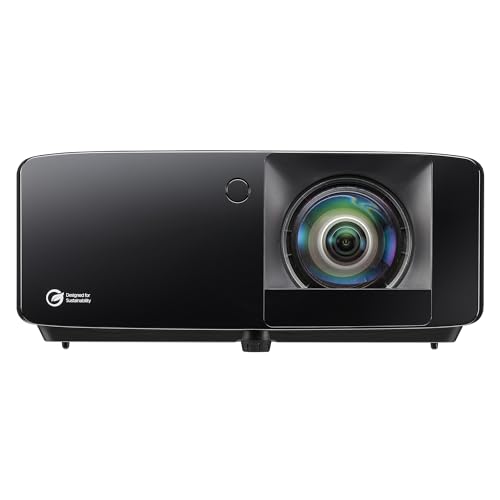
Optoma GT2400HDR Full HD Short Throw Laser Projector, 4,200 Lumens
Full HD 1080p4,200 lumensLaserLow input lag
Check price on Amazon
Best for: Game rooms and bright living rooms that want a laser projector close to the screen.

The GT2400HDR is a true short throw projector with a laser light source, 1080p and a stated 4,200 lumens. The listing adds a low input lag gaming mode and says it is ready for golf simulation, a use that needs a sturdy, bright image close to a screen. It is one of the pricier models here.

A laser source does not need lamp changes and holds its brightness for years. The brightness figure is a lumens claim without an ANSI label in the compact data, so treat it as strong but not precise. The short throw lens lets it sit a few feet from the screen, so people walking past cause fewer shadows.

Compared with the BenQ, you pay more for a brighter, lamp free light source. Mount it on a table or on the ceiling at the stated throw distance, and keep the vents clear. Fan noise rises with laser output in a small room.

What works

  • A laser light source avoids lamp changes and holds brightness
  • 4,200 lumens, stated, is the brightest figure in this guide
  • A low input lag mode suits console and golf simulator use
  • True short throw lens cuts shadows from people walking by

Watch out for

  • Among the priciest models, and the lumens figure has no ANSI label
  • Fan noise is more audible in a small quiet room

Specs

Resolution
Full HD 1080p
Brightness
4,200 lumens, stated
Light source
Laser
Gaming
Low input lag mode
Price position
8th of 11 candidates
02
BenQ TH671ST 3000 Lumens 1080p Short Throw Home Entertainment Projector
1080p3000 lumensShort throwLow input lag
Check price on Amazon
Best for: Dim living rooms and game rooms that want a short throw 1080p image at a fair price.

The TH671ST is a 1080p lamp projector sold as a short throw home entertainment model, with a stated 3000 lumens and low input lag. The listing mentions auto vertical keystone, which squares the image if the projector sits above or below the screen centre. It sits just below the Optoma on price.

A lamp projector needs a replacement lamp after a few thousand hours, which is a running cost the laser avoids. The short throw lens makes it a good match for a small living room, where a standard projector would need to sit behind the sofa. Compared with the Optoma, it is dimmer and uses a lamp, but it also costs less.

Place it on a coffee table or a low shelf and dim the room. Keep the lamp vents clear and let it cool before unplugging. It suits a dim living room or a game room.

What works

  • A short throw lens fits a small living room without ceiling work
  • 1080p and 3000 lumens, stated, suit a dimmed room
  • Low input lag helps console play
  • Auto vertical keystone speeds setup

Watch out for

  • A lamp needs replacing after a few thousand hours
  • Dimmer than the laser Optoma, so a bright room washes it out

Specs

Resolution
1080p
Brightness
3000 lumens, stated
Throw
Short throw lens
Gaming
Low input lag
Price position
7th of 11 candidates
03
ViewSonic PS502W WXGA Short Throw Projector, 4000 Lumens, Dual HDMI
WXGA4000 lumensDual HDMIShort throw
Check price on Amazon
Best for: Bright rooms, offices and classrooms where brightness matters more than sharp film detail.

ViewSonic's PS502W is a WXGA short throw projector sold for business, classrooms and conference rooms, with a stated 4000 lumens and dual HDMI. WXGA is 1280 by 800, so it is lower than 1080p. The brightness is high for the price, which is why it appears in bright rooms.

A lower resolution is fine for slides and video at a modest size, but text and fine detail look softer than on a 1080p projector. Compared with the BenQ, it is brighter and cheaper, but less sharp. It suits a bright den or an office meeting room.

Set it on a table a few feet from the screen and use the dual HDMI for two sources. Expect a lamp to need replacing over time. Do not choose it for a home theater with film detail.

What works

  • 4000 lumens, stated, handle a bright room well
  • Dual HDMI inputs connect two sources
  • Short throw lens fits a small room
  • Fifth cheapest of eleven candidates

Watch out for

  • WXGA is lower than 1080p, so text and film look softer
  • Business tuning favours brightness over colour for film

Specs

Resolution
WXGA, 1280 by 800
Brightness
4000 lumens, stated
Inputs
Dual HDMI
Use
Business, classroom, conference
Price position
5th of 11 candidates
04
KOGATA Short Throw Projector 4K with AI Auto Focus, Dolby Audio, Apps
4K labelAI auto focusBuilt in appsDolby Audio
Check price on Amazon
Best for: Dark rooms and bedrooms that want a low cost smart projector with autofocus.

KOGATA sells a projector labelled short throw with a 4K claim, AI auto focus, built in apps and Dolby Audio. It is the second cheapest model in the guide. The listing does not state a throw ratio in the compact data, so confirm how close it sits before you buy.

The 4K label usually means the unit accepts a 4K signal while the panel is lower. The listing calls it high brightness without giving an ANSI figure. Compared with the Optoma, it is cheaper and richer in smart features, but poorer in stated detail.

Treat it as a budget smart projector for a dark room. Check the throw distance, the resolution and the app support on the product page. Keep the vents clear.

What works

  • Second lowest price position of eleven candidates
  • AI autofocus speeds setup and refocus
  • Built in apps and Dolby Audio cover streaming and sound
  • 4K signal support helps with modern sources

Watch out for

  • The compact data gives no throw ratio, native resolution or ANSI lumens
  • 4K label does not mean a 4K panel

Specs

Signal
4K, accepts a 4K signal
Focus
AI auto focus
Apps
Built in apps
Audio
Dolby Audio
Price position
2nd of 11 candidates
05
iSinbox Short Throw Projector 4K with Netflix, Auto Focus, HDR10+, AirPlay
4K labelNetflixHDR10+AirPlay
Check price on Amazon
Best for: Dark rooms that want a feature rich budget projector with AirPlay and Netflix.

iSinbox sells a projector labelled short throw with a 4K input label, Netflix, auto focus, Dolby Audio, HDR10+, AirPlay and a dual mode stand. It is the third cheapest of eleven. The throw ratio is not given in the compact data, so check the page before buying.

The feature list is long, but features are not the same as picture quality. The listing says 4K input, which means the unit accepts a 4K signal. HDR10+ is a signal format, and it helps only if the panel and brightness can show it. Compared with the BenQ, it offers more smart features but less stated brightness.

Use it in a dark room and confirm the real distance for your screen size. The stand allows tabletop or ceiling placement. Keep the lens clean.

What works

  • A long feature list covers Netflix, AirPlay and HDR10+
  • Third lowest price position of eleven candidates
  • A dual mode stand allows table or ceiling use
  • Auto focus speeds up setup

Watch out for

  • The compact data gives no throw ratio or brightness figure
  • HDR10+ and 4K input do not guarantee a bright, sharp picture

Specs

Signal
4K input, HDR10+
Apps
Netflix, AirPlay
Focus
Auto focus
Stand
Dual mode stand
Price position
3rd of 11 candidates

Spec decoder

What the listing measurements really mean

The numbers brands lead with, translated into what they tell you about fit, comfort and wear at home.

Throw ratio

The distance from lens to screen divided by image width. A short throw ratio is roughly 0.4 to 1.0. It is the number that decides whether a projector will fit your room, so read it before any feature list.

Watch forThe KOGATA and iSinbox do not state it in the compact data.

Lumens

A measure of brightness. Only ANSI or ISO labelled lumens compare across brands. Higher is not always better, because a very bright projector in a dark room is tiring to watch.

Watch forThe Optoma, BenQ and ViewSonic state plain lumens.

WXGA

A 1280 by 800 resolution, common on business projectors. It is lower than 1080p. It is common on business and classroom models, where text and slides matter more than film.

Watch forThe ViewSonic PS502W uses it.

Laser light source

A solid state source that replaces the lamp. It holds brightness and needs no lamp changes. It also reaches full brightness quickly after power on.

Watch forThe Optoma GT2400HDR uses it.

Input lag

The delay between the console and the screen. Lower is better for games. The best figures are well under about 20 milliseconds in a game mode.

Watch forThe Optoma and BenQ state low input lag.

Methodology

How We Evaluated These Short Throw Projectors

Throw type honesty

We separated short throw from ultra short throw and looked for a stated lens type. The Optoma, BenQ and ViewSonic state it clearly. The KOGATA and iSinbox were flagged for missing throw data. Where a listing was silent, we said so and never filled the gap with an assumption.

Brightness and light source

We compared stated lumens and the lamp or laser source. We noted that no compact listing gives an ANSI label. We never treated lumens as a measurement of what you will see. Scores are editorial assessments from published specifications, never measurements.

Resolution

We recorded native resolution and 4K claims. The ViewSonic WXGA was noted as lower than 1080p. 4K input was never treated as a 4K panel. We also noted the aspect ratio, since a 16 by 10 image leaves bars when you watch film.

Games and features

We looked at input lag, apps and stands. The Optoma and BenQ low lag claims earned credit. No star ratings or review counts were used. Smart features were treated as extras, since a plain HDMI stick can replace them.

Price position

We used price position for ordering only. We covered the cheapest to the upper band. No product price appears in the text, and ultra short throw models are covered elsewhere.

Decision guide

How to Choose the Right Short Throw Projectors

By Room Light

SituationPickWhy
Bright den or officeViewSonic PS502W4000 lumens, stated
Dimmed living roomBenQ TH671ST3000 lumens, 1080p
Bright game roomOptoma GT2400HDR4,200 lumens, laser
Dark bedroomKOGATA or iSinboxBudget smart features

By Budget

SituationPickWhy
Lowest priceKOGATA short throwSecond cheapest of eleven
Low price, streamingiSinboxThird cheapest
Mid bandViewSonic PS502WFifth cheapest
Upper bandBenQ or OptomaSeventh and eighth of eleven

Laser vs Lamp

Laser

The Optoma GT2400HDR holds brightness for years and needs no lamp. It suits a room used every day.

Lamp

The BenQ and ViewSonic cost less up front. They need lamp changes and dim with age.

Pick laser for daily use. Pick lamp for a lower entry price.

By Use

SituationPickWhy
Console gamingOptoma or BenQLow input lag stated
Slides and meetingsViewSonic PS502WDual HDMI
Streaming appsiSinboxNetflix and AirPlay
Golf simulatorOptoma GT2400HDRSold as simulation ready

For Small Living Rooms Specifically

Look for

A throw chart that matches your sofa to screen distance, a lens that does not need ceiling work and a fan that is not loud.

In this comparison

The BenQ suits a small living room best. The Optoma suits a larger one with more light.

When to Spend More

Spend more if

You want a true 4K panel, a laser source and ultra short throw placement under the screen. That is a different product class.

Save if

You only need a bigger image in a dark room. A basic 1080p unit does that.

Ownership

Maintenance schedule

The upkeep that decides whether a piece still looks good in year five.

TaskIntervalWhy it matters
Clean the lensMonthlyDust softens the picture. A microfibre cloth and a lens brush keep it sharp. A single fingerprint on the lens shows as a soft patch on the screen.
Clean the air filterEvery 3 monthsA clogged filter heats the light source. Vacuum it gently or wipe it. A blocked filter is the most common cause of a projector shutting itself off.
Replace the lampWhen dimLamp models fade with use. A new lamp restores brightness and avoids a sudden failure. Keep a spare in the cupboard, since a failed lamp ends a film night.
Let it cool before unpluggingEvery useA hot lamp or laser needs the fan to finish its cycle. Cutting power early shortens life. This simple habit is the best way to extend the life of the lamp.
Check the mountTwice a yearA ceiling or shelf mount can loosen. Tighten screws and confirm the angle. A loose mount can also drift the image off the screen edge.

FAQ

Frequently Asked Questions

What is a short throw projector?

One that fills a large image from a few feet away, roughly 4 to 8 feet for 100 inches. Ultra short throw units sit inches from the wall. The advantage is that people and furniture rarely block the beam, and the cable run is short.

Is short throw the same as ultra short throw?

No. Ultra short throw has a much smaller throw ratio and sits just under the screen. Short throw needs a few feet of clearance. Check the product page under technical details for the throw ratio before you buy, since some listings call a standard projector short throw.

How many lumens do I need?

About 2000 to 3000 for a dimmed room and 3000 plus for a bright one. Curtains help more than extra lumens. A matte white or grey screen made for projection raises contrast in a lit room.

Does 4K mean a 4K panel?

Not always. Many listings mean the unit accepts a 4K signal. Native 1080p is a safe baseline. Check the panel size on the product page, because a vague claim is rarely a high one.

Are lamps or lasers better?

Lasers avoid lamp changes and hold brightness, but cost more. Lamps are cheaper up front and need a replacement over time. A lamp usually lasts a few thousand hours in a lit living room.

Can I use one in a bright room?

A bright short throw projector helps, but a bright room still washes out dark scenes. Add a darker screen or curtains. In a room with a lot of window light, a projector is a poor match for a television.

Bottom line

The short version

Browse more short throw projectorson Amazon →
Elena Hart, Lead Home Editor

About the author

Elena Hart

Lead Home Editor, SweetLivingRoom

Elena Hart leads SweetLivingRoom's buying guides, turning product dimensions, material specs and owner feedback into clear verdicts on sofas, rugs, lighting, storage and decor.

More from Elena →

Keep reading

Related guides