
Amazon affiliate links - we earn a commission.Affiliate disclosure

Buying guide · 13 min read · Updated 2026-11-21

Best Projectors for Living Rooms (2026)

Six living room projectors compared on lumens, resolution, throw distance, light source and built-in streaming, with honest tradeoffs for bright rooms.

Elena Hart, Lead Home EditorBy Elena HartLead Home Editor6 picks comparedSpec-sheet verified
Best Projectors for Living Rooms

At a glance

Our top picks

Side by side

Spec comparison

A projector turns a blank wall or screen into a very large picture, and for a living room that doubles as a movie space it can cost less per inch than a big TV. The catch is that a projector is judged by the room it sits in, not by the box it comes in.

Brightness, resolution, throw distance and the light source decide whether the picture looks vivid or washed out by daylight. This guide compares six models on those points so you can match one to your room, your wall and your viewing habits.

Before you buy

6 Criteria to Look For Before Buying a Projector for Living Rooms

  1. 01

    Lumens for your room

    Brightness decides how the picture holds up against light. A dark, curtained room can use 1,300 lumens like the Hisense M2 Pro, while a room with lamps benefits from 3,000 to 4,000, as on the BenQ and Epson. A bright room with windows wants 5,000 or more, like the ViewSonic. The common mistake is buying on resolution and ignoring light.

  2. 02

    Resolution and screen size

    On a 100 inch screen viewed from about 10 feet, 1080p looks good for most content. 4K, as on the Optoma, pays off on larger screens or closer seating. A 4K label does not guarantee a 4K panel, so read whether the listing says native or decoding.

  3. 03

    Throw distance

    Throw distance is the gap between lens and screen needed for a given image size. Short throw models like the BenQ fill a wall from a few feet, while standard throw units need more room. Measure your room before buying, because a long throw does not fit a small apartment.

  4. 04

    Light source and lifespan

    Lamp projectors like the Epson and BenQ dim over thousands of hours and need replacement bulbs. Laser projectors like the ViewSonic and Optoma hold brightness far longer and start instantly. Lasers cost more up front but avoid lamp costs.

  5. 05

    Built-in streaming and ports

    Built-in apps, as on the HAPPRUN, cut cable clutter, but a projector with weak software ages quickly. A projector with an HDMI port lets you attach any streamer. Check for eARC or an audio out if you want to use a soundbar.

  6. 06

    Noise and placement

    Fans cool the lamp or laser and add noise, which matters in a quiet living room. Ceiling mounting puts the noise behind you. Plan cables early, because a mid-room projector needs power and HDMI nearby.

Detailed reviews

The 6 best projectors for living rooms, explained

01
Epson Home Cinema 980 3LCD 1080p Projector, 4,000 Lumens
1080p4,000 lumens3LCD3-chip
Check price on Amazon
Best for: Living rooms with lamps or some daylight that want a bright 1080p picture.

Epson rates the Home Cinema 980 at 4,000 lumens of both color and white brightness, which is the figure that matters for a living room with lamps on or daylight at the edges. Its 3-chip 3LCD design uses a separate panel for each primary color, so color brightness matches white brightness instead of falling behind it.

The tradeoff is that it is a lamp projector, so the bulb dims over thousands of hours and will eventually need replacing, unlike the laser models here. Compared with the BenQ TH671ST, the Epson is easier to place because it offers a wider throw range, but it needs more room behind the seating. Against the 4K Optoma it gives up resolution, though at 1080p on a 100 inch screen from normal distance the difference is smaller than the marketing implies.

Setup takes about 20 minutes with a ceiling or shelf mount, and you should aim the lens square to the screen to avoid keystone correction. Run the fan at normal mode, clean the filter every few months, and let the unit cool before unplugging.

What works

  • A 4,000 lumen color and white rating handles lamp light well
  • A 3-chip 3LCD engine keeps colors bright as well as white
  • Native 1080p suits most TV and movie sources
  • Flexible placement fits shelves, tables and ceiling mounts

Watch out for

  • A lamp light source eventually needs replacement
  • Larger than portable models and needs mounting space

Specs

Resolution
1080p
Color brightness
4,000 lumens
White brightness
4,000 lumens
Technology
3-chip 3LCD
Cost tier
Middle of the group
02
BenQ TH671ST 1080p Short Throw Projector, 3,000 Lumens, Low Input Lag
1080p3,000 lumensShort throwLow input lag
Check price on Amazon
Best for: Small and medium living rooms that need a big image from a short distance.

BenQ's TH671ST is a short throw 1080p projector rated at 3,000 lumens, with 92 percent Rec.709 color coverage and low input lag for gaming. Short throw means it makes a large image from a short distance, so it suits a small or medium room where there is no space for a long projector-to-wall gap.

The tradeoff is brightness: 3,000 lumens is useful in a dim or partly lit room, but a cut below the Epson 980 at 4,000. Compared with the ViewSonic LS740HD at 5,500 lumens, it is much less bright, but it is also far easier to fit in a room under 12 feet deep. Like the Epson, it uses a lamp, so bulb replacement is part of ownership.

Place it on a coffee table or low shelf about 6 to 8 feet from the wall, depending on the screen size you want. Use the vertical lens shift and keystone only as a last resort, and clean the vent every few months. Gamers will appreciate the low input lag, which keeps controls responsive.

What works

  • A short throw lens fills a wall from a short distance
  • 3,000 lumens works in dim or partly lit rooms
  • Low input lag suits console gaming
  • 92 percent Rec.709 color coverage gives natural skin tones

Watch out for

  • 3,000 lumens struggles in a bright, sunlit room
  • A lamp light source needs periodic replacement

Specs

Resolution
Native 1080p
Brightness
3,000 lumens
Throw
Short throw
Color
92 percent Rec.709
Cost tier
Upper middle of the group
03
ViewSonic LS740HD 1080p Laser Projector, 5,500 Lumens, Optical Zoom
1080p5,500 lumensLaserOptical zoom
Check price on Amazon
Best for: Large or bright rooms where brightness and a long-lasting light source matter.

ViewSonic's LS740HD is a Full HD laser projector rated at 5,500 lumens with optical zoom, keystone and corner adjustment. A laser source holds its brightness far longer than a lamp and avoids bulb changes, and 5,500 lumens is bright enough for a living room with windows.

The tradeoff is cost and bulk: it sits at the top tier and is built more for large rooms, classrooms and even golf simulators, which the maker lists, than for a compact apartment. Compared with the Epson 980, it is about 1,500 lumens brighter, but its fan noise and size are bigger considerations. Against the 4K Optoma it has the brightness but not the resolution.

Plan for a ceiling mount or a sturdy shelf, and allow clear airflow around the vents. The optical zoom saves you from moving the unit to resize the picture. Clean the filter if fitted, and treat the unit as a fixed installation rather than something to move for every movie night.

What works

  • 5,500 lumens is the brightest rating in the group
  • A laser source avoids bulb replacements
  • Optical zoom resizes the image without moving the unit
  • Corner adjustment helps with awkward projection angles

Watch out for

  • Top cost tier and bulkier than home cinema models
  • Designed for large rooms, so it is overkill for a small one

Specs

Resolution
1080p
Brightness
5,500 lumens
Light source
Laser
Lens
Optical zoom with keystone and corner adjust
Cost tier
Top of the group
04
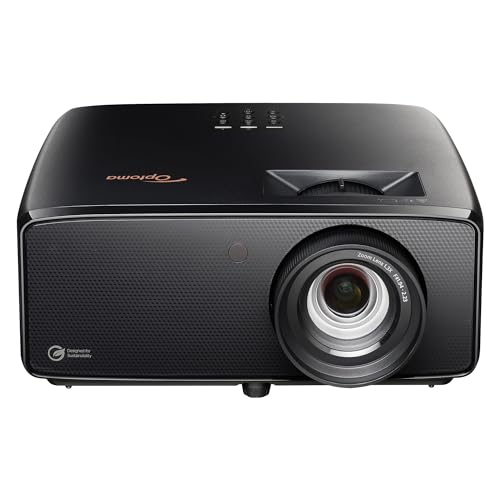
Optoma UHZ36 4K UHD Laser HDR Home Theater Projector
4K UHDLaserHDRFilmmaker Mode
Check price on Amazon
Best for: Movie fans who want 4K detail and a laser source in a darker room.

Optoma's UHZ36 is a 4K UHD laser projector with HDR support and a Filmmaker Mode that preserves the director's intended picture. The laser source gives long life without lamp changes, and 4K detail pays off on a big screen where 1080p pixels start to show.

The tradeoff is that the listing states fewer brightness details than the others, so confirm the lumen rating before buying, and a dim-room choice is likely. Compared with the Epson 980, it adds resolution and a laser source but costs more. Against the Hisense M2 Pro it is a conventional home theater unit rather than a portable lifestyle projector, so it is more of a fixed installation.

Plan the install first: measure the throw distance and the shelf or ceiling position before buying. Calibrate with Filmmaker Mode for movies, and use a dedicated screen for the best contrast. Keep the vents clear and wipe the lens with a microfibre cloth. For HDR content use a quality HDMI cable.

What works

  • 4K UHD resolution suits large screens and close seating
  • A laser light source avoids lamp replacement
  • HDR support improves highlight detail in films
  • Filmmaker Mode keeps the picture close to the intended look

Watch out for

  • Brightness details are thinner, so check lumens before buying
  • Higher cost tier than the 1080p lamp models

Specs

Resolution
4K UHD
Light source
Laser
HDR
Supported
Picture mode
Filmmaker Mode
Cost tier
Upper end of the group
05
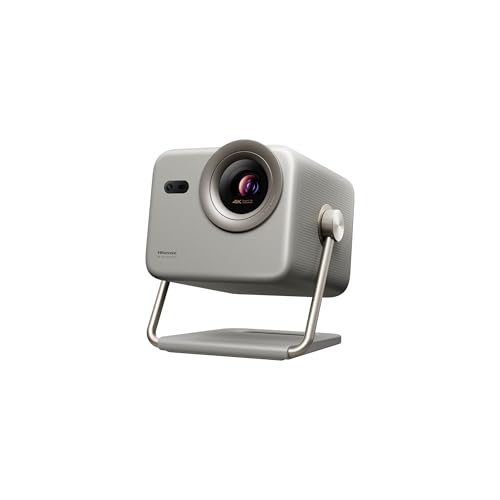
Hisense M2 Pro Triple Laser 4K Portable Projector, 1,300 Lumens, 65 to 200 Inch
4K UHDTriple laser1,300 lumens65 to 200 in
Check price on Amazon
Best for: Dim living rooms that want 4K color and a projector that moves easily.

Hisense's M2 Pro uses a triple laser light source to project a 4K picture from 65 to 200 inches at 1,300 ANSI lumens, with Dolby Vision support in a portable form. Triple laser gives strong color saturation, and the smaller body suits moving between living room, patio and bedroom.

The tradeoff is brightness: 1,300 lumens is a dim-room figure, well below the 4,000 lumens of the Epson 980, so it needs curtains or evening viewing in a living room with windows. Against the HAPPRUN, it costs more and adds 4K and triple laser color. Compared with the fixed Optoma, it is lighter and easier to carry, but not meant to fight daylight.

Set it on a stable table or tripod, and keep the vents clear. Dim the room, and use a white wall or a screen for the best contrast. Streaming apps run through the built-in system, so check your preferred services before buying.

What works

  • A triple laser source gives rich color saturation
  • 4K UHD resolution with a 65 to 200 inch image range
  • Portable body moves between rooms and outdoors
  • Dolby Vision support improves contrast in compatible films

Watch out for

  • 1,300 lumens is too dim for a sunlit living room
  • Upper middle cost tier for a portable projector

Specs

Resolution
4K UHD
Light source
Triple laser
Brightness
1,300 ANSI lumens
Image size
65 to 200 in
Cost tier
Upper middle of the group
06
HAPPRUN Google TV Native 1080p Bluetooth Projector, 4K Decoding, Voice Control
Native 1080pGoogle TV4K decodingVoice control
Check price on Amazon
Best for: Casual evening viewing in a dim room with built-in apps and no extra stick.

HAPPRUN builds a native 1080p projector with licensed Google TV, 4K decoding and a voice button, so Netflix, Prime Video and YouTube run without a separate stick. The 4K decoding is worth understanding: the projector accepts 4K video but shows it at its native 1080p, which is fine for a casual living room.

The tradeoff is brightness and build. This is a compact consumer projector, so it works best in a dim room and cannot match the 4,000 lumens of the Epson. Compared with the Hisense M2 Pro it is cheaper and simpler but offers a lower tier of color and resolution. Against the Epson it has built-in apps but not the brightness or the optics.

Setup is quick: place it on a table, set focus and keystone, and sign into your streaming accounts. Use a white wall or a screen, close curtains for evening viewing, and clear the vents. Streaming through the built-in platform needs a stable Wi-Fi connection.

What works

  • Licensed Google TV puts streaming apps inside the projector
  • A native 1080p panel gives a clear picture for the cost tier
  • Voice control on the remote speeds up searches
  • Lower middle cost tier makes it an affordable first projector

Watch out for

  • A compact light source struggles in daylight
  • 4K decoding still displays at native 1080p

Specs

Resolution
Native 1080p
Software
Licensed Google TV
Decoding
4K
Control
Voice button on remote
Cost tier
Lower middle of the group

Spec decoder

What the listing measurements really mean

The numbers brands lead with, translated into what they tell you about fit, comfort and wear at home.

ANSI lumens

ANSI lumens is a standard brightness measure at the lens. It is more trustworthy than the plain lumens number some listings use.

Watch forThe Hisense lists 1,300 ANSI lumens, while others quote plain lumens, so compare like for like.

Native resolution

This is the number of physical pixels the panel displays. A 4K input on a 1080p panel is downscaled.

Watch forThe HAPPRUN says 4K decoding but is native 1080p.

Throw ratio

The ratio of distance to image width. A lower ratio means a bigger picture from a shorter distance.

Watch forThe BenQ is short throw, so it needs less distance than the Epson for the same screen.

Laser vs lamp

Lasers hold brightness and start quickly. Lamps are cheaper but dim and need replacement.

Watch forThe ViewSonic and Optoma are laser; the BenQ and Epson are lamp models.

3LCD vs single chip

3LCD uses three panels so colors are as bright as whites. Single-chip designs can show dimmer colors.

Watch forEpson highlights equal color and white brightness at 4,000 lumens.

Methodology

How We Evaluated These Projectors for Living Rooms

Brightness and room fit

We compared stated brightness from 1,300 ANSI lumens on the Hisense up to 5,500 on the ViewSonic. We matched each rating to a type of room. We did not measure any output ourselves.

Resolution and image engine

We looked at native resolution, 3LCD versus other approaches and HDR support. The Epson, Optoma and Hisense lean on different strengths. We favoured native resolution over decoding claims.

Throw and placement

We read throw descriptions and placement flexibility, from the BenQ short throw to the zoom on the ViewSonic. These decide whether a projector fits a real room. We favoured flexible lens options.

Light source ownership

We weighed lamp versus laser, bulb replacement and start time. Lasers like the ViewSonic and Optoma avoid bulbs. This shaped our verdicts on long-term cost.

Owner feedback patterns

We researched common themes: fan noise, daylight washout and software lag. These shaped our cons. We did not use ratings or review counts.

Decision guide

How to Choose the Right Projectors for Living Rooms

By Room Light

SituationPickWhy
Dark, curtained roomHisense M2 Pro or HAPPRUN1,300 lumens is enough with curtains drawn
Room with lamps onBenQ TH671ST or Epson 9803,000 to 4,000 lumens keeps the picture vivid
Room with daylightViewSonic LS740HD5,500 lumens resists ambient light
Mixed evening useEpson 9804,000 lumens is a balanced middle
Dedicated movie nightsOptoma UHZ364K and HDR reward a dark room

By Budget

SituationPickWhy
Lower middleHAPPRUN Google TVBuilt-in apps and 1080p at a modest tier
MiddleEpson Home Cinema 9804,000 lumens at a balanced cost
Upper middleBenQ TH671ST or Hisense M2 ProShort throw or portable 4K color
Upper endOptoma UHZ364K laser and HDR
Top of the groupViewSonic LS740HD5,500 lumen laser

Lamp vs Laser

Lamp

The Epson and BenQ cost less up front and give a strong picture, but the bulb dims and needs a replacement in the long run.

Laser

The ViewSonic, Optoma and Hisense hold brightness and start quickly with no bulb changes. They cost more at purchase.

Pick lamp for a lower entry cost and a few hours a week; pick laser if you watch daily and want no maintenance.

By Room Size

SituationPickWhy
Small room under 12 feetBenQ TH671STShort throw fills a wall from a short distance
Medium roomEpson Home Cinema 980Flexible throw range
Large open roomViewSonic LS740HDBrightness and optical zoom
Moves between roomsHisense M2 ProPortable body and wide image range
Bedroom and living roomHAPPRUN Google TVCompact and app-ready

For Living Room Use Specifically

Look for

Enough lumens for your window situation, a throw distance that fits your seating plan, a quiet fan and a placement that hides the cables.

In this comparison

The Epson and ViewSonic handle living room light best, while the Hisense and HAPPRUN suit evening viewing in a dimmed room.

When to Spend More

Spend more if

You watch daily, want 4K with a laser source like the Optoma, or have a bright room that needs the ViewSonic output.

Save if

You only watch at night with curtains closed, where the HAPPRUN or a similar compact model is enough.

Ownership

Maintenance schedule

The upkeep that decides whether a piece still looks good in year five.

TaskIntervalWhy it matters
Clean the air filter and ventsEvery 2 to 3 monthsDust blocks airflow and raises fan noise. Cleaning keeps the unit cool.
Wipe the lensMonthlyFingerprints soften the image. Use a microfibre cloth and no sprays.
Replace the lampAs the picture dimsLamp projectors lose brightness over thousands of hours. Replace when the image looks flat.
Let it cool before unpluggingEvery timeCutting power while hot shortens lamp and fan life. Wait for the fan to stop.
Update firmware and appsQuarterlySmart projectors age if apps stop updating. Updates fix streaming bugs.

FAQ

Frequently Asked Questions

Is a projector better than a TV for a living room?

A projector gives a bigger picture per cost but needs a darker room and some setup. A TV is easier in a bright room and works with no planning.

How much does a living room projector cost?

Prices move, so check the current listing. The HAPPRUN sits at a lower tier and the ViewSonic at the top. Brightness and light source drive cost.

How long does a projector last?

Lamp models dim over thousands of hours and need bulbs. Laser models hold brightness longer, though fans and electronics still age.

Is 4K worth it on a projector?

On a large screen or at close seating, yes. At 100 inches and normal distance, native 1080p looks good, so spend on brightness first.

Can I use a projector in a bright room?

Yes, with 4,000 lumens or more and a good screen. Under 2,000 lumens, you need curtains.

Do I need a projector screen?

A flat white wall works for casual viewing. A screen improves contrast and color, especially in a room with ambient light.

Bottom line

The short version

Browse more projectors for living roomson Amazon →
Elena Hart, Lead Home Editor

About the author

Elena Hart

Lead Home Editor, SweetLivingRoom

Elena Hart leads SweetLivingRoom's buying guides, turning product dimensions, material specs and owner feedback into clear verdicts on sofas, rugs, lighting, storage and decor.

More from Elena →