
Amazon affiliate links - we earn a commission.Affiliate disclosure

Buying guide · 14 min read · Updated 2026-11-29

Best 4K Projectors Under $1000 (2026)

Six 4K projectors under $1000 compared on true 4K versus 4K decoding, labelled lumens, laser or lamp light, smart systems and how each handles a living room.

Elena Hart, Lead Home EditorBy Elena HartLead Home Editor6 picks comparedSpec-sheet verified
Best 4K Projectors Under $1000

At a glance

Our top picks

Side by side

Spec comparison

At this price a projector can finally be a main screen rather than a toy, but the 4K label hides a wide spread of quality. Some machines show a real 4K picture, some use shifted pixels from a lower panel, and many only accept a 4K signal and show 1080p.

This guide puts six projectors in order by how honestly their listings describe resolution and brightness, and by what each is best at: movies in the dark, gaming, streaming or a portable lifestyle setup. It leads with the better-equipped models in the band.

Before you buy

6 Criteria to Look For Before Buying a 4K Projector Under $1000

  1. 01

    True 4K versus decoding

    A 4K label can mean three things: a native 4K chip, pixel shifting from a lower panel, or only the ability to accept a 4K signal. The Optoma UHZ36 is described as 4K UHD, the Epson uses 4K PRO-UHD pixel shifting and the others decode 4K. For a large screen, native or shifted 4K is visibly sharper. If you plan to sit about ten feet from a 100 inch image, the extra sharpness of a shifted or native 4K picture shows up on text and fine detail more than on motion.

  2. 02

    Brightness in a labelled unit

    ANSI and IDMS figures are comparable, while bare lumens are not. The HAPPRUN 2500 lists 2500 ANSI, the Epson lists 1000 IDMS-rated and the XENPONAD lists 1000 ANSI. A dark room needs 1000 to 1500, and a room with curtains drawn wants 2000 to 3000. A projector that lists only a bare lumen number deserves suspicion at any price, and the same goes for contrast ratios quoted without a method.

  3. 03

    Laser, lamp or LED

    Laser sources last tens of thousands of hours and do not need lamp changes, as with the Optoma. Lamp models need replacement lamps and dim over time. LED is dim but long lived. At this price, laser is a strong upgrade. Lasers also reach full brightness quickly and hold it for years, which is a real quality-of-life gain over a lamp that dims.

  4. 04

    Smart system

    Google TV and Android TV are easier than unknown launchers, and VIDAA is a smart-TV style system. Netflix needs official certification, so check the listing. Otherwise add a streaming stick. Check whether the system has official apps for the services you pay for, because side-loaded apps can break after an update.

  5. 05

    Throw and placement

    Standard throw ratios sit at 1.2 to 2. A 100 inch image needs roughly 8 to 12 feet of throw. Measure the room, plan a shelf or a ceiling mount and keep the vents clear. A short throw or a long throw each suits a different room, so measure from the shelf or mount to the wall before you choose a model.

  6. 06

    Input lag and gaming

    Input lag under about 20 milliseconds at 1080p 60 feels fine, while 4K and enhanced modes can lag. If you game, check for a low-lag mode. Most listings do not publish a figure. If you watch a lot of fast action, ask about motion processing, since heavy smoothing can make films look unnatural.

Detailed reviews

The 6 best 4k projectors under $1000, explained

01
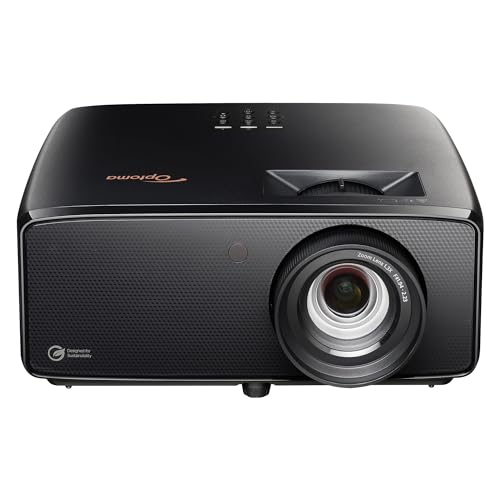
Optoma UHZ36 4K UHD Laser HDR Home Theater Projector, Filmmaker Mode
4K UHDLaser lightHDRFilmmaker Mode
Check price on Amazon
Best for: Dedicated home theaters where picture quality and a long-life light source come first.

The Optoma UHZ36 is described as a 4K UHD laser HDR home theater projector with Filmmaker Mode, which preserves a director's colour and motion settings. The listing is short but the key facts are clear: laser light, 4K UHD and HDR. A laser source lasts tens of thousands of hours and does not need lamp changes.

The tradeoff is that the listing gives few other numbers, so you must check lumens, throw ratio and input lag on Optoma's page. Laser projectors cost more than lamp models and are usually bigger and heavier. Compared with the Epson Lifestudio, it is a fixed home theater unit and not a portable one. A projector that is not smart needs a streaming stick.

Plan a shelf or ceiling mount, and a screen or a painted wall. Keep the vents clear and dust the filters. It suits a dedicated TV room where picture quality leads.

What works

  • Described as true 4K UHD, not just 4K decoding
  • Laser light avoids lamp changes
  • HDR and Filmmaker Mode help film fans
  • Highest price tier in the lineup

Watch out for

  • Listing gives few other specs in the lines we reviewed
  • No smart system, so a stick is needed
  • Needs a shelf or mount and a dark room

Specs

Resolution
4K UHD
Light source
Laser
HDR
Supported
Picture mode
Filmmaker Mode
Use
Home theater
02
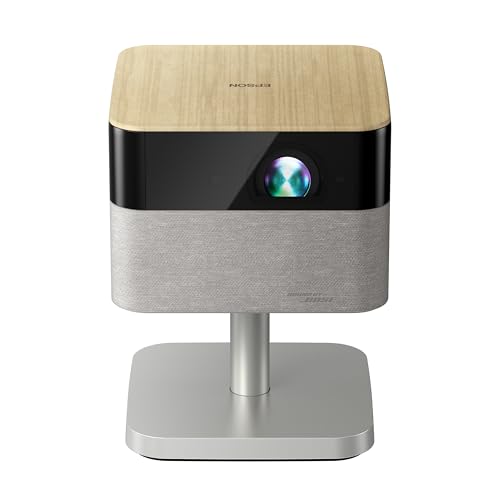
Epson Lifestudio Flex Plus 4K PRO-UHD Portable Projector, 1000 lumens, Bose sound
4K PRO-UHD1000 lumensBose soundPortable
Check price on Amazon
Best for: Stylish, portable setups in dim rooms where built-in sound matters.

The Epson Lifestudio Flex Plus is a portable lifestyle projector with 4K PRO-UHD, 1000 lumens of colour brightness and 1000 lumens of white brightness, both IDMS rated, and an integrated stereo system using Bose technology. The listing says it also works with the Epson Projection Studio app. IDMS is a recognised standard, so the brightness figure is comparable.

The tradeoff is the label. Epson's 4K PRO-UHD is a pixel-shifting process that builds a 4K image from a lower-resolution panel, which gives a sharper picture than 1080p but is not the same as native 4K. At 1000 lumens it needs a dark or dim room. Compared with the Optoma, it is portable and has built-in sound but is less of a theater piece.

Place it on a table or a stand and use it in a dim room. It suits a living room or a bedroom that wants a stylish, portable big screen with good sound.

What works

  • IDMS-rated 1000 lumens is a comparable, honest brightness figure
  • 4K PRO-UHD gives a sharper picture than a plain 1080p unit
  • Integrated stereo using Bose technology avoids a separate speaker
  • Portable design moves between rooms

Watch out for

  • 4K PRO-UHD is pixel shifting, not native 4K
  • 1000 lumens needs a dim room
  • Upper price tier among the six

Specs

Resolution
4K PRO-UHD
Brightness
1000 lumens colour and white, IDMS rated
Audio
Integrated stereo by Bose technology
Style
Portable lifestyle projector
App
Epson Projection Studio
03
HAPPRUN 2500 ANSI Google TV Smart Projector, 4K decoding, WiFi 6, Bluetooth 5.2
2500 ANSI lumensGoogle TV4K decodingWiFi 6
Check price on Amazon
Best for: Family rooms that want a bright, app-ready projector with Google TV.

The HAPPRUN 2500 is a smart projector with Google TV built in, 2500 ANSI lumens, 4K decoding, WiFi 6 and Bluetooth 5.2. The listing says it makes images vivid in rooms with ambient light and supports a 40 to 300 inch screen. Google TV is easier to use than an unknown launcher.

The tradeoff is that 4K decoding means a 4K signal shown at the panel's native resolution, probably 1080p. 2500 ANSI lumens helps in a lit room but does not beat daylight. Compared with the Optoma, it costs far less and has apps, but not a true 4K picture. Compared with the XENPONAD, it is much brighter.

Set it up with the lights dimmed and check the Netflix status on the Google TV listing. It suits a family room where the projector is the screen for movies, sports and games.

What works

  • 2500 ANSI lumens is a comparable, bright figure
  • Google TV built in avoids a streaming stick
  • WiFi 6 and Bluetooth 5.2 handle modern streaming
  • 40 to 300 inch range suits many rooms

Watch out for

  • 4K decoding is not native 4K
  • Cannot beat direct daylight
  • Fan noise can be audible in quiet scenes

Specs

Brightness
2500 ANSI lumens
System
Google TV built in
Resolution
4K decoding
Wireless
WiFi 6, Bluetooth 5.2
Image size
40 to 300 in
04
XENPONAD 4K Smart Projector with Google TV, native 1080p, 1000 ANSI lumens
1000 ANSI lumensNative 1080pGoogle TVAuto focus
Check price on Amazon
Best for: Bedrooms and small living rooms that want easy setup and Google TV.

The XENPONAD is a compact smart projector with Google TV, native 1080p resolution, 4K decoding, 1000 ANSI lumens and auto focus. The listing says it focuses itself on power-up and corrects keystone automatically. It is honest that the panel is 1080p and the 4K is decoding.

The tradeoff is brightness. 1000 ANSI is a dark-room figure, so it does not suit a lit living room. Compared with the HAPPRUN 2500, it is dimmer but simpler. The auto focus and keystone make setup easy, but they can soften an image when the correction is heavy.

Use it in a dim room and square it to the wall when you can. It suits a bedroom or small living room that wants an easy Google TV experience.

What works

  • Google TV avoids a separate stick
  • Auto focus and keystone make setup simple
  • Native 1080p is stated honestly
  • 1000 ANSI lumens is a comparable figure

Watch out for

  • 1000 ANSI is a dark-room brightness
  • 4K is decoding only
  • Heavy keystone softens the image

Specs

Brightness
1000 ANSI lumens
Resolution
Native 1080p, 4K decoding
System
Google TV
Focus
Auto focus with keystone
Style
Portable
05
KOGATA 4K Smart Projector with VIDAA system, AI auto focus and keystone, WiFi and Bluetooth
VIDAA system1200 plus appsAI auto focusWiFi and Bluetooth
Check price on Amazon
Best for: Smart-TV style users who want a big app library on a projector.

The KOGATA runs the VIDAA smart system, which the listing says offers more than 1,200 apps and more than 1,000 live TV channels, with AI auto focus and keystone, WiFi and Bluetooth. The software gives a smart-TV style home screen, which many projector buyers prefer to a plain launcher. The listing positions it for home and outdoor use.

The tradeoff is that the listing, in the lines we reviewed, does not give a native resolution or an ANSI lumen figure, so brightness cannot be compared. A big app list is not the same as certified Netflix. Compared with the HAPPRUN, it has a different system with fewer well-known apps.

Check the app list for the services you use before you buy. It suits a buyer who wants a smart-TV style interface.

What works

  • VIDAA offers a smart-TV style interface
  • Listing cites 1,200 plus apps and 1,000 plus live channels
  • AI auto focus and keystone ease setup
  • WiFi and Bluetooth are included

Watch out for

  • No native resolution or ANSI figure in the lines we reviewed
  • App count is not the same as certified Netflix
  • Less well known system than Google TV

Specs

System
VIDAA smart system
Apps
1,200 plus apps and 1,000 plus live TV channels
Focus
AI auto focus and keystone
Wireless
WiFi and Bluetooth
Use
Home theater and outdoor
06
LYNCAST 1500 ANSI Native 1080p Smart Projector, Android TV 14, 20W Dolby sound
1500 ANSI lumensNative 1080pAndroid TV 1420W Dolby audio
Check price on Amazon
Best for: Living rooms that want a native 1080p picture with strong built-in audio.

The LYNCAST is a native 1080p smart projector with 1500 ANSI lumens, 10-bit colour depth, an 18000:1 contrast ratio and a 93 percent colour gamut. It runs Android TV 14 with a built-in Play Store and the listing says 10,000 plus apps and 800 plus free live channels. A 20W Dolby audio system helps with built-in sound.

The tradeoff is that its 4K label is support only, and the contrast ratio is a claim. Compared with the HAPPRUN 2500, it is dimmer but has a stronger audio system. Android TV 14 is flexible but leaves more room for ad apps and slowdowns than a clean Google TV.

Use it in a dim room and add a soundbar only if you need more bass. It suits a living room where the projector doubles as a sound source.

What works

  • 1500 ANSI lumens is comparable and bright enough for dim rooms
  • Native 1080p with 10-bit colour is stated
  • 20W Dolby audio is a strong built-in sound system
  • Play Store gives wide app access

Watch out for

  • 4K is support only
  • Contrast ratio is a claim
  • Android TV 14 can include extra preinstalled apps

Specs

Brightness
1500 ANSI lumens
Resolution
Native 1920 x 1080, 10-bit colour
Contrast
18000:1
System
Android TV 14 with Play Store
Audio
20W Dolby

Spec decoder

What the listing measurements really mean

The numbers brands lead with, translated into what they tell you about fit, comfort and wear at home.

4K PRO-UHD

Epson's pixel-shifting method that builds a 4K image from a lower-resolution panel.

Watch forEpson uses it, and it is sharper than 1080p but not native 4K. Pair it with a screen for the best result.

IDMS rated

A brightness standard that makes lumen claims comparable.

Watch forEpson lists 1000 lumens IDMS rated. Look for the standard named in the listing.

Laser light source

A long-life light that does not need lamp changes.

Watch forOptoma UHZ36 uses laser. Ask whether replacement is ever needed.

4K decoding

Accepts a 4K signal but shows it at native resolution.

Watch forHAPPRUN, XENPONAD and LYNCAST decode 4K. Check that the resolution is stated separately.

Filmmaker Mode

A picture setting that turns off processing to match the director's intent.

Watch forOptoma lists it. Turn it on for films and off for games.

Methodology

How We Evaluated These 4K Projectors Under $1000

Listing specifications

We evaluated each projector from its stated resolution, brightness unit, light source and system. We did not handle any of them. The Epson's IDMS-rated 1000 lumens and the HAPPRUN's 2500 ANSI anchor the brightness comparison. We also noted which listings named an official brightness standard.

Owner feedback patterns

We looked at the kinds of issues owners raise about projectors, such as fan noise, dim images and app limits. We do not publish ratings or review counts. Soft focus and app limits came up in the patterns we reviewed.

Resolution honesty

We favoured listings that say what the 4K label means and marked down those that blur it. We kept the verdicts tied to the facts on each listing.

Upper band focus

At this cap we put better-equipped models first, rather than the cheapest. All six were at or below the cap on the day we checked.

Room use

We compared portable, fixed and smart models so movies, gaming and casual use each have a pick. We also compared each projector's likely placement.

Decision guide

How to Choose the Right 4K Projectors Under $1000

By Picture Quality

SituationPickWhy
Best pictureOptoma UHZ364K UHD laser.
Sharper than 1080p, portableEpson Lifestudio Flex Plus4K PRO-UHD.
Bright roomHAPPRUN 25002500 ANSI.
Dim room, easy setupXENPONADAuto focus and Google TV.
Native 1080p with soundLYNCAST20W Dolby audio.

By Budget

SituationPickWhy
Lowest spendXENPONADGoogle TV at the lowest tier here.
Low spendLYNCASTNative 1080p and Dolby audio.
Mid spendKOGATABig app library.
Upper-mid spendHAPPRUN 2500Brightness.
Top of the capOptoma or EpsonTrue 4K or 4K PRO-UHD.

Fixed vs Portable

Fixed

The Optoma and HAPPRUN suit a mounted or shelf setup. They give more brightness or picture quality.

Portable

The Epson and XENPONAD move between rooms. They trade brightness for convenience.

Choose fixed for a home theater and portable for flexibility.

By Smart System

SituationPickWhy
Google TVHAPPRUN 2500 or XENPONADClean interface.
Android TVLYNCASTPlay Store.
VIDAAKOGATASmart-TV style.
No systemOptoma UHZ36Add a stick.
App via EpsonEpsonProjection Studio app.

For Movies Specifically

Look for

A native or shifted 4K picture, HDR, a quiet fan, a dark room and a screen. Avoid unlabelled lumens.

In this comparison

The Optoma has Filmmaker Mode, the Epson has IDMS-rated lumens and the HAPPRUN has 2500 ANSI.

When to Spend More

Spend more if

You want a real 4K picture, laser light and HDR. Choose the Optoma.

Save if

You watch in the dark and accept 1080p. The LYNCAST or XENPONAD cover that.

Ownership

Maintenance schedule

The upkeep that decides whether a piece still looks good in year five.

TaskIntervalWhy it matters
Clean the lensMonthlyDust softens the image. Use a microfibre cloth and a lens brush. Do this before a movie night, not during one.
Clean air filters and ventsEvery 3 monthsDust blocks airflow and raises fan noise. A soft brush keeps it clear. Use compressed air in short bursts only.
Update firmware and appsEvery 3 monthsStreaming apps change often. Updates keep them working. Skipping updates is the usual cause of app crashes.
Check the mount or shelfEvery 6 monthsVibration loosens mounts. Tighten screws.
Store with the lens capAfter each useA cap protects the lens from dust. A cool, dry shelf is best.

FAQ

Frequently Asked Questions

Is a 4K projector under $1000 really 4K?

Only a few are. Most accept 4K and show 1080p. Pixel shifting is sharper than 1080p, and true 4K is rare at this price. Check the box contents too, because a few projectors ship without a remote or a lens cap.

How many lumens do I need?

A dark room wants 1000 to 1500 ANSI. A room with curtains drawn wants 2000 to 3000. A bright room wants more. Brightness drops as a lamp ages, so a lamp projector looks dimmer after a year of regular use.

How much does a good projector cost?

This guide caps at $1000. Prices move, so the cap reflects listing prices when the guide was updated. A laser unit also warms up and shuts down faster than most lamp models.

Is laser better than lamp?

Laser lasts tens of thousands of hours and needs no lamp changes. Lamps are cheaper but dim over time. Printed specs matter less than what you can see, so keep the return window in mind.

Do I need a screen?

A white wall works at first. A proper screen sharpens colour and contrast. A simple black screen paint is not a substitute for a screen, but a painted grey wall can help in a lit room.

Can I game on a projector?

Yes, if input lag is low. Check for a low-lag mode and avoid heavy processing. Wired HDMI is also lower in lag than wireless casting. If sound matters, connect a soundbar by optical or HDMI ARC, since Bluetooth adds a small delay.

Bottom line

The short version

Browse more 4k projectors under $1000on Amazon →
Elena Hart, Lead Home Editor

About the author

Elena Hart

Lead Home Editor, SweetLivingRoom

Elena Hart leads SweetLivingRoom's buying guides, turning product dimensions, material specs and owner feedback into clear verdicts on sofas, rugs, lighting, storage and decor.

More from Elena →

Keep reading

Related guides