
Amazon affiliate links - we earn a commission.Affiliate disclosure

Buying guide · 14 min read · Updated 2026-11-26

Best Projectors Under $1000 (2026)

Projectors under $1000 compared on lamp or laser, brightness, throw distance, gaming latency and 4K type, and what the upper band buys over cheap models.

Elena Hart, Lead Home EditorBy Elena HartLead Home Editor6 picks comparedSpec-sheet verified
Best Projectors Under $1000

At a glance

Our top picks

Side by side

Spec comparison

Under this cap, a projector stops being a toy and becomes a real home theater option. The upper end of the range buys what cheap models lack: a brightness that survives some room light, a lens with optical zoom, a laser or lamp with a long stated life and low input lag for gaming.

The cap reflects listing prices on the day we updated the guide, and prices move often. We kept the lineup distinct from our under 500 guide by favouring named brands, laser or lamp sources and stated brightness. We have not handled any of these projectors, so our judgments rest on specifications and patterns in owner feedback. Brightness numbers are the manufacturers' own, and rooms vary.

Before you buy

6 Criteria to Look For Before Buying a Projector Under $1000

  1. 01

    What the cap buys

    At this cap you can buy real brightness, an optical zoom lens, a laser or lamp with a stated life, lower latency and a recognised brand. The ViewSonic offers 5,500 lumens, and the Philips lists 6 milliseconds. Cheaper projectors list inflated numbers without units. Plan the power and cable path before you buy, since a projector on a shelf or ceiling needs an outlet and an HDMI run, and a long HDMI cable must be rated for the resolution you want. Test any projector with a bright scene and a dark scene during the return window, because a projector that looks fine in a bright demo can lose shadow detail in a dark film.

  2. 02

    Brightness for your room

    A dark room needs about 1,000 lumens, a room with curtains needs 2,000 to 3,000 and a lit room needs 3,000 or more. The ViewSonic suits a lit room, and the Epson suits a dim one. Treat ANSI or IDMS figures as more reliable than bare numbers. Measure the throw distance from the lens to the wall and compare it with the projector's throw ratio, which tells you how big a picture you get at that distance. Remember that screen size trades off against brightness: the same lumens spread over a larger picture look dimmer, so a 100 inch picture is a better fit than 150 inches for a modest projector.

  3. 03

    Lamp, LED or laser

    Lamps are bright and cheap but need replacement after a few thousand hours, and laser sources, like the ViewSonic, hold brightness for far longer. LED sources are compact but dimmer. Check the stated life. Consider placement of the projector relative to seating, since a ceiling-mounted unit is out of sight but harder to reach for cleaning and for moving.

  4. 04

    Native resolution and pixel shifting

    Native 1080P is a real Full HD chip. 4K PRO-UHD uses pixel shifting to approach 4K. 4K decoding only accepts the signal. Check which one a listing means.

  5. 05

    Throw distance and zoom

    A throw ratio decides how far the projector must sit for a given screen size. Optical zoom, as on the ViewSonic, lets you adjust the size without moving it. Ultra short throw projectors sit inches from the wall.

  6. 06

    Input lag and gaming

    Low latency, such as the Philips listed 6 milliseconds, makes games feel responsive. Many projectors have 30 to 50 milliseconds of lag. Use a game mode and check the figure at your resolution.

Detailed reviews

The 6 best projectors under $1000, explained

01
ViewSonic LS740HD 1080P Laser Projector, 5500 lumens, 1.3x optical zoom, 30 to 300 inch picture
5500 ANSILaser1.3x zoom
Check price on Amazon
Best for: A living room with ambient light that needs real brightness.

This projector lists 5,500 ANSI lumens from a laser light source, Full HD resolution, a 1.3x optical zoom lens, keystone and corner adjustment and a picture from 30 to 300 inches. At 5,500 lumens it is bright enough for a living room with the lights on, which is far beyond the 200 to 1,500 claimed lumens of the cheaper models. The listing also mentions a golf mode for simulators.

The tradeoff is that it is a big, commercial-feeling projector with fan noise and a bulkier body, and it is Full HD, not 4K. Compared with the Epson, it trades portability and a smart system for sheer brightness. A laser source holds its brightness longer than a lamp, but it is not a smart TV replacement without a streaming stick.

Plan a ceiling or shelf mount at the right distance and connect a streaming stick. Set the zoom and keystone once and mark the position. Keep the vents clear and dust the filter if one is fitted.

What works

  • 5,500 ANSI lumens from a laser source is bright enough for lit rooms
  • 1.3x optical zoom adjusts the picture without moving the projector
  • Picture from 30 to 300 inches
  • Keystone and corner adjustment ease placement

Watch out for

  • Bulky body and audible fan noise
  • Full HD, not 4K, and no smart system built in

Specs

Brightness
5,500 ANSI lumens
Resolution
Full HD 1920x1080
Source
Laser
Lens
1.3x optical zoom, 30 to 300 in picture
Setup
Keystone and corner adjustment
02
Optoma HD146X 1080P Full HD Home Theater Projector, vibrant colour
1080PHome theaterEstablished brand
Check price on Amazon
Best for: A dedicated, darkened home theater room with a proper screen.

This is a dedicated 1080P home theater projector from a long-established projector maker. The compact data gives few specifications, but the model is known as a lamp-based Full HD unit for a dark room with a screen. It is the kind of projector people build a home theater around.

The tradeoff is that the compact data does not give lumens, throw ratio or lamp life, so check the full listing before you buy. Compared with the ViewSonic, the Optoma is dimmer and lamp-based, and a lamp needs eventual replacement. Established brands offer parts and support.

Use it in a darkened room with a screen. Plan a lamp replacement in a few years. Keep the vents clear.

What works

  • Dedicated 1080P home theater design from an established brand
  • Described as vibrant for colour
  • Lamp parts and support are widely available
  • Thirteenth of sixteen in cost position

Watch out for

  • Compact data gives no lumens, throw ratio or lamp life
  • Lamp will need replacement over time

Specs

Resolution
Full HD 1920x1080
Type
Home theater projector
Brand
Optoma
Colour
Described as vibrant
Cost position
Thirteenth of 16
03
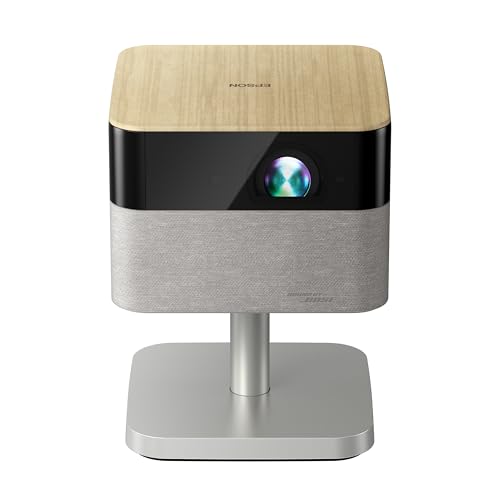
Epson Lifestudio Flex Plus 4K PRO-UHD Portable Projector, 1000 lumens, Bose sound
4K PRO-UHD1000 lumensBose sound
Check price on Amazon
Best for: A portable, good-sounding projector for a bedroom or living room in the evening.

This is a portable lifestyle projector with 4K PRO-UHD, which uses pixel shifting to produce a 4K-like picture from a lower-resolution chip, rated at 1,000 lumens of colour and white brightness under the IDMS standard. An integrated stereo system by Bose gives it better sound than most projectors, and the Epson Projection Studio app lets you create and share content. It is designed to be carried and used in several rooms.

The tradeoff is that 1,000 lumens is modest, so it needs a dim room, and pixel shifting is not true native 4K. Compared with the ViewSonic, it is far less bright, but it is portable, has built-in sound and a stated IDMS rating. The IDMS standard is a more reliable measure than a bare number.

Place it on a table or a stand and use a dim room. Use the app to set up scenes. Keep the vents clear.

What works

  • 4K PRO-UHD with IDMS-rated 1,000 lumens
  • Integrated stereo sound by Bose
  • Portable lifestyle design with a companion app
  • Brand with a long projector record

Watch out for

  • 1,000 lumens needs a dim room
  • Pixel shifting is not true native 4K

Specs

Resolution
4K PRO-UHD
Brightness
1,000 lumens color and white (IDMS rated)
Audio
Integrated stereo by Bose
Type
Portable lifestyle projector
Cost position
Fourteenth of 16
04
Philips GamePix 900 4K Projector, 3840 x 2160, 6 ms latency, 240 Hz, 1000 lumens, 3 gaming presets
6 ms latency240 Hz3 game presets
Check price on Amazon
Best for: Console gaming on a big screen in a dark room.

This projector is aimed at gamers, with a listed 3840 by 2160 resolution, 6 millisecond latency, a 240 Hz refresh rate and three dedicated gaming presets, in a body of about 2 kilograms. Low input lag matters for games because a laggy projector makes a console feel slow. The listing says brightness is 1,000, but the unit is not given in the compact data.

The compromise is that the brightness unit is unclear, and a 240 Hz refresh rate usually applies at a lower resolution. Compared with the Epson, it is the lower latency pick, but the compact data does not state sound. The listing's gaming claims should be checked with your console's output.

Connect your console by HDMI and enable game mode. Use a dark room for the best contrast. Test the lag during the return window.

What works

  • 6 millisecond latency is stated
  • 240 Hz refresh rate is listed
  • Three gaming presets simplify setup
  • About 2 kg, easy to move

Watch out for

  • Brightness unit is not given in the compact data
  • 240 Hz usually applies at a lower resolution

Specs

Resolution
3840 x 2160
Latency
6 ms
Refresh
240 Hz
Presets
Action, Adventure and a third gaming mode
Weight
2 kg, portable
05
HAPPRUN 2500 ANSI Google TV Smart Movie Projector, 4K decoding, WiFi 6, Bluetooth 5.2, 40 to 300 inch
2500 ANSI claimGoogle TV40 to 300 in
Check price on Amazon
Best for: A smart, bright-claimed projector for a living room with some ambient light.

This smart projector has Google TV built in, so you can skip the streaming stick, and it claims 2,500 ANSI lumens, 4K decoding, WiFi 6 and Bluetooth 5.2, with a picture from 40 to 300 inches. The listing says the brightness delivers vivid images even in rooms with ambient light. It is the brightest smart projector in the group by claim.

The tradeoff is credibility again: 2,500 ANSI is a high claim at this price, and we cannot verify it, so test it in your room. Compared with the ViewSonic, it is a smart system and a lower claim, with a less-established brand. Native resolution is not stated in the compact data.

Test the brightness against the stated claims and your room's light. Use a screen for the best contrast. Keep the vents clear.

What works

  • Google TV built in, no stick required
  • 2,500 ANSI lumens claimed for lit rooms
  • WiFi 6 and Bluetooth 5.2
  • 40 to 300 inch picture size range

Watch out for

  • The brightness claim is hard to verify
  • Native resolution is not stated in the compact data

Specs

Brightness
2,500 ANSI lumens claimed
System
Google TV built in
Decoding
4K
Connectivity
WiFi 6, Bluetooth 5.2
Picture
40 to 300 in
06
XuanPad Sealed Optics 4K Outdoor Projector, Google TV, TOF auto focus, dual 68 W Dolby, under 30 dB
Sealed opticsGoogle TVUnder 30 dB
Check price on Amazon
Best for: A quiet bedroom or living room where dust and fan noise matter.

This projector uses sealed optics to keep dust away from the light path, an official Google TV licence with voice control, HDR10+ support, a quiet fan rated under 30 decibels and dual 68 watt Dolby audio speakers. Sealed optics address the black-spot problem that unsealed projectors develop over time. A quiet fan matters in a bedroom.

The tradeoff is that 4K in the title likely means 4K support, and the compact data does not give a brightness figure. Compared with the HAPPRUN, it emphasises quiet and sealed optics. Dual 68 watt speakers are loud for a projector, but sound quality varies.

Place it on a stable surface and run the auto focus. Use a dark room. Check the native resolution in the full listing.

What works

  • Sealed optics keep dust off the light path
  • Official Google TV licence with voice control
  • Fan noise is listed under 30 dB
  • Dual 68 W Dolby speakers

Watch out for

  • Compact data gives no brightness figure
  • 4K in the title likely means decoding support

Specs

System
Official licensed Google TV with voice
Optics
Sealed, dust-free
HDR
HDR10+
Noise
Under 30 dB
Audio
Dual 68 W Dolby

Spec decoder

What the listing measurements really mean

The numbers brands lead with, translated into what they tell you about fit, comfort and wear at home.

ANSI lumens

A standard measure of brightness across several points on the screen. A native pixel count is the thing to look for when you want a sharper picture, and everything else is a scaling trick.

Watch forThe ViewSonic lists 5,500, and HAPPRUN lists 2,500 as a claim.

IDMS

A standard brightness test used by Epson, covering colour and white output. Standard ANSI measurement averages nine points, so it is lower than a peak number measured at the centre.

Watch forThe Epson lists 1,000 lumens IDMS rated.

Laser source

A light source using lasers, with long life and steady brightness. A lower input lag matters more for gaming than a higher refresh figure that only works at a lower resolution.

Watch forThe ViewSonic lists a laser source.

4K PRO-UHD

A pixel-shifting method that produces a 4K-like picture from a lower resolution chip. Pixel shifting moves the image quickly to produce more detail, and it works best on still or slow content.

Watch forThe Epson lists 4K PRO-UHD.

Input latency

The delay between a game console's signal and the picture. Lower is better for gaming. A peak brightness figure can be misleading when the projector dims in its eco mode, which is often the default.

Watch forThe Philips lists 6 milliseconds.

Methodology

How We Evaluated These Projectors Under $1000

Brightness and source

We evaluated each projector on the brightness and light source stated in its listing. The ViewSonic and Epson state units, and the HAPPRUN claims 2,500 ANSI. We have not handled any of these projectors. We read each listing for the brightness unit, since a number without a unit tells you almost nothing. We also considered the lifespan of each light source as listed, since a projector that dims quickly is a recurring cost.

Resolution honesty

We compared native resolution with pixel shifting and decoding. We say plainly where a listing's 4K means support. Owner feedback patterns often mention soft pictures and dim rooms. We separated projectors built for home theater from portable lifestyle models, since the right choice depends on the room. Where a listing was silent on throw ratio, we treated placement as an open question and flagged it.

Features and sound

We considered smart systems, lenses, sound and noise. The Epson has Bose sound and the XuanPad lists quiet fans.

Distinct from our 500 guide

We avoided repeating our under 500 projector lineup. We favoured named brands and stated units. We do not publish ratings or review counts.

Honest limits

Brightness claims vary and rooms differ. We say so.

Decision guide

How to Choose the Right Projectors Under $1000

By Room Light

RoomPickWhy
Lit living roomViewSonic LS740HD5,500 ANSI laser
CurtainsHAPPRUN 2500Claimed 2,500 ANSI
Dim roomEpson Flex Plus1,000 IDMS lumens
Dark theaterOptoma HD146XDedicated home theater
BedroomXuanPadUnder 30 dB

By Budget

SituationPickWhy
Lower endXuanPadEleventh of 16
Lower-middlePhilips GamePixTwelfth of 16
MiddleOptomaThirteenth of 16
Upper-middleEpsonFourteenth of 16
UpperViewSonicSixteenth of 16

Laser vs Lamp vs LED

Laser, like ViewSonic

Bright and long-lived, with steady output. Higher cost and fan noise.

Lamp or LED, like Optoma and Epson

Lamps are cheap but need replacing. LEDs are compact but dimmer.

Choose laser for a bright room and a lamp or LED for a dark one.

By Use

UsePickWhy
MoviesOptomaHome theater
GamingPhilips GamePix 9006 ms latency
PortableEpsonBose sound
Smart streamingHAPPRUNGoogle TV
Big pictureViewSonic30 to 300 inches

For a Living Room Specifically

Look for

Brightness matched to your room light, a lens that suits your throw distance and a screen or a plain light wall.

In this comparison

The ViewSonic is the best fit for a lit living room, and the Epson suits a dim one.

When to Spend More

Spend more if

You want native 4K, high dynamic range, lens shift or an ultra short throw with a screen.

Save if

You mainly watch in a dark room. A good 1080P projector is plenty.

Ownership

Maintenance schedule

The upkeep that decides whether a piece still looks good in year five.

TaskIntervalWhy it matters
Clean the lensMonthlyDust softens the picture. Let the projector cool before you move it or switch off the power, since cutting power too early can shorten lamp life. Avoid blocking the exhaust side with curtains or a wall, since heat needs a clear path out. Note the date of each lamp change so you know when the next one is due.
Clean or replace the filterEvery 3 monthsDust causes overheating.
Track lamp hoursQuarterlyLamps dim and fail after a few thousand hours.
Check the mountTwice a yearCeiling mounts loosen.
Update the firmwareEvery few monthsUpdates fix apps and Wi-Fi.

FAQ

Frequently Asked Questions

How bright should a projector be?

About 1,000 lumens for a dark room and 3,000 or more for a lit room. Use a streaming stick on any projector if built-in apps are limited, and keep the stick powered from the projector's USB port only if the manual allows it. If the image looks soft, check the focus first, and then check the lens for fingerprints before blaming the projector. Plan to keep the projector at least a foot from walls and curtains so air can circulate.

Is a laser projector worth it?

For a bright room and long life, yes. For a dark room, a lamp is fine. Mount the projector level when you can, since heavy keystone correction softens the image.

Do I need a screen?

A screen improves contrast and colour, though a flat light wall works.

What is input lag?

The delay between the console and the picture. Lower is better for games.

Do prices change?

Yes. The cap reflects listing prices when we updated the guide, and prices move often.

Can a projector replace a TV?

In a dark room, yes. In a lit room, only a bright projector can come close.

Bottom line

The short version

Browse more projectors under $1000on Amazon →
Elena Hart, Lead Home Editor

About the author

Elena Hart

Lead Home Editor, SweetLivingRoom

Elena Hart leads SweetLivingRoom's buying guides, turning product dimensions, material specs and owner feedback into clear verdicts on sofas, rugs, lighting, storage and decor.

More from Elena →

Keep reading

Related guides