
Amazon affiliate links - we earn a commission.Affiliate disclosure

Buying guide · 14 min read · Updated 2026-11-26

Best TVs Under $1000 (2026)

65 inch TVs under $1000 compared on mini LED or QLED, refresh rate, HDR, smart platform and gaming features, with honest notes on what the upper band buys.

Elena Hart, Lead Home EditorBy Elena HartLead Home Editor7 picks comparedSpec-sheet verified
Best TVs Under $1000

At a glance

Our top picks

Side by side

Spec comparison

A TV in this band is where the picture technology gets interesting: mini LED backlights with local dimming zones, QLED colour, 120 or 144 hertz panels for gaming and HDR formats such as Dolby Vision. The upper end of the budget buys contrast and motion, and the lower end buys size.

The cap reflects listing prices on the day we updated the guide, and prices move often, particularly around sales. We focused on 65 inch sets and left out outdoor TVs, small flip-down TVs and a puzzle that appeared in the search. We have not handled any of these TVs, so our judgments rest on specifications and patterns in owner feedback, including how local dimming and smart platforms behave in everyday use.

Before you buy

6 Criteria to Look For Before Buying a TV Under $1000

  1. 01

    What the cap buys

    At this cap you can buy a 65 inch mini LED or QLED set with a 120 or 144 hertz panel, Dolby Vision on some models and strong processing. The Hisense E7 and U6 list 144 hertz and mini LED, and the Samsung adds processing. Our under 500 guide covers cheaper sets. Measure your wall and your TV stand before you order, since a 65 inch TV is about 57 inches wide and needs a stand that is at least that wide with feet in the right place. Watch for sales-cycle pricing: TV prices move more than most categories, so check the listing price at the moment you buy and compare with the cap in this guide.

  2. 02

    Mini LED and local dimming

    Mini LED backlights use thousands of small LEDs in zones that dim independently, which deepens blacks and brightens highlights. More zones usually means better contrast, though bloom can appear around bright objects. Listings rarely state zone counts. Check your sofa distance: a 65 inch 4K TV works well from about 6 to 10 feet, and sitting closer shows pixels and sitting farther wastes the size.

  3. 03

    Refresh rate

    A 60 hertz panel suits most TV viewing, and 120 or 144 hertz suits gaming and sports with a console or a PC. A native refresh rate is more meaningful than a motion rating. Check that the HDMI port supports it. Look at the HDMI port count and which ports support the high frame rates, since some TVs offer only one or two full-speed ports.

  4. 04

    HDR formats

    HDR10 is the base format, HDR10+ and Dolby Vision add scene-by-scene data. Samsung supports HDR10+ and not Dolby Vision, and Hisense and Roku list Dolby Vision on some models. Peak brightness matters as much as the format.

  5. 05

    Smart platform

    Roku TV is simple, Fire TV is tied to Alexa and Android TV and Google TV offer broad apps. All show some promotions. Choose a platform you like, since you will use it daily.

  6. 06

    Sound and soundbar

    Thin TV speakers are weak. A built-in subwoofer, as on the U6 Pro, helps a little. A soundbar is the best upgrade for movies.

Detailed reviews

The 7 best tvs under $1000, explained

01
Hisense 65 Inch E7 Cinema Series Hi-QLED Mini-LED 4K Smart Fire TV, native 144 Hz, Dolby Vision and Atmos
Mini-LEDNative 144 HzDolby Vision
Check price on Amazon
Best for: A living room that is used for movies and gaming alike.

This TV lists a Hi-QLED mini-LED backlight with thousands of precise light zones, a native 144 hertz game mode, Dolby Vision and Dolby Atmos support and a Fire TV smart platform. Mini LED backlighting divides the screen into many small zones that dim independently, which improves contrast over a plain edge-lit LCD. A native 144 hertz panel suits gamers with a PC or a console that outputs high frame rates.

The tradeoff is that local dimming zones can bloom around bright objects on dark backgrounds, and the compact data does not state a zone count or a brightness figure. Compared with the Roku Select, the E7 is far more capable but costs far more. Fire TV interfaces carry promotions on the home screen.

Calibrate the picture mode and turn off motion smoothing for films. Use a certified HDMI 2.1 cable for high frame rates. Check the firmware for updates.

What works

  • Mini-LED backlight with local dimming zones
  • Native 144 Hz for gaming
  • Dolby Vision and Dolby Atmos support
  • Fire TV smart platform

Watch out for

  • Compact data does not give a zone count or nits
  • Fire TV home screen carries promotions

Specs

Size
65 in
Backlight
Mini-LED with local dimming zones
Refresh
Native 144 Hz game mode
HDR and audio
Dolby Vision and Dolby Atmos
Platform
Fire TV
02
Hisense 65 Inch U6 Pro Series Mini-LED ULED 4K Gaming AI Smart Fire TV, native 144 Hz, Hi-QLED
Mini-LED144 HzBuilt-in subwoofer
Check price on Amazon
Best for: A gaming-first living room that wants a mini-LED panel at a lower position.

This is a mini-LED ULED TV with a native 144 hertz refresh rate, a built-in subwoofer and a Fire TV smart platform, with a Hi-QLED label for its quantum dot colour. The built-in subwoofer is a rare feature that gives the TV more bass than a typical thin panel. It is aimed at gamers who want high refresh and low cost.

The compromise is that it sits slightly below the E7 Cinema in the Hisense range, and the compact data gives fewer HDR details. Compared with the E7, it offers many of the same panel features. Built-in subwoofers help but do not replace a soundbar.

Set game mode on the HDMI input you use for a console. Test motion settings with a favourite game. Consider a soundbar for movies.

What works

  • Mini-LED ULED panel with native 144 Hz
  • Built-in subwoofer adds bass
  • Hi-QLED colour
  • Fire TV platform

Watch out for

  • Compact data gives fewer HDR details
  • Built-in bass does not replace a soundbar

Specs

Size
65 in
Backlight
Mini-LED ULED
Refresh
Native 144 Hz
Audio
Built-in subwoofer
Platform
Fire TV
03
Samsung 65 Inch Class Neo QLED QN70F 4K Mini LED Smart TV, NQ4 AI Gen2 processor, Quantum Matrix Technology
Neo QLEDMini LEDAI processor
Check price on Amazon
Best for: A viewer who watches a lot of mixed-quality content and values upscaling.

This Samsung 2025 model lists Neo QLED mini LED lighting with Quantum Matrix Technology, an NQ4 AI Gen2 processor that uses neural networks to enhance picture clarity and upscale lower-resolution content to 4K. It is the second most expensive TV in the data set, and it carries a well-known brand's processing. Upscaling is useful if you watch a lot of cable or older streams.

The tradeoff is that the compact data does not state a refresh rate or HDR formats, and Samsung sets do not support Dolby Vision. Compared with the Hisense models, it offers a stronger processor but fewer gaming features in the data. AI picture modes can over-process content.

Turn off AI processing for films you want to see as the director intended. Check the HDMI ports for gaming features. Update the firmware.

What works

  • Neo QLED mini LED with Quantum Matrix Technology
  • NQ4 AI Gen2 processor upscales content to 4K
  • Well-known brand with strong support
  • Neural-network picture enhancement

Watch out for

  • Compact data lists no refresh rate or HDR formats
  • AI modes can over-process film content

Specs

Size
65 in
Backlight
Mini LED with Quantum Matrix Technology
Processor
NQ4 AI Gen2
Upscaling
AI-enhanced 4K
Cost position
Seventeenth of 18
04
Hisense ULED Premium 65U7G QLED 4K Android Smart TV, 1000 nit HDR10+, 120 Hz native refresh
ULED QLED1000 nit claim120 Hz
Check price on Amazon
Best for: A shopper who wants a bright, quantum dot TV with a proven design.

This TV lists ULED technology, quantum dot wide colour gamut, a claimed 1000 nit peak with HDR10+, a 120 hertz native refresh rate with Ultra Motion processing and Android TV with Alexa compatibility. It is an older model in the Hisense range that remains in the data. A quantum dot layer improves colour, and 120 hertz helps motion.

The compromise is that this is an older generation with a likely older Android TV interface, and a 1000 nit claim is a peak figure on a small window, not a full-screen brightness. Compared with the E7 Cinema, it lacks mini LED and Dolby Vision in the listing. Check support for current streaming apps.

Use the filmmaker or calibrated mode for movies. Test your apps before the return window closes. Do not rely on the peak brightness for a bright room.

What works

  • Quantum dot wide colour gamut is listed
  • 120 Hz native refresh with Ultra Motion
  • HDR10+ with a claimed 1000 nit peak
  • Android TV with Alexa compatibility

Watch out for

  • Older generation, so check app support
  • 1000 nits is a peak claim

Specs

Size
65 in
Panel
4K ULED with quantum dot
Brightness
1000 nit HDR10+ claimed
Refresh
120 Hz native, Ultra Motion
Platform
Android TV with Alexa
05
Roku 65 Inch Plus Series Smart TV, 4K QLED Mini-LED, Dolby Vision
Mini-LEDQLEDDolby Vision
Check price on Amazon
Best for: A family room that wants a simple interface with mini-LED contrast.

This Roku TV pairs a mini-LED backlight with a QLED panel and Dolby Vision support, running the Roku TV interface that many people know from streaming sticks. The setup takes minutes, the home screen is simple and the remote is uncluttered. Roku's free live TV and apps are built in.

The tradeoff is that the compact data does not give a refresh rate or zone count, and Roku sets are less gaming-focused than Hisense. Compared with the Select Series, the Plus adds mini-LED contrast and Dolby Vision. The home screen carries ads, as most smart TVs do.

Use the Roku app as a remote and turn off the extra home screen rows. Set picture mode to movie. Update the software.

What works

  • Mini-LED backlight with a QLED panel
  • Dolby Vision support
  • Simple Roku interface with free live TV
  • Quick setup

Watch out for

  • Compact data lists no refresh rate or zone count
  • Home screen carries ads

Specs

Size
65 in
Backlight
Mini-LED
Panel
QLED 4K
HDR
Dolby Vision
Platform
Roku TV
06
Roku 65 Inch Select Series Smart TV, 2026 4K QLED, HDR10, voice remote
QLED 4KHDR10Roku TV
Check price on Amazon
Best for: A budget-minded living room that wants a big QLED with a simple interface.

This Roku Select Series TV is a 65 inch 4K QLED with HDR10 support and the Roku interface, with fast Wi-Fi, quick app launch and a voice remote. It is the simplest TV in the group and the lowest in price among the 65 inch sets. QLED adds more vivid colour than a plain LED panel.

The compromise is that it uses a standard backlight with no local dimming zones listed, and HDR10 is a basic format. Compared with the Plus, it lacks mini LED and Dolby Vision. For a bright family room, it is a solid TV.

Set the picture mode to a standard or movie mode. Turn off the energy saver if the picture looks dim. Add a soundbar for better sound.

What works

  • 65 inch 4K QLED at a low position
  • HDR10 support
  • Easy Roku setup and voice remote
  • Fast apps

Watch out for

  • No local dimming listed, so contrast is modest
  • HDR10 only, without Dolby Vision

Specs

Size
65 in
Panel
4K QLED
HDR
HDR10
Platform
Roku TV
Cost position
Twelfth of 18
07
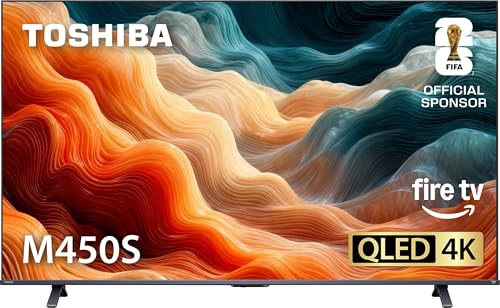
TOSHIBA 65 Inch Class M450 Series QLED 4K UHD Smart Fire TV, REGZA Engine ZR, REGZA Power Audio
QLED 4KREGZA engineFire TV
Check price on Amazon
Best for: A family room that wants a Fire TV and a branded picture engine.

This Toshiba QLED lists the REGZA AI Engine ZRi Gen3 for picture processing, REGZA QLED colour, REGZA Power Audio for fuller sound and a Fire TV platform with an Alexa voice remote. The listing says you can stream live TV without cable. A processing engine tunes the picture and sound for what is on screen.

The tradeoff is that the compact data gives no refresh rate, HDR formats or backlight type. Compared with the Roku Select, it adds a processing engine and audio feature but fewer stated specs. Fire TV home screens carry promotions.

Use the standard or movie mode. Check the HDMI ports. Add a soundbar for movies.

What works

  • REGZA AI Engine processing is listed
  • QLED colour on a 65 inch screen
  • REGZA Power Audio for sound
  • Fire TV with an Alexa voice remote

Watch out for

  • Compact data gives no refresh rate or HDR formats
  • Home screen carries promotions

Specs

Size
65 in
Panel
QLED 4K
Processor
REGZA AI Engine ZRi Gen3
Audio
REGZA Power Audio
Platform
Fire TV with Alexa

Spec decoder

What the listing measurements really mean

The numbers brands lead with, translated into what they tell you about fit, comfort and wear at home.

Mini LED

A backlight made of thousands of small LEDs in dimming zones. A zone count tells you how finely the backlight can dim, and higher counts reduce bloom, but listings seldom state it.

Watch forThe E7, U6 Pro, Samsung QN70F and Roku Plus list mini LED.

Native refresh rate

How many times per second the panel updates, without interpolation. A native 144 hertz panel refreshes 144 times per second, while a motion rating is a processing claim that does not change the panel.

Watch forThe E7 and U6 Pro list 144 Hz, and the U7G lists 120 Hz.

Dolby Vision

An HDR format with scene-by-scene data. It needs TV support. Dolby Vision uses scene-by-scene data, and it needs both the TV and the content to support it.

Watch forThe E7 and Roku Plus list Dolby Vision.

QLED

A quantum dot layer over an LED backlight that improves colour. QLED is a quantum dot film over an LED backlight, and it is not the same as OLED, which lights each pixel individually.

Watch forAll seven TVs list QLED or ULED variants.

Peak nits

Brightness for a small area, measured in nits. Full-screen brightness is lower. Peak nits describe a small bright highlight, and full-screen brightness is lower, so a bright room needs a TV that holds its brightness.

Watch forThe U7G lists a 1000 nit claim.

Methodology

How We Evaluated These TVs Under $1000

Panel and backlight

We evaluated each TV on the panel and backlight stated in its listing. The Hisense E7 and U6 Pro list mini LED and 144 Hz. We have not handled any of these TVs. We read each listing for the HDR formats and refresh rate, since both are central to picture quality at this cap and both are often omitted.

HDR and refresh

We compared HDR formats and refresh rates. Several listings omit them. Owner feedback patterns often mention bloom and smart platform ads. We separated mini LED sets from standard QLED sets, since the backlight is the biggest difference in this band.

Platform and sound

We considered smart platforms and audio features. We do not publish ratings or review counts.

65 inch focus

We kept to 65 inch sets and left out outdoor TVs, small TVs and non-TV items from the search.

Honest limits

Listings often omit zone counts and nits. Where a number is missing, we say so.

Decision guide

How to Choose the Right TVs Under $1000

By Use

UsePickWhy
Movies and gamingHisense E7Mini LED and 144 Hz
Gaming on a budgetHisense U6 Pro144 Hz and a subwoofer
Mixed contentSamsung QN70FAI upscaling
Simple useRoku SelectEasy interface
Bright roomHisense U7G1000 nit claim

By Budget

SituationPickWhy
Lower endToshiba M450Eleventh of 18
Lower-middleRoku SelectTwelfth of 18
MiddleRoku PlusThirteenth of 18
Upper-middleHisense E7 or U6 ProFifteenth and sixteenth
UpperSamsung or Hisense U7GSeventeenth and eighteenth

Mini LED vs Standard QLED

Mini LED, like Hisense E7

Deeper blacks, brighter highlights and more control. Can bloom around bright objects.

Standard QLED, like Roku Select

Vivid colour at a lower position. Contrast is more modest.

Choose mini LED for movies in a dim room and standard QLED for a bright family room.

By Platform

PlatformPickWhy
Roku TVRoku Plus or SelectSimplest
Fire TVHisense or ToshibaAlexa built in
Android TVHisense U7GOlder but broad
Samsung TizenSamsung QN70FSamsung ecosystem
AnyAllAll include ads

For a Living Room Specifically

Look for

A panel that suits your room light, a refresh rate for your devices and a platform you like. Measure your wall and seating distance.

In this comparison

The Hisense E7 is the best all-round pick, and the Roku Select is the simplest.

When to Spend More

Spend more if

You want OLED, a higher zone count, brighter peak output or a model with better anti-glare coating.

Save if

You mainly stream. A good QLED is plenty.

Ownership

Maintenance schedule

The upkeep that decides whether a piece still looks good in year five.

TaskIntervalWhy it matters
Update the firmwareEvery few monthsUpdates fix apps and picture bugs. Dust the screen with a dry microfibre cloth and avoid sprays, which can damage the coating.
Dust the screenMonthlyDust shows in dark scenes.
Check the HDMI settingsAfter adding a consoleA wrong setting disables high frame rates.
Check the mount or standTwice a yearA loose stand is a tip risk.
Reset the picture modeAfter updatesUpdates can switch picture modes.

FAQ

Frequently Asked Questions

Is mini LED worth it?

For movies in a dim room, yes. It improves contrast over a standard LCD. Turn off motion smoothing for films, which makes them look like video. A wall mount can help with glare and viewing angle, and our TV mount guides explain how to choose one.

Do I need 144 Hz?

Only if you game on a PC or a console that outputs high frame rates. Place the TV away from a bright window to reduce glare, or choose a model with an anti-glare coating.

Which HDR format matters?

Dolby Vision and HDR10+ add scene data, and HDR10 is the base. Brightness matters too.

Do I need a soundbar?

For movies, yes. TV speakers are thin.

Do prices change?

Yes. The cap reflects listing prices when we updated the guide, and prices move often, especially around sales.

What size should I buy?

A 65 inch set suits seating about 8 to 10 feet away.

Bottom line

The short version

Browse more tvs under $1000on Amazon →
Elena Hart, Lead Home Editor

About the author

Elena Hart

Lead Home Editor, SweetLivingRoom

Elena Hart leads SweetLivingRoom's buying guides, turning product dimensions, material specs and owner feedback into clear verdicts on sofas, rugs, lighting, storage and decor.

More from Elena →

Keep reading

Related guides