
Amazon affiliate links - we earn a commission.Affiliate disclosure

Buying guide · 14 min read · Updated 2026-11-29

Best Streaming Sticks (2026)

Seven streaming sticks compared: Fire TV HD, 4K Select, 4K, 4K Plus and 4K Max, a Roku 4K stick and a Xiaomi Google TV stick, with HDR, Wi-Fi and remotes.

Elena Hart, Lead Home EditorBy Elena HartLead Home Editor7 picks comparedSpec-sheet verified
Best Streaming Sticks

At a glance

Our top picks

A streaming stick plugs into an HDMI port, hides behind the TV and turns it into a smart one. The category looks crowded, but most sticks differ in only a few things: resolution, HDR formats, Wi-Fi hardware, remote and the software platform behind the home screen.

This guide compares seven sticks across three platforms, and it separates them by what each platform asks of you in ads, accounts and voice assistants. We say plainly where a stick is more than your TV needs, since an HD set gains nothing from the dearer models.

Before you buy

6 Criteria to Look For Before Buying a Streaming Stick

  1. 01

    Resolution and HDR support

    A 4K stick only pays off on a 4K TV, and HDR only on a TV that supports it. HDR10 is the base format, HDR10+ is common on Samsung and Panasonic sets, and Dolby Vision is common on LG and Sony. The Roku Streaming Stick 4K lists both dynamic formats, while the Fire sticks list HDR in general terms.

  2. 02

    Wi-Fi hardware

    A stick lives behind a TV, where signal is often weak. Wi-Fi 6 on the Fire TV Stick 4K Plus handles busy networks better than older standards, and Wi-Fi 6E on the 4K Max adds the 6 GHz band if your router has it. If the signal is poor, moving the router matters more than the stick.

  3. 03

    Platform and ads

    Fire TV, Roku and Google TV each push their own content on the home screen. Fire TV favours Amazon, Roku shows ads and free channels, and Google TV recommends from many services. None is ad-free, so decide which interface you can live with.

  4. 04

    Remote and voice assistant

    Fire sticks use an Alexa voice remote, the Xiaomi uses Google Assistant, and Roku has its own voice remote. If you already use Alexa for smart home control, the Fire sticks fit best. Remotes with TV power and volume buttons save a second remote.

  5. 05

    Power and HDMI fit

    A stick draws power from a USB port or a wall adapter. The Fire TV Stick HD lists power from the TV, but a TV USB port may not supply enough. Many TVs have tight HDMI ports, so use the extender provided and keep the stick away from heat.

  6. 06

    Future-proofing

    A 4K TV purchase tends to last years. Choose a stick with Wi-Fi 6 or better, a current remote and an active software roadmap. A cheap HD stick is fine for an HD TV, but it will not carry you to a new TV. Keep the box and the receipt for the first 30 days so that a weak-signal problem can be solved by a return rather than a workaround.

Detailed reviews

The 7 best streaming sticks, explained

01
Amazon Fire TV Stick 4K Plus with AI-powered Fire TV Search, Wi-Fi 6, hundreds of thousands of movies
4KWi-Fi 6AI searchAlexa remote
Check price on Amazon
Best for: 4K TVs in normal living rooms with a modern Wi-Fi 6 router.

The Fire TV Stick 4K Plus is described as the next generation of the best-selling Fire TV 4K stick, with Wi-Fi 6, 4K streaming and AI-powered search across apps. Wi-Fi 6 improves performance on a busy network, and a more capable chip helps the interface feel fast. It is the best balance between capability and cost in the Fire lineup.

The tradeoff is the interface. The Fire TV home screen promotes Amazon content and sponsored rows, and the stick needs a 4K TV to be worth it. Compared with the 4K Max, it has Wi-Fi 6 rather than Wi-Fi 6E, so the difference only matters with a 6E router. Compared with the 4K Select, it adds the stronger radio.

Plug it into the HDMI port with the extender if the port is tight and sign in with your Amazon account. It suits a 4K TV in a normal living room with a modern router.

What works

  • Wi-Fi 6 for busier networks
  • AI-powered search across apps
  • 4K streaming
  • Alexa voice remote

Watch out for

  • Home screen carries Amazon promotion
  • Needs a 4K TV to be worthwhile
  • Needs an Amazon account

Specs

Resolution
4K
Wi-Fi
Wi-Fi 6
Search
AI-powered Fire TV Search
Generation
Next generation of the 4K stick line
Content
Hundreds of thousands of movies and shows
02
Amazon Fire TV Stick 4K Max, Wi-Fi 6E, AI-powered Fire TV Search, newest model
4K MaxWi-Fi 6EAI searchNewest model
Check price on Amazon
Best for: Homes with a Wi-Fi 6E router and a 4K TV that will stay for years.

The Fire TV Stick 4K Max is the top of the Fire stick range, with Wi-Fi 6E, AI-powered search and the new 2026 Fire TV experience. Wi-Fi 6E adds the 6 GHz band for less congestion if your router supports it. It is the stick with the most hardware headroom.

The tradeoff is that the extra headroom is subtle on an ordinary TV, and the interface still carries Amazon promotion. A 4K Max also needs a 6E router to show its Wi-Fi advantage. Compared with the 4K Plus, it is the newer hardware for a higher price tier. Compared with the Xiaomi stick, it has a more active software roadmap but less neutral ad treatment.

Place it with a clear line to the router and avoid placing it behind a metal mount. It suits a home with a Wi-Fi 6E router and a 4K TV that stays for years.

What works

  • Wi-Fi 6E for the 6 GHz band
  • AI-powered search
  • Newest 2026 Fire TV software
  • Most headroom of the Fire sticks

Watch out for

  • Extra headroom is subtle on ordinary TVs
  • Needs a 6E router to show the benefit
  • Home screen carries promotion

Specs

Resolution
4K
Wi-Fi
Wi-Fi 6E
Search
AI-powered Fire TV Search
Software
Newest Fire TV experience, 2026
Class
Top of the stick range
03
Amazon Fire TV Stick 4K newest model, simple 4K streaming with new Fire TV remote
4KNew remoteAll apps in one placeNewest model
Check price on Amazon
Best for: Bedrooms and second-room 4K TVs that want a straightforward setup.

The Fire TV Stick 4K newest model is described as simple 4K streaming with a new Fire TV remote, fast performance and all your apps in one place, plus free and live TV. It sits between the Select and the Plus, which makes it the stick for people who want 4K and a remote refresh without paying for premium radios. The listing stresses simplicity.

The tradeoff is that it lacks the Wi-Fi 6 radio of the Plus, so a congested home may feel slower. The listing does not state HDR format support in the lines we reviewed, so check that your TV's formats are listed before buying. Compared with the 4K Select, it adds the new remote. Compared with the 4K Plus, it has less capable Wi-Fi.

Plug it in, run the setup and tune the display settings for your TV. It suits a bedroom or second-room 4K TV that wants a straightforward setup.

What works

  • Simple 4K streaming
  • New Fire TV remote
  • All apps in one place
  • Lower price tier than the Plus

Watch out for

  • No Wi-Fi 6 radio
  • HDR formats not clear in the listing
  • Home screen carries promotion

Specs

Resolution
4K
Remote
New Fire TV remote
Interface
All your apps in one place
Content
Free and live TV
Positioning
Simple 4K streaming
04
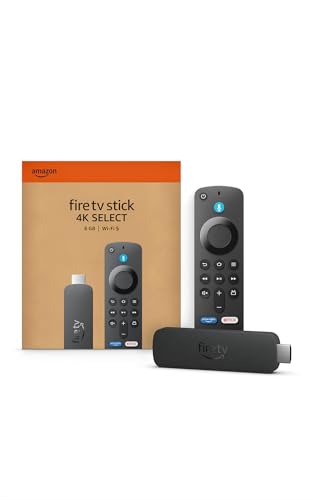
Amazon Fire TV Stick 4K Select, essential 4K streaming with HDR, AI-powered search, free and live TV
4KHDRAI searchFree and live TV
Check price on Amazon
Best for: 4K TVs on solid Wi-Fi where cost matters most.

The Fire TV Stick 4K Select is the essential 4K model, with 4K Ultra HD, HDR support, AI-powered search and free and live TV. The listing says it has everything you need to stream in 4K, which is accurate for a typical home. It is the lowest price 4K stick in the Fire range.

The tradeoff is that essentials means it skips the faster radio and extras of the Plus and Max. A busy network may feel slower, and the interface still promotes Amazon content. Compared with the 4K stick, it has similar capability with an older remote. Compared with the Fire TV Stick HD, it adds 4K and HDR.

Set the picture mode on the TV to match HDR and plug the stick in with the extender. It suits a 4K TV where cost matters and the Wi-Fi is solid.

What works

  • 4K Ultra HD with HDR
  • AI-powered search
  • Free and live TV
  • Lowest 4K price tier in the Fire range

Watch out for

  • No Wi-Fi 6 radio
  • Less headroom than the Plus and Max
  • Home screen carries promotion

Specs

Resolution
4K Ultra HD
HDR
High Dynamic Range
Search
AI-powered Fire TV Search
Content
Free and live TV
Class
Essential 4K
05
Amazon Fire TV Stick HD newest model, free and live TV, Alexa Voice Remote, powered by the TV
HDAlexa Voice RemotePowered by the TVFree and live TV
Check price on Amazon
Best for: 1080p TVs in bedrooms, kitchens and guest rooms.

The Fire TV Stick HD is the newest HD model and the listing calls it the fastest HD Fire TV stick yet, with an Alexa Voice Remote and power drawn from the TV. A TV that powers the stick over USB means one less outlet and cable. It is the sensible stick for a bedroom, kitchen or guest room with a 1080p TV.

The tradeoff is that HD only. If you later upgrade the TV to 4K, the stick will not carry you, and a TV whose USB port cannot power the stick may need the wall adapter. Compared with the 4K Select, it costs less but gives up 4K and HDR. Compared with the Roku Stick HD in our other guide, it carries more Amazon promotion.

Check whether the TV USB port supplies enough power, and use the wall adapter if not. It suits a 1080p set where upgrade is not planned.

What works

  • Alexa Voice Remote
  • Powered by the TV for fewer cables
  • Fast HD performance per the listing
  • Lowest price tier in the Fire range

Watch out for

  • No 4K or HDR
  • TV USB port may not supply enough power
  • Home screen carries promotion

Specs

Resolution
HD
Remote
Alexa Voice Remote
Power
Powered by the TV
Performance
Fastest HD Fire TV stick yet per the listing
Setup
Effortless
06
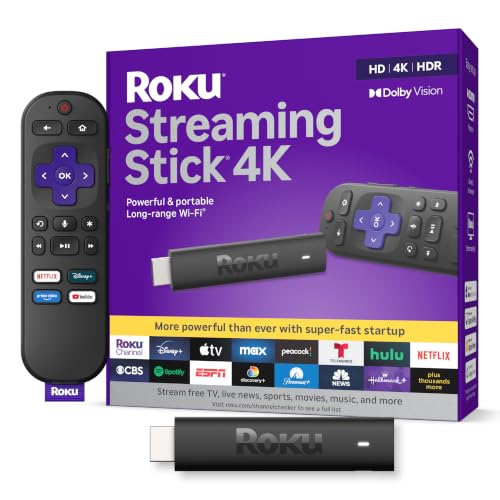
Roku Streaming Stick 4K with Voice Remote, HDR10+ and Dolby Vision, compact
4KHDR10+Dolby VisionVoice remote
Check price on Amazon
Best for: Households that prefer a neutral platform and have a Dolby Vision or HDR10+ TV.

The Roku Streaming Stick 4K is a compact 4K stick with a voice remote and support for both HDR10+ and Dolby Vision. Roku's interface is a plain grid of apps, and Roku is a platform not owned by a retailer. It is the pick for anyone who wants Dolby Vision without Amazon's ecosystem.

The tradeoff is that Roku's home screen has its own ads and promoted channels, and the stick lacks the newest Wi-Fi. Compared with the Fire TV Stick 4K Max, it has plainer software but older hardware. Compared with the Xiaomi stick, it has a simpler interface and fewer Google features.

Set the TV to the right HDR mode and keep the remote within line of sight. It suits a household that prefers a neutral platform and has a Dolby Vision or HDR10+ TV.

What works

  • HDR10+ and Dolby Vision
  • Plain app grid interface
  • Voice remote
  • Not tied to a retailer

Watch out for

  • No newest Wi-Fi hardware
  • Home screen still has ads
  • Fewer Google features

Specs

Resolution
4K
HDR
HDR10+ and Dolby Vision
Remote
Roku Voice Remote
Form
Compact stick
Platform
Roku
07
Xiaomi Mi TV Stick 4K 2nd Gen Ultra HD Streaming Device, Google TV, Google Assistant remote
4KGoogle TVGoogle Assistant2nd gen
Check price on Amazon
Best for: Google account households that want a non-Amazon stick.

The Xiaomi Mi TV Stick 4K 2nd Gen is a 4K stick running Google TV, with a Google Assistant voice remote. Google TV gathers your apps and recommendations into one home screen and ties into a Google account. It is the only Google TV stick in this guide.

The tradeoff is brand and support. Xiaomi is a hardware maker with a less certain update record in some regions, and the listing gives no details of HDR formats in the lines we reviewed. Compared with the Roku, it has more Google integration. Compared with the Fire sticks, it has a different recommendation engine and fewer Amazon ads.

Sign in with your Google account and check the regional app availability. It suits a household that already uses Google services and wants a non-Amazon stick.

What works

  • Google TV interface
  • Google Assistant voice remote
  • 4K Ultra HD
  • Not tied to Amazon

Watch out for

  • Less certain update record in some regions
  • HDR formats not clear in the listing
  • Fewer Alexa features

Specs

Resolution
4K Ultra HD
Platform
Google TV
Assistant
Google Assistant voice remote
Generation
2nd gen
Maker
Xiaomi

Spec decoder

What the listing measurements really mean

The numbers brands lead with, translated into what they tell you about fit, comfort and wear at home.

Wi-Fi 6 and 6E

Newer Wi-Fi standards, with 6E adding the 6 GHz band for less crowded connections.

Watch forThe Fire TV Stick 4K Plus lists Wi-Fi 6 and the 4K Max lists 6E, and both need a matching router.

Dolby Vision

A dynamic HDR format that adjusts brightness scene by scene on TVs that support it.

Watch forThe Roku Streaming Stick 4K lists it, and the Fire listings give less detail.

HDR10+

An open dynamic HDR format used on Samsung and Panasonic TVs.

Watch forThe Roku stick lists it, so check your TV.

Google TV

Google's smart TV interface, which gathers apps and recommendations.

Watch forThe Xiaomi stick uses it and needs a Google account.

Alexa Voice Remote

A remote with a microphone that talks to Alexa for search and smart home control.

Watch forThe Fire sticks include one, so check the microphone privacy settings.

Methodology

How We Evaluated These Streaming Sticks

Listing specifications

We read each listing for resolution, HDR, Wi-Fi, remote and platform. We treated claims as claims. We did not run speed tests.

Platform mix

Most sticks come from Amazon, so we picked the Fire range's distinct tiers and added one Roku and one Google TV stick. We left out the boxes and duplicates of the same stick. Seven sticks cover three platforms.

Owner feedback patterns

We researched common complaints, such as weak Wi-Fi, ads, HDR mismatches and stick overheating. We rewarded newer radios and clear format lists. The Fire TV 4K Plus and Roku 4K scored well.

TV fit

We matched each stick to HD, 4K and Dolby Vision TVs. A stick that exceeds the TV wastes money. We noted power and HDMI fit.

Price ordering

Relative price tiers were used for ordering only. Prices move, so verify before you buy. Scores are editorial.

Decision guide

How to Choose the Right Streaming Sticks

By Platform

SituationPickWhy
Alexa householdFire TV Stick 4K PlusWi-Fi 6, Alexa.
Neutral platformRoku Streaming Stick 4KPlain grid.
Google householdXiaomi Mi TV Stick 4KGoogle TV.
Newest Fire hardwareFire TV Stick 4K MaxWi-Fi 6E.
HD TVFire TV Stick HDLow tier.

By Budget

SituationPickWhy
Lowest spendFire TV Stick HDHD.
Low spendFire TV Stick 4K SelectEssential 4K.
Middle spendFire TV Stick 4K or Xiaomi4K, new remote.
Upper-middle spendFire TV Stick 4K Plus or Roku 4KWi-Fi 6 or Dolby Vision.
Highest spendFire TV Stick 4K MaxWi-Fi 6E.

Fire TV vs Roku vs Google TV

Fire TV

The Fire sticks use Alexa and the newest hardware. They promote Amazon content.

Roku and Google TV

The Roku stick has a plain grid and both HDR formats. The Xiaomi uses Google TV and an assistant.

Pick by the voice assistant and interface you will live with.

By TV Type

SituationPickWhy
1080p TVFire TV Stick HDHD only.
Standard 4K TVFire TV Stick 4K Select4K and HDR.
Dolby Vision TVRoku Streaming Stick 4KBoth formats.
Busy Wi-Fi homeFire TV Stick 4K PlusWi-Fi 6.
Wi-Fi 6E routerFire TV Stick 4K Max6 GHz.

For Weak Wi-Fi Specifically

Look for

Wi-Fi 6 or 6E, an HDMI extender for clearer signal and an Ethernet adapter option. Move the router closer first.

In this comparison

The Fire TV Stick 4K Plus lists Wi-Fi 6 and the 4K Max lists Wi-Fi 6E.

When to Spend More

Spend more if

You want Ethernet, Dolby Atmos or a faster box. Look above the stick class.

Save if

Your TV is HD or you want a spare. The Fire TV Stick HD is enough.

Ownership

Maintenance schedule

The upkeep that decides whether a piece still looks good in year five.

TaskIntervalWhy it matters
Update the softwareMonthlyUpdates fix bugs and keep apps working.
Restart the stickEvery few weeksA restart clears memory and fixes slowdowns.
Replace remote batteriesYearlyWeak batteries cause lag and missed presses.
Check HDMI and powerEach seasonLoose connections cause dropouts and heat builds behind a TV.
Review privacy and account settingsEvery 3 monthsPlatforms collect viewing data. Check what you share.

FAQ

Frequently Asked Questions

Do I need a 4K streaming stick?

Only if your TV is 4K. On an HD TV a 4K stick gains nothing. If you may upgrade, buy a 4K stick. A good rule is to match the stick to the TV you will own in three years, not the one you own today.

Fire TV, Roku or Google TV?

Fire TV suits Alexa households, Roku is plainer and Google TV ties into Google services. Choose by the ecosystem you use.

Will a stick work with an old TV?

Yes, if the TV has an HDMI port. Match the stick to the TV resolution.

What is the difference between Wi-Fi 6 and 6E?

6E adds the 6 GHz band for less crowded connections. You need a 6E router to see the benefit.

Do streaming sticks overheat?

They can in tight HDMI ports. Use the extender and keep air flowing around the stick.

Can I use a stick without a smart TV?

Yes, that is the main use. Plug it into any HDMI port and connect to Wi-Fi.

Bottom line

The short version

Browse more streaming stickson Amazon →
Elena Hart, Lead Home Editor

About the author

Elena Hart

Lead Home Editor, SweetLivingRoom

Elena Hart leads SweetLivingRoom's buying guides, turning product dimensions, material specs and owner feedback into clear verdicts on sofas, rugs, lighting, storage and decor.

More from Elena →