
Amazon affiliate links - we earn a commission.Affiliate disclosure

Buying guide · 12 min read · Updated 2026-11-21

Best Streaming Devices (2026)

Six streaming sticks and boxes compared on platform, HDR formats, remote design, speed and ecosystem fit, with honest tradeoffs for living room TVs.

Elena Hart, Lead Home EditorBy Elena HartLead Home Editor6 picks comparedSpec-sheet verified
Best Streaming Devices

At a glance

Our top picks

Side by side

Spec comparison

PieceResolutionRemoteCost tierPlatform
Roku Streaming Stick 4K with Voice Remote, HDR10+ and Dolby VisionBest OverallRoku Streaming Stick 4K with Voice Remote, HDR10+ and Dolby Vision4KVoice remote with TV controlsUpper middle of the groupn/a
Amazon Fire TV Stick 4K Select with AI-Powered Search, Free and Live TVBest Value 4KAmazon Fire TV Stick 4K Select with AI-Powered Search, Free and Live TV4K Ultra HDn/aAmong the cheapest in the groupFire TV (2026 experience)
Google TV Streamer 4K with Voice Search RemoteBest Smart Home IntegrationGoogle TV Streamer 4K with Voice Search Remote4KVoice search remoteTop of the groupGoogle TV
Roku Ultra 4K Streaming Player, HDR10+, Dolby Vision, Atmos, Voice Remote ProBest Wired BoxRoku Ultra 4K Streaming Player, HDR10+, Dolby Vision, Atmos, Voice Remote Pro4KRechargeable Voice Remote Pro, backlitUpper end of the groupn/a
ONN Android TV 4K UHD Streaming Device with Voice Remote and Google AssistantBest Android TV ValueONN Android TV 4K UHD Streaming Device with Voice Remote and Google Assistant4K Ultra HDn/aUpper middle of the groupAndroid TV
Amazon Fire TV Cube with AI-Powered Search and Hands-Free Alexa ControlBest Hands-FreeAmazon Fire TV Cube with AI-Powered Search and Hands-Free Alexa Control4Kn/aUpper end of the groupFire TV (2026 experience)

A streaming device plugs into an HDMI port and replaces a slow or outdated smart TV platform with a faster, better supported one. It is the cheapest way to refresh an older television, and it is easy to move between rooms.

The real differences are the platform you will live with, the HDR formats the device passes through, how the remote feels and whether the hardware keeps up in two or three years. This guide compares six devices on those points so you can match one to your TV and your household.

Before you buy

6 Criteria to Look For Before Buying a Streaming Device

  1. 01

    Platform and ecosystem

    You will live with the interface every day, so the platform matters more than the hardware. Roku is plain and neutral, Fire TV pushes Amazon content, Google TV ties to Google accounts. The common mistake is choosing on cost and then fighting the home screen for years.

  2. 02

    HDR and audio formats

    The Roku Streaming Stick 4K and Roku Ultra list Dolby Vision and HDR10+, and the Ultra adds Dolby Atmos. Your TV must support the same formats to benefit. Buy for the formats your TV uses rather than the longest feature list.

  3. 03

    Speed and memory

    A faster processor keeps menus snappy after a few years of app updates. The Fire TV Cube and Roku Ultra are the fast boxes here, while entry sticks may slow after two or three years. Slow hardware is the main reason people replace devices.

  4. 04

    Remote design

    A good remote controls power and volume, has voice search and fits the hand. The Roku Ultra has a rechargeable backlit remote, the Fire TV Cube offers hands-free voice. A cheap remote can make the whole experience feel worse.

  5. 05

    Connectivity and form

    Sticks plug into HDMI and rely on Wi-Fi, boxes can add Ethernet. Wi-Fi is fine for most homes, but a wired link helps with weak signals. Check HDMI port crowding behind your TV.

  6. 06

    Privacy and ads

    All of these platforms show recommendations, and several collect viewing data. Look at the privacy settings during setup and turn off what you do not want. Home-screen ads are heavier on Fire TV.

Detailed reviews

The 6 best streaming devices, explained

01
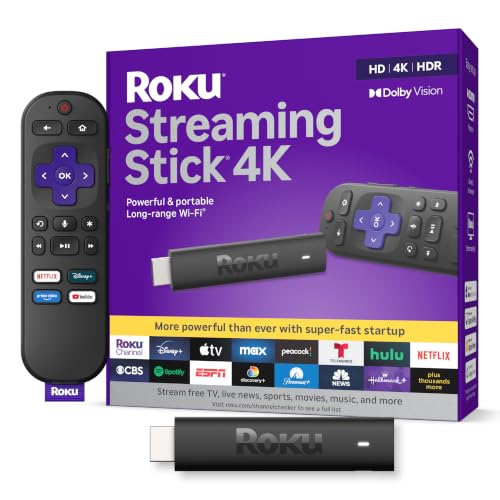
Roku Streaming Stick 4K with Voice Remote, HDR10+ and Dolby Vision
4K streamingHDR10+Dolby VisionVoice remote
Check price on Amazon
Best for: Households that want a simple platform with both major HDR formats.

Roku's Streaming Stick 4K outputs 4K video with both HDR10+ and Dolby Vision, a pairing many sticks skip. It plugs into an HDMI port, comes with a voice remote and uses Roku's simple tile home screen, which is the easiest platform for non-technical household members to learn.

The tradeoff is that the Roku platform is less aggressive about recommendations than Fire TV and has fewer smart-home features than Google TV, so it suits a household that wants a plain launcher. Compared with the Roku Ultra, the stick is smaller and cheaper but relies on Wi-Fi and a stick form factor, while the Ultra offers a wired Ethernet port. Against the Fire TV Stick 4K Select, you pay more for Dolby Vision support.

Setup takes about 10 minutes: plug in, join Wi-Fi, sign in to your apps and pair the remote. Use the supplied extender if the stick blocks a neighboring HDMI port, and place the TV near the router for stable streaming. Restart the stick every few months if apps slow down.

What works

  • Supports both Dolby Vision and HDR10+ for compatible TVs
  • The tile home screen is easy for everyone in the house to use
  • A compact stick leaves neighboring HDMI ports free
  • The remote can control TV power and volume

Watch out for

  • Wi-Fi only, with no Ethernet port on the stick
  • Cost tier is above entry sticks that also stream 4K

Specs

Resolution
4K
HDR
HDR10+ and Dolby Vision
Form
Compact HDMI stick
Remote
Voice remote with TV controls
Cost tier
Upper middle of the group
02
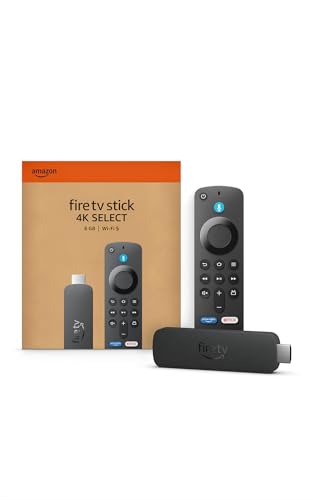
Amazon Fire TV Stick 4K Select with AI-Powered Search, Free and Live TV
4K Ultra HDFire TV platformAI searchFree and live TV
Check price on Amazon
Best for: Buyers who want 4K streaming at a low cost tier and use Amazon services.

The Fire TV Stick 4K Select targets essential 4K streaming on the redesigned Fire TV experience, with AI-powered search and free and live TV access. It is among the cheapest ways in this group to get 4K video, and Fire TV supports most major apps.

The tradeoff is the platform itself: Fire TV leans on Amazon content and promotes it prominently on the home screen, which some owners find intrusive. Compared with the Roku Streaming Stick 4K, you save money but drop Dolby Vision, so check what your TV supports. Against the Fire TV Cube, you get the same platform without hands-free voice or extra ports.

Setup is quick: plug the stick in, join Wi-Fi and sign in with your Amazon account. Use the HDMI extender if the stick crowds neighbouring ports, and keep the remote batteries fresh. Reboot every few months and clear unused apps to keep the interface responsive.

What works

  • One of the lowest cost tiers for 4K streaming in the group
  • AI-powered search makes finding shows faster across apps
  • Free and live TV options expand content without extra fees
  • Compact stick fits behind most televisions

Watch out for

  • The home screen pushes Amazon content prominently
  • Lacks the Dolby Vision support some competitors list

Specs

Resolution
4K Ultra HD
Platform
Fire TV (2026 experience)
Search
AI-powered Fire TV search
Free content
Free and live TV options
Cost tier
Among the cheapest in the group
03
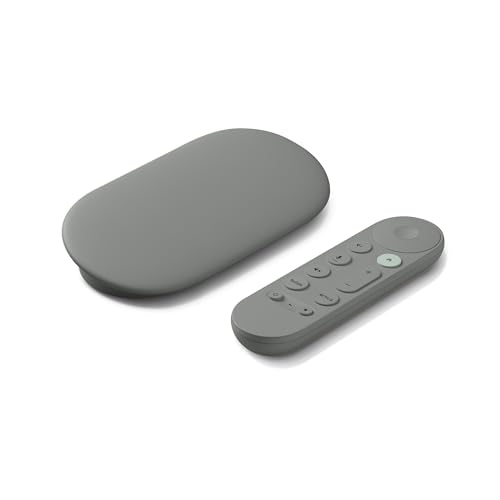
Google TV Streamer 4K with Voice Search Remote
4K streamingGoogle TVVoice search remoteSet-top box form
Check price on Amazon
Best for: Households that use Google accounts and smart home devices.

Google's TV Streamer is a small set-top box rather than a stick, running Google TV with a voice search remote. It gathers shows from all your services onto one home screen, and ties into smart home controls and Google accounts better than the other platforms here.

The tradeoff is cost and the cable: it sits at the top tier of the group, and the listing notes an HDMI 2.1 cable is sold separately. Compared with the ONN 4K Android TV device, the Google box is faster and newer but costs more. Against the Roku Ultra, it offers broader smart home hooks but a less simple home screen.

Set up takes about 15 minutes with the Google Home app. Place it on a shelf with airflow, use the supplied remote for voice search, and keep it plugged in so it can update overnight. Clear app caches if the interface slows after long use, and check that your TV supports the HDMI features you want.

What works

  • Google TV merges all your services into one home screen
  • Smart home controls work from the TV in a Google setup
  • Set-top form gives more cooling room than a stick
  • Voice search remote speeds up finding shows

Watch out for

  • Top cost tier is highest in the group
  • An HDMI 2.1 cable is sold separately for some features

Specs

Resolution
4K
Platform
Google TV
Remote
Voice search remote
Cable note
HDMI 2.1 cable sold separately
Cost tier
Top of the group
04
Roku Ultra 4K Streaming Player, HDR10+, Dolby Vision, Atmos, Voice Remote Pro
4K streamingDolby VisionDolby AtmosRechargeable remote
Check price on Amazon
Best for: Living rooms with a soundbar or receiver that want Atmos and a wired link.

Roku Ultra is a set-top box that supports HDR10+, Dolby Vision and Dolby Atmos, with a rechargeable, backlit Voice Remote Pro. Roku describes it as the fastest of its players, and a box has more room for a proper Wi-Fi radio and a wired Ethernet connection.

The tradeoff is cost and size: it is pricier than the Roku stick and sits on a shelf rather than hiding behind the TV. Compared with the Roku Streaming Stick 4K, it adds Atmos passthrough, faster performance and better connectivity. Against the Google TV Streamer, it keeps the simpler Roku interface but has fewer smart-home features.

Place it on a shelf near the TV and connect Ethernet if the Wi-Fi is weak. Charge the remote when the light shows low battery, and use the remote finder if available. Keep vents clear of dust and clean the box with a dry cloth. Reboot if streaming stutters after updates.

What works

  • Supports Dolby Atmos alongside Dolby Vision and HDR10+
  • The backlit, rechargeable remote is easier to use in the dark
  • A wired connection avoids Wi-Fi hiccups on big streams
  • A faster processor keeps menus responsive over the years

Watch out for

  • Higher cost tier than the stick versions
  • A box needs shelf space and cannot hide behind the TV

Specs

Resolution
4K
HDR and audio
HDR10+, Dolby Vision, Dolby Atmos
Speed
Roku's fastest player
Remote
Rechargeable Voice Remote Pro, backlit
Cost tier
Upper end of the group
05
ONN Android TV 4K UHD Streaming Device with Voice Remote and Google Assistant
4K UHDAndroid TVGoogle AssistantVoice remote
Check price on Amazon
Best for: Buyers who want the Google Play app library at a modest cost tier.

The ONN streaming device runs Android TV in a small box, with a voice remote that calls Google Assistant and an HDMI cable in the box. It reaches the Google Play app store, which means more app choices than closed platforms, and it supports 4K video.

The tradeoff is age: Android TV is the older platform that Google TV replaced, so the interface feels less polished and may receive fewer updates. Compared with the Google TV Streamer, it costs much less but is slower and older. Against the Fire TV Stick 4K Select, it gives broader app access but fewer free channels.

Plug it in with the included cable, sign in with a Google account and pair the remote. Place the box on a shelf with airflow, and clear unused apps to keep storage free. Reboot occasionally if the interface slows, and check for system updates.

What works

  • Android TV opens access to the Google Play app library
  • An HDMI cable is included in the box
  • Google Assistant on the remote handles voice searches
  • A small box sits neatly beside most televisions

Watch out for

  • Android TV is the older platform and can feel dated
  • Slower than the newest Google TV hardware

Specs

Resolution
4K Ultra HD
Platform
Android TV
Voice
Google Assistant button on remote
Cable
High speed HDMI cable included
Cost tier
Upper middle of the group
06
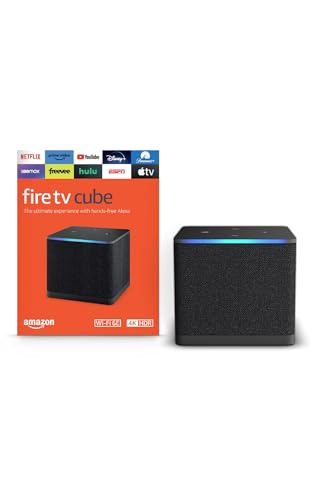
Amazon Fire TV Cube with AI-Powered Search and Hands-Free Alexa Control
4K streamingHands-free voiceFast app startsFire TV platform
Check price on Amazon
Best for: Alexa households that want hands-free control and quick app starts.

The Fire TV Cube is Amazon's fastest streaming player, with hands-free Alexa control from across the room. It is a cube-shaped set-top box with faster app launches than the Fire sticks, plus the same Fire TV platform and AI-powered search.

The tradeoff is that its far-field microphones are the headline feature, which only matters if you use Alexa regularly, and the Fire TV home screen still promotes Amazon content. Compared with the Fire TV Stick 4K Select, it is faster but costs more. Against the Roku Ultra, it adds hands-free voice but not Dolby Vision from Roku's approach.

Place the Cube on a shelf where the microphones are not blocked, and use the mic mute button when privacy matters. Connect Ethernet if available, and restart it when the interface slows. Keep the vents clear and wipe the surface with a dry cloth.

What works

  • Hands-free Alexa control works from across the room
  • Faster app launches than the Fire TV sticks
  • The Fire TV platform supports most major apps
  • A set-top form leaves room for better cooling

Watch out for

  • Upper end cost tier for a feature that suits only Alexa users
  • The home screen pushes Amazon content prominently

Specs

Resolution
4K
Voice
Hands-free Alexa control
Platform
Fire TV (2026 experience)
Speed
Fastest Fire TV player
Cost tier
Upper end of the group

Spec decoder

What the listing measurements really mean

The numbers brands lead with, translated into what they tell you about fit, comfort and wear at home.

4K and HDR formats

4K is resolution. HDR adds contrast and color range, in formats like HDR10+ and Dolby Vision.

Watch forThe Fire TV Stick 4K Select lists 4K but check Dolby Vision support against the Roku stick.

Dolby Atmos

Atmos is an object-based surround format. It needs a soundbar or receiver that supports it.

Watch forThe Roku Ultra lists Atmos; most sticks pass less audio.

Wi-Fi standard

Newer Wi-Fi gives steadier streams in busy homes. Older sticks may buffer on crowded networks.

Watch forSome Fire TV listings highlight Wi-Fi 6; check your router matches.

HDMI version

HDMI 2.1 carries more bandwidth for high refresh and gaming. Streaming mostly does not need it.

Watch forThe Google TV Streamer notes an HDMI 2.1 cable is sold separately.

Processor and app speed

Speed is how fast apps open and menus move. It shows in the first year and matters more by year three.

Watch forRoku calls the Ultra its fastest player; Amazon calls the Cube its fastest.

Methodology

How We Evaluated These Streaming Devices

Platform fit

We compared Roku, Fire TV, Google TV and Android TV home screens as the listings describe them. Each suits a different household. We favoured neutral platforms.

Picture and audio formats

We checked the HDR formats and audio support, such as Dolby Vision on the Roku stick and Atmos on the Roku Ultra. We matched formats to TV types. We did not measure picture quality.

Speed and hardware

We read processor and form-factor claims, from the compact sticks to the Fire TV Cube and Roku Ultra boxes. Speed matters most in year three. We favoured boxes for long-term use.

Remote and control

We looked at remote design, voice features and TV control. The Roku Ultra remote is rechargeable and backlit, and the Cube adds hands-free voice. Remotes shape daily satisfaction.

Owner feedback patterns

We researched common themes: slow menus on old sticks, ad-heavy home screens and Wi-Fi drops. These shape our cons. We did not use ratings or review counts.

Decision guide

How to Choose the Right Streaming Devices

By Platform

SituationPickWhy
Want a plain launcherRoku Streaming Stick 4KSimple tile home screen
Amazon and Alexa homeFire TV CubeHands-free voice control
Google accounts and smart homeGoogle TV StreamerTies into Google Home
Want the Play StoreONN Android TVGoogle Play app library
Lowest cost 4KFire TV Stick 4K Select4K at a low cost tier

By Budget

SituationPickWhy
Lowest tierFire TV Stick 4K SelectAmong the cheapest here
Upper middleRoku Streaming Stick 4K or ONN Android TVDolby Vision or Android TV
Upper endRoku Ultra or Fire TV CubeWired box or hands-free
Top of the groupGoogle TV StreamerNewest Google hardware
StretchingRoku UltraAtmos and a rechargeable remote

Stick vs Box

Stick

The Roku Streaming Stick 4K and Fire TV Stick 4K Select hide behind the TV and cost less. They rely on Wi-Fi and may slow after a few years.

Box

The Roku Ultra, Fire TV Cube and Google TV Streamer sit on a shelf and run faster. They cost more and offer Ethernet or better remotes.

Pick a stick for a bedroom or a rented TV and a box for the main living room.

By Audio Setup

SituationPickWhy
TV speakers onlyFire TV Stick 4K SelectNo need for Atmos
Soundbar with AtmosRoku UltraLists Dolby Atmos support
Receiver and big speakersRoku Ultra or Google TV StreamerBox form and better output
Mixed audioRoku Streaming Stick 4KDolby Vision and HDR10+
Voice control from a sofaFire TV CubeHands-free microphones

For Living Room Use Specifically

Look for

A platform the whole household can use, HDR formats your TV supports, a remote that controls volume and enough speed to last several years.

In this comparison

The Roku Ultra and Google TV Streamer fit a main living room best, while the sticks are better suited to secondary TVs.

When to Spend More

Spend more if

The device runs your main TV every day, you own a soundbar with Atmos or you want smart home control.

Save if

The TV is in a guest room or you stream a few hours a week, where the Fire TV Stick 4K Select is enough.

Ownership

Maintenance schedule

The upkeep that decides whether a piece still looks good in year five.

TaskIntervalWhy it matters
Restart the deviceEvery 1 to 2 monthsMemory builds up and menus slow. A restart clears it in a minute.
Remove unused appsQuarterlyStorage fills on cheaper devices. Clearing apps keeps updates smooth.
Update the systemAs promptedUpdates fix bugs and add security patches. Do not skip them.
Replace remote batteriesYearly or as neededLow batteries cause laggy buttons. The Roku Ultra remote recharges instead.
Clean vents and portsTwice a yearDust traps heat in set-top boxes. A dry cloth or air puff helps.

FAQ

Frequently Asked Questions

Do I need a streaming device if I have a smart TV?

Not always. If your TV is fast and gets updates, you can skip it. Older smart TVs often slow down, and a device is the cheapest fix.

How much does a streaming device cost?

Prices move, so check the current listing. The Fire TV Stick 4K Select sits at the low end and the Google TV Streamer at the top.

Roku, Fire TV or Google TV: which is best?

It depends on your household. Roku is simplest, Fire TV suits Alexa homes and Google TV suits Google accounts.

Do I need 4K for streaming?

Only if your TV is 4K. On a 1080p TV, 4K gives no gain, so a cheaper device will do.

Is a stick as good as a box?

For video quality, often yes. Boxes are faster, have Ethernet and often better remotes, so they age better in a main living room.

Can a streaming device improve my picture?

It can pass HDR formats your TV supports, but it cannot upgrade the TV. The display sets the limit.

Bottom line

The short version

Browse more streaming deviceson Amazon →
Elena Hart, Lead Home Editor

About the author

Elena Hart

Lead Home Editor, SweetLivingRoom

Elena Hart leads SweetLivingRoom's buying guides, turning product dimensions, material specs and owner feedback into clear verdicts on sofas, rugs, lighting, storage and decor.

More from Elena →