
Amazon affiliate links - we earn a commission.Affiliate disclosure

Buying guide · 11 min read · Updated 2026-11-21

Best Smart Plugs (2026)

Six Wi-Fi smart plugs compared on Matter support, HomeKit, energy monitoring, size and app setup, so you can automate lamps and small appliances with no hub.

Elena Hart, Lead Home EditorBy Elena HartLead Home Editor6 picks comparedSpec-sheet verified
Best Smart Plugs

At a glance

Our top picks

Side by side

Spec comparison

A smart plug sits between an outlet and a lamp, fan or small appliance, and lets you switch it on and off from an app, a schedule or your voice. It is the cheapest way to make a floor lamp or a string of lights smart, and it needs no wiring.

The details that matter are the platform, the load rating, the size and how reliably it stays connected. A plug that blocks the second outlet, drops off Wi-Fi or only works with one assistant becomes a nuisance, so choose by how you will actually use it.

Before you buy

6 Criteria to Look For Before Buying a Smart Plug

  1. 01

    Platform and Matter

    Check which assistant you use. The Amazon plug works only with Alexa, the Kasa EP10 works with Alexa and Google, the EP25 adds HomeKit and the Tapo and Linkind use Matter across all three. Matter also keeps local control working when the internet fails. If you might change phones or assistants, choose Matter.

  2. 02

    Load rating and appliances

    Most plugs are rated 15 amps, or 1800 watts at 120 volts, as the Tapo lists. Lamps draw 10 to 60 watts, and a fan draws 50 to 100. Space heaters and air conditioners can draw 1500 watts, which is at the plug's limit. Check the appliance label and avoid running a plug at its maximum for hours. Never use a plug with something that could cause harm if it switches unexpectedly.

  3. 03

    Size and outlet blocking

    A mini plug like the Kasa Ultra Mini or Tapo Mini leaves the second outlet free, while larger bodies can block it. Check the shape against your outlets, especially if outlets are close to furniture. Consider a plug with a right-angle design if the outlet is behind a sofa.

  4. 04

    Network and setup

    Most plugs use 2.4 GHz Wi-Fi and no hub. Some, like the EIGHTREE, need a separate app and then a link to the assistant. A weak signal at the outlet causes dropouts. If you have many smart devices, check your router's device limit.

  5. 05

    Energy monitoring and schedules

    The Kasa EP25 reports real-time and historical energy use. Schedules and timers are common, and local schedules keep running if Wi-Fi drops. Energy monitoring helps you find standby loads. It is not a safety feature.

  6. 06

    Safety certification

    Look for UL or ETL certification on the plug. The Kasa EP25 lists UL, and certified plugs have been checked for overheating. Avoid uncertified plugs for appliances. Do not daisy-chain plugs or put them behind heavy furniture.

Detailed reviews

The 6 best smart plugs, explained

01
TP-Link Tapo Matter Smart Plug Mini, 15A 1800W
Matter15A, 1800WCompactApple, Alexa, Google
Check price on Amazon
Best for: Mixed Apple, Alexa and Google homes that want a compact Matter plug.

Tapo's Matter plug is a compact mini rated for 15 amps and 1800 watts, and the listing says it works with Apple Home, Alexa and Google Home. It also says Matter devices on your local network keep working when the home internet goes down.

Matter makes a plug less likely to be stranded when you change phones or assistants, because the same plug can be added to several ecosystems. An 1800 watt rating covers lamps, fans, humidifiers and a window air conditioner of modest size, though you should always check the appliance's own wattage. Compared with the Kasa Ultra Mini, the Tapo adds Matter and Apple support at a similar size.

The mini body leaves the second outlet free on most duplex receptacles. Set it up in the Tapo app, then add it to your platform with the Matter code. Keep a note of the code or the QR on the box, because you need it to re-pair, and photograph it with your phone so that it survives when the box goes in the recycling. Avoid using any plug with a space heater unless the heater's wattage is well under the plug's rating and you are comfortable with the risk.

What works

  • Matter works across Apple, Alexa and Google
  • 15A, 1800W rating covers most lamps and fans
  • Compact body leaves the second outlet free
  • Local control keeps working when the internet drops

Watch out for

  • Matter setup needs a code and a compatible hub or app
  • Not suitable for heavy heaters

Specs

Protocol
Matter over Wi-Fi
Rating
15A, 1800W maximum
Platforms
Apple Home, Alexa, Google Home
Size
Compact mini design
Local control
Works on the LAN when the internet is down
02
Kasa Smart Plug Ultra Mini 15A, 4-Pack EP10P4
15A4 packAlexa and GoogleNo hub
Check price on Amazon
Best for: Alexa and Google homes that need several plugs for lamps.

Kasa's Ultra Mini is a 15 amp plug that works with Alexa and Google Home with no hub, and it comes in a four-pack. The listing says it needs 2.4 GHz Wi-Fi, and that you can set timers, countdowns and schedules in the Kasa app.

The Ultra Mini is small enough that it rarely blocks the second outlet, and the four-pack covers a living room's lamps with a spare. Compared with the Tapo Matter, the Kasa EP10 does not support Matter or Apple, so it suits Alexa and Google homes. Kasa's app is mature and reliable, with schedules that run locally, so it continues after a brief outage.

Plug it in, open the Kasa app and follow the steps. Name each plug clearly, like Reading Lamp, because voice commands depend on the name. A plug controls only on and off, so use it with lamps that have a physical switch left on. Check that your router supports 2.4 GHz and that the signal reaches each outlet. If a plug keeps dropping off, try moving it to a different outlet or adding a small mesh node, because a metal lamp base or a nearby microwave can weaken the signal enough to break the connection.

What works

  • Four plugs cover a whole room
  • Ultra Mini body keeps the second outlet free
  • Timer, countdown and schedule features
  • Mature Kasa app and no hub

Watch out for

  • No Matter or Apple support on this model
  • Requires a 2.4 GHz network

Specs

Rating
15A
Pack
4 plugs
Platforms
Alexa and Google Home
Network
2.4 GHz Wi-Fi, no hub
Features
Timer, countdown, schedules
03
Kasa Smart Plug Mini 15A EP25P4 with Energy Monitoring, 4-Pack
Energy monitoringHomeKit4 packUL listed
Check price on Amazon
Best for: Apple households that want energy monitoring and HomeKit control.

Kasa's EP25P4 is a 15 amp plug that works with Apple HomeKit, Siri, Alexa and Google Home, and it monitors the connected device's energy use in real time and over history. The listing says it is UL listed and supports Amazon Frustration-Free Setup and Google Seamless Setup.

Energy monitoring shows what a lamp, a TV or a dehumidifier actually uses, which is useful for finding standby draw. HomeKit support makes it the pick for an iPhone household that does not use Matter yet. Compared with the Kasa Ultra Mini, the EP25 adds monitoring and Apple support, but it is a little larger.

The larger body may block the second outlet on a tight receptacle, so check your outlets. Use the monitoring to identify devices that draw power while off, and set a schedule to cut them. Do not treat the monitor as a safety device, since it only reports usage. Keep the pack for lamps, the TV box and the router if you want a remote reboot. The monitor is also handy in year three, when an old dehumidifier or space-hungry gaming console starts drawing more than it used to, and the history graph shows that drift before it shows up on a bill.

What works

  • Energy monitoring shows real-time and historical use
  • HomeKit, Alexa and Google support
  • UL listed
  • Four plugs cover a room

Watch out for

  • Slightly larger body can block the second outlet
  • Matter is not listed

Specs

Rating
15A
Pack
4 plugs
Platforms
Apple HomeKit, Siri, Alexa, Google Home
Feature
Real-time and historical energy use
Certification
UL listed
04
Linkind Matter Smart Plug, Works with Apple Home and Alexa
MatterTimer and scheduleApple HomeAlexa
Check price on Amazon
Best for: Buyers who want a Matter plug from a smaller brand with timer features.

Linkind's Matter plug works with Apple Home, Alexa, Siri and Google Home, and the listing says you can skip downloading a separate app for each brand once it is on Matter. It has a timer and schedule, and devices on your local network communicate directly.

Matter plugs reduce the app clutter that grows with every smart home purchase. Compared with the Tapo Matter, the Linkind is nearly the same in function, and the difference lies in the brand's app and support, which is smaller. Direct local communication means commands run faster and keep working in an outage.

Use the Matter setup code to add the plug to your platform of choice, and consider adding it to a second platform through multi-admin if your family uses both Apple and Alexa. Name the plug for its room and device. For lights that must stay on, such as a fish tank or medical equipment, do not rely on any plug, because a Wi-Fi fault or an accidental off command could cause harm.

What works

  • Matter works with Apple, Alexa and Google
  • Timer and schedule built in
  • Local control on the home network
  • Fewer apps to manage

Watch out for

  • Smaller brand with less support
  • Not for devices that must never switch off

Specs

Protocol
Matter over Wi-Fi
Platforms
Apple Home, Alexa, Siri, Google Home
Features
Timer and schedule
Control
App, remote before arriving home
Local control
Devices on the LAN talk directly
05
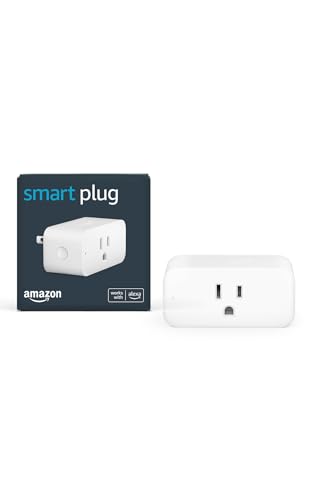
Amazon Smart Plug for Alexa, Simple Setup
Alexa onlyNo hubSimple setupPlug and play
Check price on Amazon
Best for: Echo owners who want the simplest possible setup for one or two lamps.

Amazon's Smart Plug is a simple plug that works with the Alexa app and compatible Alexa devices, and the listing says no hub is required. It suits lamps, fans and coffee makers that have a physical on and off switch.

The appeal is that setup happens inside the Alexa app with a few taps, and it is a first-party device with direct support. Compared with the Kasa Ultra Mini, the Amazon plug works only with Alexa and lacks the timers and energy tools of a dedicated app, so it is the simplest path rather than the most capable. It is a fine starter for a single lamp.

For devices to work, the appliance must be left in the on position, since the plug only supplies or cuts power. Create an Alexa routine for sunset, and name the plug clearly. Because it is tied to Alexa, switching to another assistant means replacing it, so pick a Matter model if you expect to change.

What works

  • Setup happens entirely in the Alexa app
  • No hub required
  • First-party Amazon support
  • Works with lamps and small appliances

Watch out for

  • Alexa only, with no Google or Apple
  • Fewer features than a dedicated app

Specs

Platform
Alexa only
Setup
Plug in, open Alexa app
Hub
Not required
Suited devices
Lamps, fans, coffee makers with a physical switch
Brand
Amazon
06
EIGHTREE Smart Plug 15A Wi-Fi Outlet, 4-Pack
15A4 packSmart Life appAlexa and Google
Check price on Amazon
Best for: Budget buyers who want several plugs and accept a generic app.

EIGHTREE's four-pack is a 15 amp Wi-Fi plug that works with Alexa and Google Assistant, but the listing notes that you must connect the plug in the Smart Life app first and then link it to your assistant. It supports remote control and schedules.

The extra step is the tradeoff for a low-cost pack, because you manage the plugs in a third-party app and then link that app to Alexa or Google. Compared with the Kasa Ultra Mini, the EIGHTREE has a less polished app and less certainty about long-term updates. The Smart Life platform is widely used, though, so the plugs work with many other devices.

Set it up in the Smart Life app, then enable the skill in Alexa or the action in Google Home. Name each plug clearly. Since this is a generic platform, check that the plug carries a recognized safety mark such as UL or ETL on the label before you use it with anything important, and avoid using it for high-draw appliances. The plugs are also on the larger side, so a power strip or a tight outlet behind a sofa may not take two of them at once, and the cheapest packs are usually the ones whose app stops getting updates first.

What works

  • Four plugs at a low cost
  • Works with Alexa and Google through Smart Life
  • Remote control and schedules
  • Smart Life app works with many brands

Watch out for

  • Requires the Smart Life app and a linking step
  • Less polished app and support

Specs

Rating
15A
Pack
4 plugs
App
Smart Life
Platforms
Alexa and Google Assistant via the app
Control
Remote control and schedules

Spec decoder

What the listing measurements really mean

The numbers brands lead with, translated into what they tell you about fit, comfort and wear at home.

Matter

Matter is a cross-platform standard that lets one device join Apple, Alexa and Google at once. It also supports local control.

Watch forThe Tapo and Linkind list Matter, while the Kasa EP10 and Amazon plug do not.

15A, 1800W

This is the maximum current and power the plug can switch. Appliances must stay within it.

Watch forThe Tapo lists 15A and 1800W, and heaters can approach that limit.

Energy monitoring

Energy monitoring measures the power a connected device uses. It shows real-time and past use.

Watch forThe Kasa EP25 lists it, and the others do not.

2.4 GHz Wi-Fi

2.4 GHz is the longer-range Wi-Fi band that most smart plugs use. It passes through walls better than 5 GHz.

Watch forThe Kasa listings require 2.4 GHz, so your router must support it.

UL listed

UL listing means an outside lab checked the product against safety standards. It matters for devices that carry household current.

Watch forThe Kasa EP25 lists UL, and the Tapo lists compact design with a 15A rating.

Methodology

How We Evaluated These Smart Plugs

Platform and Matter

We compared Matter support on the Tapo and Linkind with the Alexa-only Amazon plug. Broader support ranked higher. We weighed lock-in risk.

Load and safety

We looked at the 15A and 1800W ratings and certification, such as the Kasa EP25's UL listing. We weighed which appliances each suits. Clear safety marks earned trust.

Size and fit

We compared mini bodies with larger ones and considered second-outlet blocking. The Tapo Mini and Kasa Ultra Mini stood out. Fit on real outlets matters.

App and setup

We looked at Kasa's app, the Alexa app and the Smart Life linking step. Owner feedback patterns show setup friction with generic apps. Simpler setup raised a plug's rank.

Features and value

We counted energy monitoring, timers and pack sizes. The EP25's monitoring and the four-packs add value. Features matter only when the plug stays connected.

Decision guide

How to Choose the Right Smart Plugs

By Platform

SituationPickWhy
Apple, Alexa and GoogleTapo MatterMatter and 1800W rating
Apple HomeKit and monitoringKasa EP25Energy data and HomeKit
Alexa and Google lampsKasa Ultra Mini 4-packCompact and reliable
Matter alternativeLinkind MatterTimer features
Alexa only, one lampAmazon Smart PlugSimple setup
Low-cost packEIGHTREE 4-packFour plugs

By Budget

TierPickWhy
Lowest tierKasa Ultra Mini 4-packCompact four-pack
Low tierAmazon Smart PlugSimple Alexa plug
Lower middleTapo MatterMatter
MiddleEIGHTREE 4-packFour plugs
Upper middleLinkind MatterMatter alternative
Top tierKasa EP25 4-packMonitoring and HomeKit

Matter vs Platform-Specific

Matter

The Tapo and Linkind work across Apple, Alexa and Google. They keep working on the local network and survive an ecosystem change.

Platform-specific

The Kasa EP10, EP25 and Amazon plug tie you to certain assistants. They are mature and simple, but you may need to replace them if you switch.

Choose Matter if you might change assistants, and platform-specific if your setup is settled.

By Use

SituationPickWhy
Floor and table lampsKasa Ultra MiniCompact
Holiday lights on a timerEIGHTREESchedules in a pack
Checking standby powerKasa EP25Energy monitoring
Fan or humidifierTapo Matter1800W rating
One lamp, AlexaAmazon Smart PlugSimple
Cross-platform householdLinkind MatterMatter

For Lamps Specifically

Look for

Look for a compact plug, a name you can say easily and a schedule feature. Leave the lamp's own switch on.

In this comparison

The Kasa Ultra Mini and Tapo Mini suit lamps best because they leave the second outlet free.

When to Spend More

Spend more if

You want Matter, HomeKit or energy monitoring, such as the Tapo or Kasa EP25.

Save if

You only need timers for lamps, where the Kasa Ultra Mini pack is enough.

Ownership

Maintenance schedule

The upkeep that decides whether a piece still looks good in year five.

TaskIntervalWhy it matters
Check app and firmware updatesEvery few monthsUpdates fix bugs and security issues. Keep the app and the plug current.
Test schedulesAfter clock changesDaylight saving and router resets can shift schedules. Verify that timers run on time.
Inspect plugs and outletsEvery 6 monthsWarm or discolored plugs signal a problem. Replace any plug that feels hot.
Re-pair after router changesAs neededA new router or password drops devices. Reconnect and rename them in the app.
Check the loadWhen adding devicesOverloaded plugs overheat. Confirm that the appliance wattage is well under the plug rating.

FAQ

Frequently Asked Questions

What can I plug into a smart plug?

Lamps, fans, coffee makers with a physical switch and chargers are typical. Avoid space heaters and anything that could cause harm if it switches unexpectedly.

Do smart plugs need a hub?

Not the ones here. They connect directly over 2.4 GHz Wi-Fi.

Does a smart plug work if the internet is down?

Matter plugs and schedules stored on the plug can keep working locally. Cloud-only control and voice commands may stop.

Why does my plug go offline?

Weak Wi-Fi, a router change or an overloaded network usually causes it. Move the router or add an access point.

Can I use a smart plug with a space heater?

Only if the heater's wattage is well below the plug rating, and even then it carries risk. Many heaters are designed to plug directly into the wall.

Are smart plugs safe?

Certified plugs rated for the load are safe in normal use. Avoid uncertified plugs and never exceed the rating.

Bottom line

The short version

Browse more smart plugson Amazon →
Elena Hart, Lead Home Editor

About the author

Elena Hart

Lead Home Editor, SweetLivingRoom

Elena Hart leads SweetLivingRoom's buying guides, turning product dimensions, material specs and owner feedback into clear verdicts on sofas, rugs, lighting, storage and decor.

More from Elena →