
Amazon affiliate links - we earn a commission.Affiliate disclosure

Buying guide · 12 min read · Updated 2026-11-21

Best Smart Light Switches (2026)

Six Wi-Fi smart light switches compared on Matter support, neutral wire needs, dimming, 3-way wiring and voice platforms, so you can upgrade lights with no hub.

Elena Hart, Lead Home EditorBy Elena HartLead Home Editor6 picks comparedSpec-sheet verified
Best Smart Light Switches

At a glance

Our top picks

Side by side

Spec comparison

PieceTypeProtocolPlatformsWiringControl
Kasa Matter Smart Light Switch KS205, Single PoleBest OverallKasa Matter Smart Light Switch KS205, Single PoleSingle pole smart switchMatter over Wi-FiApple Home, Alexa, Google Home, SmartThingsNeutral wire requiredKasa app, voice, schedules
TP-Link Tapo Matter Smart Light SwitchBest Matter ValueTP-Link Tapo Matter Smart Light Switchn/aMatter over Wi-FiSiri, Alexa, Google Homen/an/a
Kasa Smart Dimmer Switch HS220, Single PoleBest DimmerKasa Smart Dimmer Switch HS220, Single PoleSingle pole dimmern/aAlexa and Google HomeNeutral wire requiredButton or Kasa app
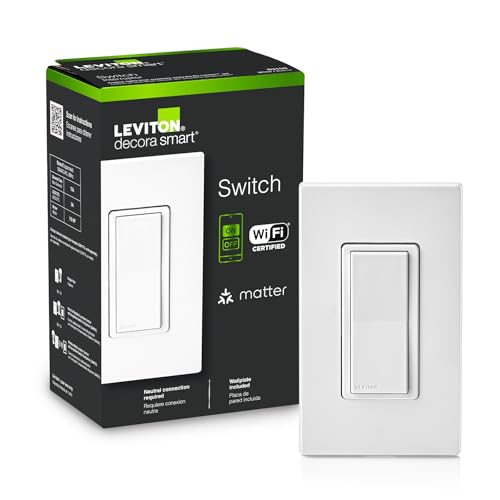
Leviton Decora Smart Wi-Fi Switch D315S with MatterBest Brand SupportLeviton Decora Smart Wi-Fi Switch D315S with Mattern/aMatter and Wi-FiMy Leviton, Alexa, Google, Applen/aRemote and voice
Kasa Smart 3-Way Switch HS210 KitBest 3-WayKasa Smart 3-Way Switch HS210 Kit3-way or single pole kitn/aAlexa and Google HomeNeutral wire requiredKasa or Tapo app
Amazon Basics Smart Light Switch, Single Pole, Alexa OnlyBest Alexa-OnlyAmazon Basics Smart Light Switch, Single Pole, Alexa OnlySingle pole smart switchn/an/an/an/a

A smart light switch replaces the wall switch you already use, which means every light on that switch becomes smart, and guests still flip it like a normal switch. It avoids the problem of smart bulbs that stop responding when someone turns the wall switch off.

What matters is the wiring, the platform and the dimming. Most Wi-Fi switches need a neutral wire in the box, they connect on 2.4 GHz and they work with certain voice assistants. Matter support widens that last point, while dimming and 3-way handling decide whether the switch fits your room.

Before you buy

6 Criteria to Look For Before Buying a Smart Light Switch

  1. 01

    Neutral wire requirement

    Most Wi-Fi switches need a neutral wire in the box, usually white wires bundled at the back. All the switches here require it. Houses built before the 1980s often lack neutrals at the switch. Switch off the breaker, remove the plate and check before you buy, or choose a no-neutral model from another line.

  2. 02

    Platform and Matter support

    Matter lets a switch work across Apple Home, Alexa, Google Home and SmartThings. The Kasa KS205, Tapo and Leviton D315S support it, while the HS210, HS220 and Amazon Basics are tied to specific assistants. Works with Alexa does not mean works with Google or Apple. Matter also keeps local control working when the internet is down.

  3. 03

    Dimming and load type

    A dimmer such as the HS220 gives 0 to 100 percent control, but it needs dimmable bulbs. On/off switches such as the KS205 control any bulb. Non-dimmable LEDs flicker or buzz on a dimmer. Check the minimum and maximum load in the manual, since LED loads are small and can trigger flicker.

  4. 04

    Circuit type: single pole or 3-way

    A single-pole circuit has one switch, and a 3-way circuit has two switches controlling one light. The HS210 kit is built for 3-way circuits. Installing a single-pole switch in a 3-way box can give odd behavior. Identify your circuit before you buy, and take a photo of the wiring.

  5. 05

    Wi-Fi and network

    These switches use 2.4 GHz Wi-Fi, so your router must support that band. Many switches on a crowded router can strain it. A strong signal at the switch location matters, since metal boxes weaken it. Check your router's device limit if you plan to replace many switches.

  6. 06

    Style and wall plates

    Decora rocker switches, like the Leviton D315S, need a Decora cutout plate. Toggle plates need to be swapped. Matching colors and gang boxes matter for a tidy look. The Kasa 2-gang style fits two circuits in one gang.

Detailed reviews

The 6 best smart light switches, explained

01
Kasa Matter Smart Light Switch KS205, Single Pole
MatterSingle poleNeutral wireWi-Fi
Check price on Amazon
Best for: Homes that use more than one smart home platform or may change later.

Kasa's KS205 is a single-pole Wi-Fi switch with Matter, which the listing says lets it work across Apple Home, Alexa, Google Home and SmartThings. It needs a neutral wire, and you control it through the Kasa app, by voice with Siri, Alexa or Google, or with schedules.

Matter is the practical reason to buy a new switch today, because a switch that supports it is not locked to one assistant, and you can change ecosystems later. Compared with the older HS200, the KS205 adds that platform flexibility and keeps the same easy install. A Matter switch also keeps working inside the home network when the internet drops, which helps reliability.

Before buying, check that your switch box has a neutral wire, usually a bundle of white wires at the back of the box. Switch off the breaker and verify with a tester. Keep a 2.4 GHz network available, since the switch connects on that band. If your light is on a 3-way circuit, use the Kasa 3-way kit instead. Smart switches are slightly deeper than a standard toggle, so in a crowded gang box, push the wires back neatly and check that the plate sits flush, because a switch that bulges out will not seat the faceplate and can stress the wire nuts.

What works

  • Matter works across Apple, Alexa, Google and SmartThings
  • Local control keeps working when the internet is out
  • Familiar Kasa app and guided install
  • Single-pole wiring is simple for most rooms

Watch out for

  • Neutral wire is required
  • Does not dim lights on this model

Specs

Type
Single pole smart switch
Protocol
Matter over Wi-Fi
Platforms
Apple Home, Alexa, Google Home, SmartThings
Wiring
Neutral wire required
Control
Kasa app, voice, schedules
02
TP-Link Tapo Matter Smart Light Switch
MatterSiri, Alexa, GoogleTimerUL certified
Check price on Amazon
Best for: Mixed Apple and Android households that want multi-admin Matter control.

Tapo's Matter switch is UL certified, supports Siri, Alexa and Google Home, and has a timer and schedule. The listing says devices on the home network communicate directly, so control can keep working if the internet goes down, and that multi-admin lets you use several smart home systems at the same time.

Multi-admin means you can add the same switch to Apple Home and Alexa, so family members with different phones are not locked out. Compared with the Kasa KS205, the Tapo is nearly the same in function, and the choice often comes down to which app you prefer, since TP-Link makes both Kasa and Tapo. UL certification is a good sign for a device that connects to household wiring.

A neutral wire is required, as with the Kasa. Install it using the Tapo app, and add it to your platform of choice using the Matter code. Test local control by disconnecting the internet briefly. If setup fails, check that your phone is on 2.4 GHz and that your router is not blocking device-to-device traffic. In year three, the usual complaint with any Wi-Fi switch is a dropped connection after a router change, so write down your network name and password, and expect to re-pair the switch once if you replace the router.

What works

  • Matter with Siri, Alexa and Google support
  • Multi-admin works with several platforms at once
  • UL certified for household wiring
  • Timer and schedule built in

Watch out for

  • Neutral wire is required
  • Does not dim lights on this model

Specs

Protocol
Matter over Wi-Fi
Platforms
Siri, Alexa, Google Home
Features
Timer and schedule
Certification
UL certified
Multi-admin
Multiple platforms at once
03
Kasa Smart Dimmer Switch HS220, Single Pole
0 to 100% dimmingSingle poleNeutral wireAlexa and Google
Check price on Amazon
Best for: Living rooms and dining rooms that need smooth dimming.

Kasa's HS220 is a single-pole dimmer switch with 0 to 100 percent dimming, adjustable by the button or the Kasa app, and voice control through Alexa and Google. A neutral wire is required and the app guides the install.

A smart dimmer is the best match for a living room, where you want evening light at 20 or 30 percent. Compared with the KS205, the HS220 dims but does not list Matter or Apple support, so it is for Alexa and Google homes. Dimming must match the bulbs: it works with dimmable LEDs and incandescent bulbs, but non-dimmable LED bulbs flicker or buzz.

Set a minimum brightness so that cheap LEDs do not flicker at the bottom of the range. Do not use it with a load under the minimum wattage stated in the manual, since very low loads cause flicker. If you have bulbs that buzz at low levels, swap one to a dimmable model rated for the dimmer. The switch also remembers the last level, so a single press returns to your preferred setting. A dimmer also generates a little heat in the box, so avoid packing it into a gang box with several other dimmers, and keep the total load well under the rated maximum in the manual.

What works

  • 0 to 100 percent dimming suits evening light
  • Button and app control
  • Alexa and Google voice support
  • Guided app install

Watch out for

  • No Matter or Apple support on this model
  • Needs dimmable bulbs to avoid flicker

Specs

Type
Single pole dimmer
Dimming
0 to 100 percent
Control
Button or Kasa app
Platforms
Alexa and Google Home
Wiring
Neutral wire required
04
Leviton Decora Smart Wi-Fi Switch D315S with Matter
MatterDecora styleMy Leviton appWi-Fi
Check price on Amazon
Best for: Buyers who want a Matter switch from an established electrical brand.

Leviton's D315S is a Decora-style Wi-Fi switch that works with Matter, the My Leviton app, Alexa, Google Assistant and Apple. The listing highlights scheduling lights to turn on at sunset and checking or adjusting lights remotely.

Leviton is a long-standing electrical brand, so its switches are designed around standard wall plates, with a flat rocker that matches most modern homes. Compared with the Kasa and Tapo, the Leviton is a more traditional electrical product with the same Matter flexibility, and it will suit buyers who prefer an established wiring brand. The Decora rocker is also easier to match with other switches in a gang box.

Check whether your wall plate is a Decora cutout, and replace it if it is a toggle style. The switch needs a neutral wire, so inspect the box first. Pair it in the My Leviton app, then add it to your preferred platform through Matter. A sunset schedule is a useful way to automate porch and living room lights through the seasons.

What works

  • Matter with Apple, Alexa and Google support
  • Decora rocker matches modern plates
  • Sunset scheduling follows the seasons
  • Established electrical brand

Watch out for

  • Requires a Decora-compatible plate
  • Neutral wire is required

Specs

Style
Decora rocker
Protocol
Matter and Wi-Fi
Platforms
My Leviton, Alexa, Google, Apple
Scheduling
Sunset schedules
Control
Remote and voice
05
Kasa Smart 3-Way Switch HS210 Kit
3-way kit2 switchesNeutral wireAlexa and Google
Check price on Amazon
Best for: Hallways and stairs where two switches control one light.

Kasa's HS210 kit is designed for a light controlled from two locations, and the listing says it can be used as a 3-way or a single-pole switch. It needs a neutral wire, uses 2.4 GHz Wi-Fi and works with Alexa and Google Home through the app.

Three-way circuits are the hardest wiring problem in smart switches, and a purpose-built kit saves you from guessing which wire is the traveler. Compared with the KS205, the HS210 is the one to buy for a hallway or a staircase where two switches control one light. The pair communicates, so both locations stay in sync.

Take a photo of the existing wiring before you disconnect anything, and label the wires. If one of the boxes has no neutral, the kit will not work. Install the main switch where the line power arrives, and the companion at the other location, following the app. Test from both positions before closing the boxes. If the light flickers or stays on when you flip the companion switch, the traveler wire is probably on the wrong terminal, so turn the breaker off and swap it, using the photo you took as a guide, before you blame the switch itself.

What works

  • Kit handles 3-way circuits with two switches
  • Can also act as a single-pole switch
  • Alexa and Google voice support
  • App-guided wiring steps

Watch out for

  • Both boxes need a neutral wire
  • No Matter or Apple support on this model

Specs

Type
3-way or single pole kit
Pack
Kit for two locations
Wiring
Neutral wire required
Platforms
Alexa and Google Home
Control
Kasa or Tapo app
06
Amazon Basics Smart Light Switch, Single Pole, Alexa Only
Alexa onlySingle pole2.4 GHzNo hub
Check price on Amazon
Best for: Alexa-only homes that want the simplest, cheapest setup.

Amazon Basics sells a single-pole smart switch that works with Alexa only, over 2.4 GHz Wi-Fi with no hub. The listing describes a guided installation with a video and manual, and scheduling through Alexa routines.

A single-platform switch is simpler to set up if you already own Echo devices, because it appears in the Alexa app without extra bridges. Compared with the Kasa KS205, the Amazon Basics does not work with Google or Apple, so it locks you into Alexa. Its advantage is price and the single clear setup path.

Choose it only if you are sure that you will stay with Alexa for years. A neutral wire is typically required for a Wi-Fi switch, so check your box. Create an Alexa routine for sunset and for a bedtime scene, and keep the wall switch usable for guests. If you later change platforms, you will need to replace the switch. That limit matters more over a decade than the savings today, so weigh it against the Matter models, which cost a little more but let you move to another assistant without touching the wiring again.

What works

  • Works directly with Alexa and no hub
  • Schedules and routines through Alexa
  • Guided video installation
  • Simple single-pole wiring

Watch out for

  • Does not work with Google or Apple
  • Locks you into Alexa

Specs

Type
Single pole smart switch
Platform
Alexa only
Network
2.4 GHz Wi-Fi, no hub
Features
Voice, schedule, routines
Install
Video and manual guidance

Spec decoder

What the listing measurements really mean

The numbers brands lead with, translated into what they tell you about fit, comfort and wear at home.

Matter

Matter is a cross-platform smart home standard. It lets one device work with several ecosystems.

Watch forThe KS205, Tapo and Leviton list Matter, while the HS210, HS220 and Amazon Basics do not.

Neutral wire

A neutral wire completes the circuit and gives the switch constant power. Many older boxes lack one.

Watch forAll six switches in this guide need a neutral wire.

Single pole versus 3-way

Single pole means one switch controls a light, and 3-way means two switches control it. The wiring differs.

Watch forThe HS210 kit is built for 3-way, and the others are single pole.

2.4 GHz Wi-Fi

2.4 GHz is the longer-range Wi-Fi band that most smart devices use. It is slower but passes through walls better.

Watch forThe Amazon Basics and Kasa switches list 2.4 GHz, so your router must support it.

Multi-admin

Multi-admin lets a Matter device join several smart home platforms at once. It suits mixed households.

Watch forThe Tapo lists multi-admin, which helps when family members use different phones.

Methodology

How We Evaluated These Smart Light Switches

Platform support

We compared Matter support on the KS205, Tapo and Leviton with the Alexa-only Amazon Basics. Broader support ranked higher. We weighed the risk of lock-in.

Wiring and install

We checked neutral wire needs, single-pole and 3-way options and app guidance. The HS210 kit addresses 3-way wiring. Clear installation help earned points.

Dimming and features

We looked at the HS220's 0 to 100 percent dimming, schedules and timers. We weighed which features matter in a living room. Dimming and sunset scheduling stood out.

Reliability and local control

We read claims about local control when the internet fails, such as the Tapo's direct device communication. Owner feedback patterns show cloud dependency as a risk. Local control raised a switch's rank.

Brand and value

We considered brand support from Kasa, Tapo, Leviton and Amazon. We weighed price against platform flexibility. A switch you can keep through a platform change offers better value.

Decision guide

How to Choose the Right Smart Light Switches

By Platform

SituationPickWhy
Apple, Alexa and Google mixKasa KS205Matter
Family on different phonesTapo MatterMulti-admin
Alexa onlyAmazon BasicsSimple, no hub
Alexa and Google with dimmingKasa HS2200 to 100 percent dimming
Established brand with MatterLeviton D315SDecora and Matter
Two-location hallwayKasa HS210 kit3-way kit

By Budget

TierPickWhy
Lowest tierKasa KS205Matter for the money
Low tierAmazon BasicsAlexa only
Lower middleTapo MatterMulti-admin
MiddleKasa HS210 kit3-way kit
Upper middleLeviton D315SBrand and Decora
Top tierKasa HS220Dimmer

Matter vs Alexa-Only

Matter

The KS205, Tapo and Leviton work across platforms. They keep local control when the internet is down and survive a change of ecosystem.

Alexa-only

The Amazon Basics works only with Alexa. It is simple and low-cost, but it ties you to one assistant.

Choose Matter if you might change platforms, and Alexa-only if you are committed to Echo.

By Circuit Type

SituationPickWhy
Single switch, on and offKasa KS205Single pole Matter
Single switch with dimmingKasa HS220Dimmer
Two switches for one lightKasa HS2103-way kit
Decora platesLeviton D315SDecora rocker
Alexa routinesAmazon BasicsSimple
Mixed phonesTapoMulti-admin

For Living Rooms Specifically

Look for

Look for dimming, sunset scheduling and a switch that works with your voice assistant. Pair it with dimmable LED bulbs.

In this comparison

The Kasa HS220 dimmer and the Leviton D315S with sunset scheduling suit living rooms best.

When to Spend More

Spend more if

You want dimming and platform flexibility, such as the HS220 or a Matter model.

Save if

You only need simple on and off and use Alexa, where the Amazon Basics is enough.

Ownership

Maintenance schedule

The upkeep that decides whether a piece still looks good in year five.

TaskIntervalWhy it matters
Update firmwareEvery few monthsUpdates fix bugs and security issues. Check the app for available updates.
Check Wi-Fi signalEvery 6 monthsRouter changes can drop switches. Reconnect and check signal at the switch.
Test schedulesAfter clock changesDaylight saving changes shift sunset schedules. Check that routines still run on time.
Inspect the faceplate and wiringYearlyLoose wires cause heat or flicker. With the breaker off, check connections for tightness.
Verify bulbs and dimmingAs neededFailing bulbs cause flicker on dimmers. Replace them with dimmable bulbs rated for the switch.

FAQ

Frequently Asked Questions

Do I need a neutral wire for a smart switch?

Most Wi-Fi switches do, including all six here. Check the back of the switch box for a bundle of white wires, or choose a no-neutral model.

Do smart switches work with any bulb?

On and off switches work with any bulb. Dimmers need dimmable bulbs, or the lights flicker or buzz.

Is Matter worth it?

Yes, if you use more than one ecosystem or might change later. It also keeps local control working when the internet is down.

Can I install a smart switch myself?

Many homeowners can, after turning off the breaker and verifying with a tester. A 3-way circuit or old wiring calls for an electrician.

What if my light has two switches?

That is a 3-way circuit. Use a 3-way kit like the Kasa HS210, or a dimmer rated for 3-way.

Should I choose smart switches or smart bulbs?

Switches control every bulb on the circuit and stay usable by guests. Bulbs offer color but stop responding when someone flips the wall switch off.

Bottom line

The short version

Browse more smart light switcheson Amazon →
Elena Hart, Lead Home Editor

About the author

Elena Hart

Lead Home Editor, SweetLivingRoom

Elena Hart leads SweetLivingRoom's buying guides, turning product dimensions, material specs and owner feedback into clear verdicts on sofas, rugs, lighting, storage and decor.

More from Elena →

Keep reading

Related guides