
Amazon affiliate links - we earn a commission.Affiliate disclosure

Buying guide · 12 min read · Updated 2026-11-27

Best Smart Displays (2026)

Four smart displays compared on screen size, viewing distance, speaker design and camera use, from an 8 inch Echo Show to a 21 inch wall screen.

Elena Hart, Lead Home EditorBy Elena HartLead Home Editor4 picks comparedSpec-sheet verified
Best Smart Displays

At a glance

Our top picks

Side by side

Spec comparison

PieceScreenAudioHubSoftwareUse
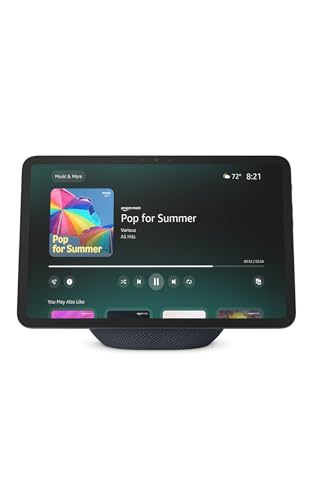
Amazon Echo Show 11 Full HD 11 in Smart Display with Spatial AudioBest OverallAmazon Echo Show 11 Full HD 11 in Smart Display with Spatial Audio11 in Full HD touchscreenSpatial audioBuilt-in smart home hubDesigned for Alexa+n/a
Amazon Echo Show 8 HD 8.7 in Smart Display with Spatial AudioBest ValueAmazon Echo Show 8 HD 8.7 in Smart Display with Spatial Audio8.7 in HD touchscreenSpatial audioBuilt-in smart home hubDesigned for Alexa+Recipes, calendar, clock, video
Amazon Echo Show 21 Full HD 21 in Smart Display with Fire TVBest Large ScreenAmazon Echo Show 21 Full HD 21 in Smart Display with Fire TV21 in Full HDn/an/aAlexa smart displayFamily board and kitchen TV
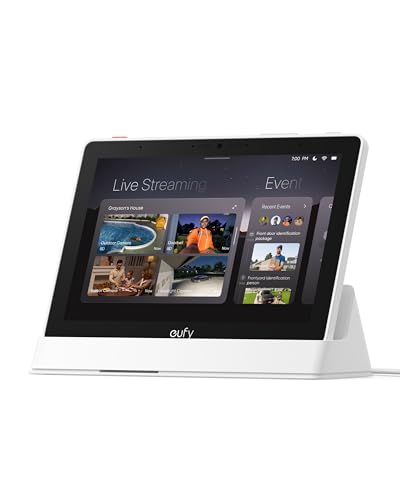
eufy Smart Display E10 8 in Control Panel for Security DevicesBest for Cameraseufy Smart Display E10 8 in Control Panel for Security Devices8 in control paneln/an/an/an/a

A smart display is a speaker with a screen, and the screen decides almost everything about how you use it. A small panel is a timer and a clock, a medium one shows recipes and video calls at arm length, and a large one starts to behave like a family bulletin board that you glance at from the sofa.

This guide is about the screen first. We compare four displays on size, resolution, speaker design, what the screen is actually good for, and how far away you can sit before the content stops being useful, with honest notes where a listing is vague on camera or software details.

Before you buy

6 Criteria to Look For Before Buying a Smart Display

  1. 01

    Screen size and viewing distance

    Screen size sets how far away the content stays useful. A clock-sized 8.7 inch panel like the Echo Show 8 works within a few feet, an 11 inch panel works across a coffee table, and a 21 inch panel can be read from across a room. A common mistake is buying a larger screen than the room needs or a smaller one than the viewing distance demands. Sit where you will actually use it, hold a sheet of paper at the screen size, and ask whether you could read it. If the answer is only just, step up a size.

  2. 02

    Resolution and picture

    Resolution matters most for photos, video and video calls. The Echo Show 8 uses an HD panel, while the Echo Show 11 and 21 are Full HD. Text is readable on any of them, so resolution is a bonus unless you plan to stream or view photos often. If the screen will mostly show a clock, a calendar and weather, the sharper panel adds little. If it will rotate family photos on a console, the Full HD models show the difference.

  3. 03

    Speaker and audio

    Spatial audio makes a small speaker sound wider. A display is rarely a substitute for a proper speaker, but the Echo Show 11 and 8 are far better than a basic smart speaker. Placement matters too, since a display pushed into a corner or a shelf muffles sound. Leave a few inches of space around the speaker, keep it away from large glass, and avoid placing it on the same shelf as a subwoofer, which can make the cabinet rattle.

  4. 04

    Camera and privacy

    Many smart displays have a camera for video calls. Whether you want one in a living room is a personal decision, so check the listing for a physical shutter or a camera-off switch and use it. Treat the microphone the same way and read the privacy settings before the first use. Many owners keep the camera covered by default and open it only for calls.

  5. 05

    Software and ecosystem

    An Echo Show works with Alexa, and its features depend on that ecosystem. The eufy display depends on eufy devices. If you rely on another assistant, check compatibility before buying, because a display bought for the wrong ecosystem becomes a clock. Also consider whether your lights, plugs and locks already work with the assistant, since the screen is most useful when it controls things you own.

  6. 06

    Placement and mounting

    Screens need power, a stable surface and a glare-free angle. The Echo Show 21 needs a wall mount or a stand, while the 8 and 11 sit on a table. Aim for eye level and avoid direct light from windows, since glare reduces readability more than low resolution does. A matte room with soft light flatters any panel, while a bright window behind the display makes even a sharp screen hard to read. Cable routing matters as well, because a dangling cord ruins the look of a shelf.

Detailed reviews

The 4 best smart displays, explained

01
Amazon Echo Show 11 Full HD 11 in Smart Display with Spatial Audio
11 in Full HDSpatial audioAZ3 Pro chipBuilt-in hub
Check price on Amazon
Best for: A living room console or side table where you want a readable screen without a big footprint.

The Echo Show 11 pairs an 11 inch Full HD touchscreen with spatial audio and the AZ3 Pro chip, and the listing says it includes a built-in smart home hub. It is aimed at being both a kitchen-counter and a living room device, with recipes, calendar and clock on the home screen and video apps such as Prime Video and Netflix available.

Eleven inches is a sweet spot because the picture is large enough to read from across a coffee table, yet small enough to sit on a console without looking like a second television. Compared with the Echo Show 8, it adds roughly three inches of diagonal and a Full HD panel in place of HD, which makes video and photos visibly sharper. Compared with the Show 21, it takes a fraction of the space.

Plan the placement before you buy. Screens attract glare from windows, and a speaker screen on a deep console needs room for sound to open up. As with any microphone and camera device, review the privacy controls in the listing and set up the shutter and mute behaviour you want. It is the best balance of size, sound and shelf footprint in this guide.

What works

  • 11 inch Full HD touchscreen is readable across a coffee table
  • Spatial audio gives it more room-filling sound than small displays
  • Built-in smart home hub per the listing
  • Compact enough for a shelf or console

Watch out for

  • Screen glare from windows can wash out the picture
  • Alexa dependent, so features are tied to that ecosystem

Specs

Screen
11 in Full HD touchscreen
Audio
Spatial audio
Chip
AZ3 Pro
Hub
Built-in smart home hub
Software
Designed for Alexa+
02
Amazon Echo Show 8 HD 8.7 in Smart Display with Spatial Audio
8.7 in HDSpatial audioBuilt-in hubCompact
Check price on Amazon
Best for: A side table, bookshelf or small room where a clock-sized screen is enough.

The Echo Show 8 uses an 8.7 inch HD touchscreen with spatial audio and a built-in smart home hub. The listing describes recipes, a calendar and a clock on the display, as well as streaming from services such as Prime Video and Netflix. It is the compact choice in the range.

At this size, the screen works best within a few feet. Text, timers, weather and the clock read well from a nearby table, but a video call or a movie clip feels small from the far side of a living room. Compared with the Echo Show 11, the HD panel is less sharp and the picture is smaller, though it also costs less and fits on a bedside table or a bookshelf.

Think of it as a smart clock with a screen, and it is excellent in that role. For a whole-room, glanceable board you will want something larger. Check where the nearest outlet is, and place it at roughly eye level so the touchscreen is comfortable to use. It suits a small apartment living room or a second room in a larger home.

What works

  • 8.7 inch screen fits a side table or shelf easily
  • Spatial audio improves sound over smaller speakers
  • Built-in smart home hub per the listing
  • Lower cost than the 11 and 21 inch models

Watch out for

  • HD panel is less sharp than the Full HD models
  • Small for video calls viewed from across the room

Specs

Screen
8.7 in HD touchscreen
Audio
Spatial audio
Hub
Built-in smart home hub
Software
Designed for Alexa+
Use
Recipes, calendar, clock, video
03
Amazon Echo Show 21 Full HD 21 in Smart Display with Fire TV
21 in Full HDBuilt-in Fire TVWall or standFamily board
Check price on Amazon
Best for: An open-plan home that wants a large family board and a small streaming screen.

The Echo Show 21 is the largest smart display in this guide, with a 21 inch Full HD screen and built-in Fire TV. The listing calls it a kitchen hub for home organisation and highlights personalisation of the home screen as a family dashboard. Built-in Fire TV lets it stream content like a small television.

That size changes what the product is. At 21 inches, you can read a family calendar, to-do lists and weather from across a room, and a streaming show is genuinely watchable from a few feet away. Compared with the Echo Show 11, it behaves less like a speaker and more like a wall panel, so it needs space and probably a wall mount or a dedicated stand.

It is also the least discreet option, so think about where it will live. In a living room, a 21 inch screen competes with the television for attention and can look like clutter on a shelf. It suits a household that wants a family command centre in a kitchen-adjacent open plan. If you only want a clock and voice control, this is far more screen than you need.

What works

  • 21 inch Full HD screen is readable from across a room
  • Built-in Fire TV turns it into a small streaming screen
  • Home screen can be personalised as a family dashboard
  • Large panel makes shared calendars practical

Watch out for

  • Needs a stand or wall mount and a lot of space
  • Highest cost and the largest footprint in this guide

Specs

Screen
21 in Full HD
Streaming
Built-in Fire TV
Software
Alexa smart display
Use
Family board and kitchen TV
Position
Counter or wall
04
eufy Smart Display E10 8 in Control Panel for Security Devices
8 in panelFour camera viewsDoor alertsPlayback
Check price on Amazon
Best for: A household with eufy cameras and a doorbell that wants a glanceable security screen.

The eufy Smart Display E10 is an 8 inch control panel designed for eufy security devices. The listing says it shows four views on one screen, pops up hands-free alerts when someone rings the doorbell or unlocks the door, and plays back recorded events instantly without buffering. It is a security screen first and a smart speaker second.

That focus is its strength and its limit. If you own eufy cameras and a doorbell, a dedicated screen on a living room wall or side table saves you from picking up a phone every time someone arrives. Compared with the Echo Show 8, it is no better as a general smart display, and it will not show recipes or stream video in the same way.

Check which devices are compatible before you buy, as the listing says it works with compatible devices only. It is not a replacement for an Echo Show if you want a family board and a music speaker. For a household that already uses eufy cameras and wants a glanceable security view, it is the pick, and the only display here built for cameras.

What works

  • Shows four camera views on one screen
  • Hands-free pop-up alerts for doorbell and lock events
  • Instant playback of recorded events per the listing
  • Built for security rather than general entertainment

Watch out for

  • Works only with compatible eufy devices
  • Less capable than an Echo Show as a general smart display

Specs

Screen
8 in control panel
Views
Four camera views at once
Alerts
Hands-free doorbell and lock alerts
Playback
Instant event playback
Ecosystem
Compatible eufy devices

Spec decoder

What the listing measurements really mean

The numbers brands lead with, translated into what they tell you about fit, comfort and wear at home.

Screen diagonal

The size of the screen measured corner to corner in inches. It sets how far away you can read it.

Watch forThe lineup ranges from 8 inches on the eufy to 21 inches on the Echo Show 21, so compare the diagonal with your seating distance.

Resolution

How many pixels the screen shows. Full HD is sharper than HD for video and photos.

Watch forThe Echo Show 8 lists HD, and the 11 and 21 list Full HD.

Spatial audio

A sound processing mode that makes a speaker feel wider than its size.

Watch forIt appears on the Echo Show 8 and 11 listings and does not replace a real speaker.

Built-in hub

A radio inside the display that can control compatible smart devices directly.

Watch forCheck which protocols the listing names, since support varies, and do not assume a display replaces a dedicated hub for a large smart home.

Camera shutter

A physical cover or switch that blocks the camera lens.

Watch forConfirm the exact privacy features on the listing before buying.

Methodology

How We Evaluated These Smart Displays

Screen and distance

We evaluated each display by its stated screen size and the viewing distance that size supports. We paid particular attention to whether the screen is useful from the sofa and not only at arm length, since that is the real test in a living room.

Display quality

We compared resolution and sound claims from the listing, such as Full HD and spatial audio.

Use case

We separated general smart displays from the eufy, which is a security panel. Mixing them in one ranking would be misleading, so each is judged against its own purpose and its limits are stated.

Placement

We considered footprint, mounting and glare in a living room. The Echo Show 21 needs a plan for the wall or stand, while the Echo Show 8 can sit almost anywhere.

Owner feedback patterns

We looked at patterns in owner feedback on sound, screen brightness and ecosystem limits. Scores are editorial assessments and not measurements.

Decision guide

How to Choose the Right Smart Displays

By Screen Size

SituationPickWhy
Side table or bedsideEcho Show 88.7 in HD screen
Console or coffee tableEcho Show 1111 in Full HD
Wall or open planEcho Show 2121 in Full HD
Security feedseufy E10Four camera views
Small apartmentEcho Show 8Compact footprint

By Budget

TierPickWhy
Lower costEcho Show 8Smallest Echo Show
Low to mideufy E10Security panel
MidEcho Show 11Best balance
Upper midEcho Show 21Largest screen
Higher costEcho Show 21Largest screen and Fire TV

Small vs Large Screens

Small (8 to 11 in)

Shelf and table friendly and good for clocks, timers and video calls at arm length. It does not read well from across a big room, and its speaker is built for nearby listening rather than for filling an open-plan space.

Large (21 in)

Works as a family board and a small TV. It needs a wall or stand, dominates a small room and draws the eye even when you are not using it.

Choose small if you want a smart clock and speaker and large if you want a shared dashboard.

By Viewing Distance

DistancePickWhy
Within a few feetEcho Show 8Clock-sized screen
Across a coffee tableEcho Show 11Readable across a table
Across a roomEcho Show 21Large text and video
Door and camera glanceseufy E10Pop-up alerts
BedsideEcho Show 8Soft and compact

For Living Rooms Specifically

Look for

A screen size that matches your seating distance, a quiet design that suits the room, and a camera shutter you will actually use. Also consider where the cord will run and whether the screen can be dimmed at night so it does not glow in a dark room.

In this comparison

The Echo Show 11 suits a console, the Echo Show 21 suits an open plan and the Echo Show 8 suits a side table. The eufy is best on a wall near the entry, where door alerts matter most.

When to Spend More

Spend more if

You want to read the screen from the sofa or use it as a family board. A larger Full HD display justifies the cost.

Save if

You mostly want a clock, timers and voice control. The Echo Show 8 does that at a lower cost.

Ownership

Maintenance schedule

The upkeep that decides whether a piece still looks good in year five.

TaskIntervalWhy it matters
Wipe the screenWeeklyFingerprints and dust reduce readability. Use a dry microfiber cloth and avoid sprays.
Check updatesMonthlySoftware updates add features and fix bugs. Leave the device on Wi-Fi so it updates itself, and restart it once in a while if the screen becomes slow.
Review privacy settingsEvery 6 monthsSettings can change after updates. Recheck the camera, microphone and voice history options.
Reposition for glareSeasonallySun angles change through the year. Move the display if the screen is washed out.
Clean the speaker grilleEvery 3 monthsDust dulls sound over time. A soft brush clears the grille.

FAQ

Frequently Asked Questions

What is a smart display actually good for?

Timers, recipes, calendars, video calls, music and smart home control. It is a glanceable screen and not a replacement for a tablet. Most owners settle into a handful of routines such as a morning briefing, a cooking timer and a photo frame, and the screen earns its place through those daily habits.

Which size should I buy?

Match it to your viewing distance. An 8 inch screen suits a nearby table, 11 inches suits a coffee table distance and 21 inches suits viewing across a room.

Do smart displays have cameras?

Many do, but the details vary. Check the listing for a camera shutter or off switch, and use it in a living room if privacy matters. A speaker-only model is a better fit if you never want a lens in the room. Remember that visitors and children did not agree to the setup, so a visible shutter is a courtesy as well as a control.

Can I use an Echo Show without Alexa?

Features depend heavily on Alexa. If you prefer another assistant, check the listing before buying.

Is the eufy display a general smart display?

No. It is a control panel for eufy security devices and does not replace an Echo Show for recipes or streaming.

Will a smart display replace my speaker?

Not for music lovers. Spatial audio helps, but a dedicated speaker still sounds fuller. A smart display is best treated as a convenient everyday speaker, with a hi-fi system kept for serious listening.

Bottom line

The short version

Browse more smart displayson Amazon →
Elena Hart, Lead Home Editor

About the author

Elena Hart

Lead Home Editor, SweetLivingRoom

Elena Hart leads SweetLivingRoom's buying guides, turning product dimensions, material specs and owner feedback into clear verdicts on sofas, rugs, lighting, storage and decor.

More from Elena →