
Amazon affiliate links - we earn a commission.Affiliate disclosure

Buying guide · 14 min read · Updated 2026-11-28

Best Robot Vacuums Under $200 (2026)

Six robot vacuums under $200, from LiDAR mapping models to self-emptying and mop combos, compared on navigation, dustbin, brush design, carpet and upkeep.

Elena Hart, Lead Home EditorBy Elena HartLead Home Editor6 picks comparedSpec-sheet verified
Best Robot Vacuums Under $200

At a glance

Our top picks

Side by side

Spec comparison

PieceDockSuctionBrushMoppingNavigation
roborock Q7 M5+ Robot Vacuum and Mop With Self-Empty Dock, 2.7 L Bag, Dual Anti-TangleBest Overallroborock Q7 M5+ Robot Vacuum and Mop With Self-Empty Dock, 2.7 L Bag, Dual Anti-TangleSelf-emptying, 2.7 L sealed dust bag10,000 Pa as listedDual anti-tangle systemVacuum and mopn/a
DREAME D20 Air Plus Robot Vacuum and Mop, 20,000Pa, 120-Day Self-Empty, 4 L BagBest Self-Emptying ValueDREAME D20 Air Plus Robot Vacuum and Mop, 20,000Pa, 120-Day Self-Empty, 4 L BagSelf-emptying with 4 L dust bag20,000 Pa as listedn/aVacuum and mopn/a
Shark Navigator Robot Vacuum RV2110, SmartPath Navigation, Carpets and Hard FloorsBest Familiar BrandShark Navigator Robot Vacuum RV2110, SmartPath Navigation, Carpets and Hard Floorsn/an/an/an/aSmartPath row-by-row
iRobot Roomba 105 Vac Robot Vacuum With Charging Base, 7,000 Pa, LiDAR NavigationBest iRobot OptioniRobot Roomba 105 Vac Robot Vacuum With Charging Base, 7,000 Pa, LiDAR NavigationCharging base7,000 Pa as listedn/an/aLiDAR mapping
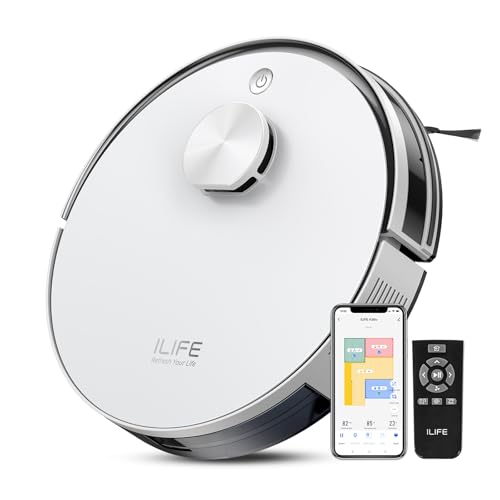
ILIFE A30s Robot Vacuum, 10,000Pa Max, LiDAR Mapping, No-Go Zones, 150 MinBest Budget LiDARILIFE A30s Robot Vacuum, 10,000Pa Max, LiDAR Mapping, No-Go Zones, 150 Minn/a10,000 Pa max in spot modeDual anti-tanglen/aLiDAR with home mapping
roborock Q7 L5 Robot Vacuum and Mop, 8,000Pa HyperForce, Dual Anti-TangleBest Mop Comboroborock Q7 L5 Robot Vacuum and Mop, 8,000Pa HyperForce, Dual Anti-TangleCharging base8,000 Pa HyperForce as listedDual anti-tangleVacuum and mopn/a

A robot vacuum does a quick, quiet clean every day so a bigger job is rarely needed. It will not replace a full vacuum on thick carpet or stairs, but it keeps hair, crumbs and dust under control on hard floors and low pile, which is where most of a home's daily dirt lands.

This guide looks at robot vacuums that fit under a $200 cap, and we favour the upper band of it. Listing prices move, and the cap reflects Amazon listing prices when this guide was last updated. Suction figures in pascals have no shared standard, so we weigh navigation, brush design and upkeep more heavily than a headline number.

Before you buy

6 Criteria to Look For Before Buying a Robot Vacuum Under $200

  1. 01

    Navigation

    LiDAR robots map the home and clean in rows, while simple bump-and-turn models wander. LiDAR also allows no-go zones and room-by-room cleaning. The Roomba 105 and ILIFE A30s use LiDAR, and the Shark uses a row-based path. Look for room-by-room cleaning and virtual walls, which stop the robot from going where you do not want it. A robot with a map can also resume after a recharge, which matters in a larger home.

  2. 02

    Dustbin and dock

    A self-emptying dock holds weeks of dust in a sealed bag, which removes the daily emptying chore. The roborock M5+ and Dreame D20 have docks, and the others do not. A dock costs floor space and bag money. Bag docks also trap dust in a sealed bag, which is kinder to allergy-minded households than emptying an open bin. Check the cost and availability of replacement bags before you buy.

  3. 03

    Brush design

    Anti-tangle brushes cut hair wrap, which is the most common robot problem. Even good designs need a snip every few weeks. Choose dual anti-tangle for long hair and pets. A rubber roller brush tends to tangle less than a bristle one and is easier to clean.

  4. 04

    Suction numbers

    Pascal figures have no shared standard across brands, so use them only within a brand. A 10,000 Pa claim from one maker may equal 6,000 from another. Judge by navigation and brush design. In practice, a robot with good navigation and a clean brush will outperform one with a bigger number and poor design.

  5. 05

    Carpet and thresholds

    Robots at this price handle low pile and hard floors, and struggle on deep pile and thick rugs. Thresholds over about half an inch can stop them. Robot vacuums handle daily shed, not deep carpet or stairs. If you have thick rugs, try a robot on a small area first, or lift the rug edges and tape tassels so the robot does not eat them.

  6. 06

    Mopping

    A mop pad on a robot is good for light dust and fresh marks, not for dried stains. Keep it off carpet and rugs. Empty and rinse the tank after each use. A robot with a mop plate often lifts the plate on carpet, but not always, so check that feature in the manual.

Detailed reviews

The 6 best robot vacuums under $200, explained

01
roborock Q7 M5+ Robot Vacuum and Mop With Self-Empty Dock, 2.7 L Bag, Dual Anti-Tangle
Self-empty dock2.7 L sealed bag10000Pa listedMop support
Check price on Amazon
Best for: Busy households that want the fewest chores and a mopping option.

The roborock Q7 M5+ pairs a robot with a self-emptying dock that holds a 2.7 litre sealed dust bag, which the listing says can go seven to nine weeks between changes. The robot uses a dual anti-tangle system to keep hair from wrapping the brush, and it can mop as well as vacuum. The dock is the real convenience, because the daily chore of emptying the bin disappears.

The trade-off is size and cost of bags. A dock takes floor space, and replacement bags are a running cost, so the low weekly effort comes with a small yearly spend. Compared with the Shark RV2110, the roborock is more automated and more capable, but it sits at a higher rung on the pricing ladder.

In practice, place the dock against a wall with clearance on both sides and near an outlet. Pick up cables and socks before each run, and map the home on the first run. Wipe the sensors and empty the mop tank if you use it. Keep a spare bag in a drawer. Owners of self-emptying robots often say the biggest change is that the vacuum actually runs every day, because there is no bin to empty first.

What works

  • Self-emptying dock holds weeks of dust
  • Dual anti-tangle brushes cope with long hair
  • Mopping and vacuuming in one unit
  • Mapping and app control support schedules

Watch out for

  • Dock takes extra floor space
  • Replacement bags are a running cost
  • Mop pad is less effective than hand mopping on dried stains

Specs

Dock
Self-emptying, 2.7 L sealed dust bag
Emptying
Up to 7 to 9 weeks per listing
Suction
10,000 Pa as listed
Brush
Dual anti-tangle system
Mopping
Vacuum and mop
02
DREAME D20 Air Plus Robot Vacuum and Mop, 20,000Pa, 120-Day Self-Empty, 4 L Bag
Self-empty dock4 L bag20,000Pa listedVacuum and mop
Check price on Amazon
Best for: Buyers who want the longest bag interval and a large claimed suction.

The Dreame D20 Air Plus is a vacuum and mop robot with a self-emptying dock and a 4 litre dust bag, and the listing quotes up to 120 days of hands-free use and 20,000 pascals of suction. The figures are marketing at the top of what the category claims, and the pascal number has no common test standard, so treat it as a rough ranking against its siblings, not as a promise on your carpet. The large bag is the most useful part.

The compromise is that big numbers on a budget robot rarely translate to deep-clean performance. Compared with the roborock Q7 M5+, the Dreame offers a larger bag and a higher claimed suction at the top of the pricing ladder, but the practical difference on hard floors is small.

In practice, use it for daily upkeep on hard floors and low pile, and use the app to set no-go zones. Replace the bag on schedule, and clean the sensors and mop pads regularly. If you live in a small flat, a dock of this size may be more than you need.

What works

  • 4 litre bag with a very long listed interval
  • Vacuum and mop in one robot
  • High claimed suction for carpet edges
  • App control for schedules and zones

Watch out for

  • Suction figure has no shared standard
  • Top rung of the pricing ladder in this guide
  • Bag changes are a running cost

Specs

Dock
Self-emptying with 4 L dust bag
Emptying
Up to 120 days per listing
Suction
20,000 Pa as listed
Mopping
Vacuum and mop
Tier
Top of the cap
03
Shark Navigator Robot Vacuum RV2110, SmartPath Navigation, Carpets and Hard Floors
SmartPath navCarpet and hard floorBrand supportSimple
Check price on Amazon
Best for: People who want a recognised brand and simple controls.

The Shark Navigator RV2110 uses SmartPath navigation to clean in tidy rows, with suction and coverage claims measured against the maker's earlier model, and it is designed for carpet and hard floors. Row-by-row cleaning is more efficient than random bouncing and shows up as fewer missed stripes. The Shark name brings easier service and parts than most budget brands.

The trade-off is features. Without a self-emptying dock or LiDAR mapping, you empty the dustbin yourself and the robot navigates with simpler sensors. Compared with the roborock, the Shark is less automated but simpler and cheaper to own.

In practice, run it daily on a schedule and empty the bin each time. Clean the brush roll every couple of weeks and wash the filter monthly. Parts such as filters and side brushes are easy to find, which keeps the robot running for years.

What works

  • SmartPath rows reduce missed areas
  • Shark service and parts are widely available
  • Designed for carpet and hard floors
  • Simple controls and app

Watch out for

  • No self-emptying dock
  • Claims compare to the maker's earlier model
  • Basic sensors compared with LiDAR

Specs

Navigation
SmartPath row-by-row
Floors
Carpet and hard floor
Claim
Up to 50% more suction than the previous model
Coverage
Up to 1.5x more coverage than the previous model
Tier
Mid rung
04
iRobot Roomba 105 Vac Robot Vacuum With Charging Base, 7,000 Pa, LiDAR Navigation
7,000 Pa listedLiDAR nav3-stage cleanCharging base
Check price on Amazon
Best for: Buyers who want a well-known brand with mapping at a modest rung.

The iRobot Roomba 105 Vac is a vacuum-only model with a charging base, a listed 7,000 pascals of suction and LiDAR-based navigation and mapping. A three-stage cleaning system lifts dirt from carpet and hard floors, and iRobot's app offers schedules. The Roomba brand is the best known in the category.

The compromise is that the base only charges, so you empty the bin yourself. Compared with the Dreame and roborock, the Roomba is simpler but less automated, and the brand name accounts for some of the price.

In practice, use the app to set a schedule and keep the sensors clean. Empty the bin after each run and replace the filter and brushes as advised. It also pairs well with a handheld vacuum for stairs, since the Roomba will not climb.

What works

  • Well-known brand with an established app
  • LiDAR navigation for efficient rows
  • Three-stage cleaning for carpet and floor
  • Charging base with a simple dock

Watch out for

  • No self-emptying base
  • Vacuum only, no mopping
  • Higher price for the brand

Specs

Suction
7,000 Pa as listed
Navigation
LiDAR mapping
Cleaning
3-stage
Dock
Charging base
Brand
iRobot Roomba
05
ILIFE A30s Robot Vacuum, 10,000Pa Max, LiDAR Mapping, No-Go Zones, 150 Min
LiDAR mappingNo-go zones150 min runAnti-tangle
Check price on Amazon
Best for: Small and medium homes that want LiDAR mapping on a tight budget.

The ILIFE A30s is a vacuum-only robot with LiDAR navigation, home mapping, no-go zones and up to 150 minutes of runtime, and its 10,000 pascal maximum applies only in spot mode, which is an honest note in the listing. A dual anti-tangle design suits pet hair. LiDAR maps the home so the robot can clean in rows and avoid areas you mark off.

The trade-off is the dustbin. It has no dock that empties itself, so a bin of modest size fills on a large home. Compared with the roborock, it lacks a dock and a mop but sits at the lowest rung of the ladder among the mapping models.

In practice, set no-go zones around pet bowls and cables, empty the bin after each run and clean the sensors. It suits a small to medium flat. Because there is no dock, plan to empty it right after each run so dust does not blow back out.

What works

  • LiDAR mapping and no-go zones at a low rung
  • Dual anti-tangle brush for pet hair
  • Long runtime of up to 150 minutes
  • Honest note on suction in spot mode

Watch out for

  • No self-emptying dock
  • No mopping
  • Bin is small for a large home

Specs

Navigation
LiDAR with home mapping
Zones
No-go zones
Runtime
Up to 150 min
Brush
Dual anti-tangle
Suction
10,000 Pa max in spot mode
06
roborock Q7 L5 Robot Vacuum and Mop, 8,000Pa HyperForce, Dual Anti-Tangle
8,000Pa listedVacuum and mopDual anti-tangleUpgraded from Q5 Pro
Check price on Amazon
Best for: Buyers who want roborock mapping and mopping without a dock.

The roborock Q7 L5 is a vacuum and mop robot with 8,000 pascals of listed suction, a dual anti-tangle brush system and an upgrade from the maker's earlier Q5 Pro. It lacks the self-emptying dock of the M5+, so it is a simpler and cheaper way to get roborock navigation and mopping. The mop is designed for light daily cleaning.

The trade-off is that you empty the bin and refill the mop tank yourself. Compared with the Q7 M5+, the L5 sits lower on the ladder and gives up the dock.

In practice, use it for daily upkeep, empty the bin each run and rinse the mop pad. It suits a small to medium home. Rinse the mop pad after each run and let it air dry so it does not smell.

What works

  • 8,000 Pa HyperForce suction as listed
  • Dual anti-tangle brushes cope with hair
  • Vacuum and mop in one unit
  • Lower rung than the self-emptying model

Watch out for

  • No self-emptying dock
  • Mop is for light cleaning
  • Bin needs emptying each run

Specs

Suction
8,000 Pa HyperForce as listed
Brush
Dual anti-tangle
Mopping
Vacuum and mop
Dock
Charging base
Lineage
Upgraded from the Q5 Pro

Spec decoder

What the listing measurements really mean

The numbers brands lead with, translated into what they tell you about fit, comfort and wear at home.

Pascals

Pa is a measure of suction pressure. It is not standardised across brands.

Watch forThe Dreame lists 20,000 Pa and the Roomba 7,000 Pa, but they are not comparable. Claims are best compared within a single maker's range.

LiDAR

LiDAR uses a spinning laser to map a room. It allows rows and no-go zones.

Watch forThe Roomba 105 and ILIFE A30s list LiDAR. A map also lets you clean one room on request.

Self-emptying

A dock that sucks dust from the robot into a bag. It cuts emptying to weeks.

Watch forThe roborock M5+ and Dreame list it. Docks cost floor space and bags.

Anti-tangle

A brush design that limits hair wrap. It reduces cleaning.

Watch forThe roborock models list dual anti-tangle. Check the brush every few weeks regardless.

No-go zones

Areas you mark in the app that the robot avoids. They protect cables and pet bowls.

Watch forCheck that the app supports them. Mark cables and pet bowls first.

Methodology

How We Evaluated These Robot Vacuums Under $200

Navigation and mapping

We evaluated navigation type from the listings. LiDAR and row-based paths scored higher than random bumping. We noted the ILIFE A30s for low-rung LiDAR. A robot that cleans in rows tends to miss less floor.

Dustbin and upkeep

We compared bins and docks. The roborock M5+ and Dreame stood out for weeks of hands-free use. We noted bag costs. We also noted bag size and the claimed interval.

Brush and hair

We researched brush design for pet hair. Dual anti-tangle designs scored higher. Hair wrap is the most common complaint.

Owner feedback patterns

We looked at recurring themes in owner feedback, such as getting stuck and app problems. We never count stars. These patterns shaped our cons. Getting stuck on cables and rugs was the recurring theme.

Budget band

We favoured the upper band of the $200 cap and excluded premium Shark and roborock models above it. Prices move, so check before buying. We kept to robots that fit the cap with a live listing.

Decision guide

How to Choose the Right Robot Vacuums Under $200

By Home

SituationPickWhy
Busy householdroborock Q7 M5+Self-emptying dock
Long dock intervalDREAME D20 Air Plus4 L bag
Simple and familiarShark RV2110SmartPath rows
Mapping brandRoomba 105 VacLiDAR
Small flatILIFE A30sLiDAR at low rung

By Budget

TierPickWhat you get
LowerILIFE A30sLiDAR and no-go zones
Lower-midroborock Q7 L5Mop and vacuum
MidShark RV2110Familiar brand
Upper-midRoomba 105 VaciRobot with LiDAR
Top of caproborock M5+ and DreameSelf-emptying docks

Dock vs No Dock

Self-emptying dock (roborock M5+, Dreame)

Weeks between bin trips and less dust exposure. Costs floor space and bag money.

No dock (Shark, Roomba, ILIFE)

Simpler and cheaper. You empty the bin after each run.

Choose a dock for busy homes and no dock for small flats.

By Floor Type

FloorPickWhy
Hard floorsroborock Q7 L5Vacuum and mop
Low pileRoomba 105 Vac3-stage clean
Mixed floorsShark RV2110Carpet and hard floor
Pet hairILIFE A30sDual anti-tangle
Large homeDreame D204 L dock bag

For Pet Owners Specifically

Look for

Dual anti-tangle brushes, a self-emptying dock and no-go zones for water bowls.

In this comparison

The roborock and ILIFE models suit pets best.

When to Spend More

Spend more if

You want obstacle avoidance, a self-washing mop dock or strong carpet performance. Those cost more than this cap.

Save if

You want daily upkeep on hard floors. These robots do that.

Ownership

Maintenance schedule

The upkeep that decides whether a piece still looks good in year five.

TaskIntervalWhy it matters
Empty the dustbinAfter each run or per dockA full bin lowers suction. A dock reduces this to weeks. Do it outdoors if you can to avoid a dust cloud.
Clean the brush rollEvery 2 weeksHair wraps even anti-tangle brushes. Snip with scissors. A small pair of scissors makes this quick.
Wash the filterMonthlyA clogged filter cuts suction. Rinse and dry for 24 hours. Let it dry fully before refitting.
Wipe the sensorsEvery 2 weeksDust confuses cliff and wall sensors. Use a dry cloth. Dirty sensors cause the robot to stop or bump.
Replace brushes and bagsEvery 6 to 12 monthsWorn parts reduce performance. Replace on schedule. Keep spare parts in a drawer.

FAQ

Frequently Asked Questions

Do robot vacuums replace a normal vacuum?

No. They handle daily shed on hard floors and low pile but not deep carpet or stairs. A robot keeps daily dirt down between deep cleans.

Is LiDAR worth it?

Yes, for mapping, rows and no-go zones. It is no longer expensive. Maps also let you send the robot to one room.

Do I need a self-emptying dock?

Not strictly, but it removes daily emptying. A dock mostly saves time.

Are suction numbers reliable?

Not across brands. Use them within a brand. Pascal figures have no common test.

Can they mop?

Some can, but only lightly. Keep mop pads off carpet. Never use a mop pad on carpet.

What does a $200 cap buy?

A mapping or dock model with basic features. Premium obstacle avoidance costs more. Prices move, so check before buying.

Bottom line

The short version

Browse more robot vacuums under $200on Amazon →
Elena Hart, Lead Home Editor

About the author

Elena Hart

Lead Home Editor, SweetLivingRoom

Elena Hart leads SweetLivingRoom's buying guides, turning product dimensions, material specs and owner feedback into clear verdicts on sofas, rugs, lighting, storage and decor.

More from Elena →

Keep reading

Related guides