
Amazon affiliate links - we earn a commission.Affiliate disclosure

Buying guide · 13 min read · Updated 2026-11-26

Best Projector Stands (2026)

Seven tripod and floor projector stands compared on height range, load rating, tray size, casters, ball head tilt and stability, with notes on wobble.

Elena Hart, Lead Home EditorBy Elena HartLead Home Editor7 picks comparedSpec-sheet verified
Best Projector Stands

At a glance

Our top picks

Side by side

Spec comparison

PieceHeightUsePrice tier
CAHAYA Adjustable Projector Tripod Stand with CastersBest OverallCAHAYA Adjustable Projector Tripod Stand with CastersAdjustableProjector, laptop and other devicesSecond cheapest in the lineup
CAHAYA Projector Stand Tripod, 26 to 51.5 in, Tool-Free AssemblyBest Tool-FreeCAHAYA Projector Stand Tripod, 26 to 51.5 in, Tool-Free Assembly26 to 51.5 inn/aCheapest in the lineup
DECOSIS Projector Tripod Stand, 23.5 to 46.5 in, Safety LatchBest Safety LatchDECOSIS Projector Tripod Stand, 23.5 to 46.5 in, Safety Latch23.5 to 46.5 inn/aFifth cheapest in the lineup
LEORFI Projector Tripod Stand with Iron Folding Plate and Steel TubesBest Steel BuildLEORFI Projector Tripod Stand with Iron Folding Plate and Steel Tubesn/aProjector, laptop, devicesThird cheapest in the lineup
Facilife Projector Stand Tripod, 22 lb Maximum LoadBest Stated LoadFacilife Projector Stand Tripod, 22 lb Maximum LoadAdjustableTall projector standSixth cheapest in the lineup
PUTORSEN Universal Projector Floor Stand with 360 Degree Ball Head, WhiteBest Ball HeadPUTORSEN Universal Projector Floor Stand with 360 Degree Ball Head, WhiteAdjustable floor standn/aUpper end of the lineup
Lusweimi Projector Tripod Stand with 2 Shelves, 26.7 to 50 inBest Two-Shelf StandLusweimi Projector Tripod Stand with 2 Shelves, 26.7 to 50 in26.7 to 50 inProjector, tablet, laptopMost expensive in the lineup

A projector stand puts the projector where the picture lands on the screen without drilling a ceiling, and it moves when the room does. That is the whole case for a tripod in a living room. The catch is stability: a tall, narrow tripod with a projector on top is a lever, and every nudge shows up as a shake in the picture.

This guide compares seven projector stands on height range, load rating, tray size, caster use and adjustment. We evaluated each from published specifications and patterns in owner feedback, and we say plainly where a listing gives no weight rating or no leg-spread figure. Scores are editorial assessments, not measurements.

Before you buy

6 Criteria to Look For Before Buying a Projector Stand

  1. 01

    Height range and eye line

    A stand needs to place the lens at the height that suits the throw. The CAHAYA reaches 26 to 51.5 in, the DECOSIS 23.5 to 46.5 in. Extend only as far as needed. A tall, thin tripod has a high centre of gravity. Seated eye level is about 40 in, so a lens at that height on a stand behind the sofa needs a stand that reaches it comfortably.

  2. 02

    Load rating and projector weight

    Most home projectors weigh well under 20 lb. The Facilife states 22 lb. Many listings state nothing. Choose a stand with a rating at least double your projector. Add a margin for a streaming stick, a power brick and cables that hang from the shelf.

  3. 03

    Tray, ball head or tripod plate

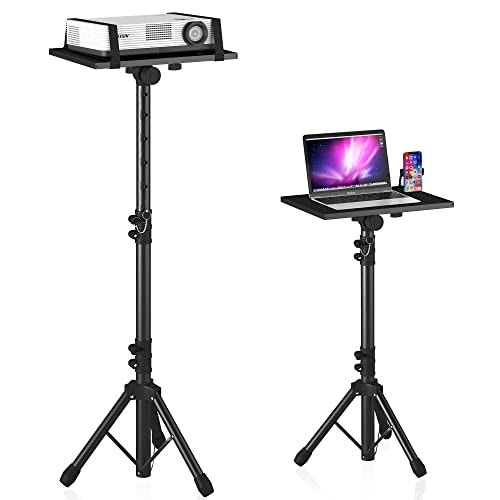
    A tray suits projectors with no holes, as on the Lusweimi. A ball head, as on the PUTORSEN, suits aiming at odd angles and needs a threaded base. Check your projector's underside. Many tripod-style stands use a standard quarter inch threaded screw, which many projectors share.

  4. 04

    Casters or fixed feet

    Casters, as on the CAHAYA, make a stand mobile but add wobble. Fixed feet are steadier. Lock the casters in use. On carpet, casters sink and the stand tips more easily, so use a mat.

  5. 05

    Leg spread and stability

    A wider leg spread resists tipping. Thick steel tubes, as on the LEORFI at 32 mm, add rigidity. Place the stand on a hard, flat surface. Keep walkways clear of the legs, because a leg caught by a foot is the most common cause of a fall.

  6. 06

    Ownership after year three

    Clamps loosen, casters wear and finishes scratch. No independent source documents lifespan for these stands. Tighten clamps every season. A stand used every week ages faster than one used a few times a year.

Detailed reviews

The 7 best projector stands, explained

01
CAHAYA Adjustable Projector Tripod Stand with Casters
CastersAdjustable heightLaptop trayPortable
Check price on Amazon
Best for: Family rooms where the projector rolls out for movie nights.

This tripod has omnidirectional casters, an adjustable height and a laptop tray, and the listing says it suits nearly all projectors. Casters make it easy to roll to the sofa or away to a corner. It is the second cheapest stand in the comparison, which is rare for a wheeled design.

The tradeoff is that casters add a little wobble compared with fixed feet, and a rolling tripod needs locking wheels or a flat floor. Compared with the Lusweimi, it is simpler but has fewer shelves. A tripod base with casters can drift if you push the projector.

In a real room, lock the casters when the stand is in use, and keep the legs fully spread. Tighten the height clamps after a week and check the tray screw. It suits a family living room where the projector comes out for movie nights and goes away after. A thin rubber mat under each foot also reduces slide on a polished floor.

What works

  • Omnidirectional casters make it easy to roll and store
  • Adjustable height suits sofa and floor viewing
  • Laptop tray holds a source device
  • Second cheapest price tier in the comparison

Watch out for

  • Casters add a little wobble compared with fixed feet
  • A rolling base can drift if the casters are not locked

Specs

Casters
Omnidirectional, with a spare
Height
Adjustable
Tray
Laptop tray
Use
Projector, laptop and other devices
Price tier
Second cheapest in the lineup
02
CAHAYA Projector Stand Tripod, 26 to 51.5 in, Tool-Free Assembly
26 to 51.5 inTool-freeUniversal trayPortable
Check price on Amazon
Best for: Households that want the cheapest tool-free tripod with a wide height range.

This tripod stand has a stated height range of 26 to 51.5 in, tool-free assembly and a universal tray for nearly all projectors. It is the cheapest stand in the comparison. The wide height range lets you aim at a screen from a low sofa or a standing position.

The tradeoff is that the load rating is not stated in the data we reviewed, and a 51.5 in extension on thin legs is a tipping risk. Compared with the casters model, it has fixed feet, which are steadier. A tool-free clamp loosens if overtightened by hand.

For ownership, extend only as high as needed and keep the legs wide. It suits a household that wants the cheapest tool-free tripod. Keep the tray clean, because dust under the projector raises its temperature.

What works

  • A stated 26 to 51.5 in height range helps planning
  • Tool-free assembly takes minutes
  • Universal tray fits nearly all projectors
  • Cheapest price tier in the comparison

Watch out for

  • Load rating is not stated in the data we reviewed
  • Full extension on thin legs risks tipping

Specs

Height
26 to 51.5 in
Assembly
Tool-free, intuitive
Compatibility
Nearly all projectors
Tray
Adjustable rack tray
Price tier
Cheapest in the lineup
03
DECOSIS Projector Tripod Stand, 23.5 to 46.5 in, Safety Latch
23.5 to 46.5 inSafety latchLaptop tray5 to 10 min setup
Check price on Amazon
Best for: Households with children that want a safety latch on a tall stand.

This tripod has a stated height of 23.5 to 46.5 in and a safety latch that the listing says avoids the danger of falling. Setup takes five to ten minutes according to the included accessories. A safety latch is a meaningful extra on a tall stand.

The tradeoff is that the data we reviewed gives no weight rating, and a latch does not fix a narrow leg spread. Compared with the CAHAYA, it has a lower maximum height and a latch. Metal leg joints can loosen if overtightened.

For ownership, check the latch each time you raise the stand. It suits a household with children. It is a good partner for a screen on a wall that sits at standing height.

What works

  • A safety latch helps prevent a sudden drop
  • Stated 23.5 to 46.5 in height range aids planning
  • Setup takes five to ten minutes
  • Laptop tray suits a source device

Watch out for

  • No weight rating is stated in the data we reviewed
  • A latch does not fix a narrow leg spread

Specs

Height
23.5 to 46.5 in
Safety
Latch to prevent falling
Tray
Laptop-sized
Setup
Five to ten minutes
Price tier
Fifth cheapest in the lineup
04
LEORFI Projector Tripod Stand with Iron Folding Plate and Steel Tubes
Iron plate32 mm brushed steelFoldablePortable
Check price on Amazon
Best for: Households that want a sturdier steel tripod at a low price.

This tripod has an iron folding plate and 32 mm diameter brushed steel tubes, which the listing says are stable and durable. A 32 mm tube is thicker than many thin aluminium stands. It is the third cheapest stand here.

The tradeoff is weight: steel and iron make it heavier to carry. Compared with the PUTORSEN, it is a tray stand rather than a ball-head stand. Brushed steel resists corrosion but can scratch.

For ownership, tighten the clamps and wipe the tubes. It suits a household that wants a sturdier-feeling stand. Because the plate folds, it stores flat behind a sofa or in a cupboard.

What works

  • 32 mm brushed steel tubes are thicker than many rivals
  • Iron folding plate adds rigidity
  • Foldable for storage
  • Third cheapest price tier

Watch out for

  • Heavier to carry than aluminium stands
  • Brushed steel can scratch

Specs

Plate
Iron folding plate
Tubes
32 mm diameter brushed steel
Fold
Foldable for storage
Use
Projector, laptop, devices
Price tier
Third cheapest in the lineup
05
Facilife Projector Stand Tripod, 22 lb Maximum Load
22 lb loadMetal buildTall standLaptop tripod
Check price on Amazon
Best for: Households that want a stated load figure on a tall tripod.

This tripod states a maximum load of 22 lb, with a new metal build and an adjustable height for a tall projector stand. A stated load is the main reason it ranks well. It sits in the upper half of the price range.

The tradeoff is that 22 lb is adequate for most home projectors but not for heavy models, and the height figure is not clear in the data we reviewed. Compared with the DECOSIS, it states a load but not a latch. A metal build is more rigid than plastic.

For ownership, stay well under 22 lb and keep the legs spread. It suits a household that wants a stated rating. A stated load is a good starting point, but leave a margin for the cable and the lens cap.

What works

  • A stated 22 lb maximum load gives a real figure
  • New metal build is more rigid than plastic
  • Tall stand suits sofa-level projection
  • Adjustable height

Watch out for

  • 22 lb is not enough for heavy projectors
  • Height range is not clear in the data we reviewed

Specs

Maximum load
22 lb
Material
New metal material
Use
Tall projector stand
Height
Adjustable
Price tier
Sixth cheapest in the lineup
06
PUTORSEN Universal Projector Floor Stand with 360 Degree Ball Head, White
360 degree ball headCarbon steelStainless coatingWhite
Check price on Amazon
Best for: Rooms that need unusual aiming, such as ceiling or angled projection.

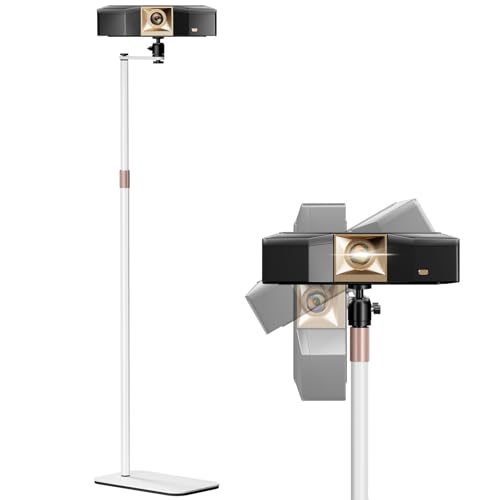
This floor stand has a 360 degree ball head for aiming, carbon steel with a stainless coating and an adjustable height in white. A ball head allows aiming at a ceiling or a wall, which a tray cannot do. It sits at the upper end of the price range.

The tradeoff is that a ball head needs a threaded projector base, so check your model. Compared with the tray stands, it suits ceiling projection or odd angles. A white finish suits a bright room.

For ownership, tighten the ball head locking knob and wipe the white finish. It suits a room where the image needs unusual aiming. A white stand also blends into a light wall, which helps when the projector stays set up.

What works

  • A 360 degree ball head allows any aiming angle
  • Carbon steel with a stainless coating is sturdy
  • White finish suits bright rooms
  • Adjustable height floor stand

Watch out for

  • Needs a threaded projector base
  • Upper price tier

Specs

Head
360 degree ball head
Material
Carbon steel with stainless coating
Height
Adjustable floor stand
Finish
White
Price tier
Upper end of the lineup
07
Lusweimi Projector Tripod Stand with 2 Shelves, 26.7 to 50 in
26.7 to 50 in2 shelvesIron top trayDetachable tray
Check price on Amazon
Best for: Family rooms that want a shelf for a source device and a drink.

This tripod adjusts from 26.7 to 50 in, with an iron top tray and a detachable beverage tray. Two shelves give a place for a source device and a drink. It is the most expensive stand in the comparison.

The tradeoff is price and weight. A second shelf adds weight high up on a tripod, which raises the tipping risk. Compared with the CAHAYA, it offers more surfaces but costs more. A detachable tray can be removed when the stand is crowded.

For ownership, keep drinks low and avoid loading the top. It suits a family room. Because the top tray is iron, it holds a heavier projector than a plastic tray.

What works

  • Two shelves hold a source device and a drink
  • Stated 26.7 to 50 in height range aids planning
  • Iron top tray is sturdy
  • Detachable tray can be removed when not needed

Watch out for

  • Most expensive stand in the comparison
  • A second shelf adds weight high up

Specs

Height
26.7 to 50 in
Shelves
Top iron tray plus detachable beverage tray
Use
Projector, tablet, laptop
Material
Iron top tray
Price tier
Most expensive in the lineup

Spec decoder

What the listing measurements really mean

The numbers brands lead with, translated into what they tell you about fit, comfort and wear at home.

Maximum load

The weight the stand is rated to carry. It is a manufacturer figure. Treat it as the limit and not a target.

Watch forThe Facilife states 22 lb. Leave a margin.

Ball head

A swivel joint that lets you aim in any direction. It locks with a knob. Check your projector's base for a threaded socket.

Watch forThe PUTORSEN has one.

Tube diameter

The thickness of the leg tubes. Thicker tubes are stiffer. Thicker tubes resist wobble.

Watch forThe LEORFI lists 32 mm. Most rivals state nothing.

Safety latch

A catch that stops the stand from dropping suddenly. It helps prevent accidents. Check it each time you raise the stand.

Watch forThe DECOSIS has one.

Caster

A wheel at the foot of the stand. It adds mobility but can add wobble. Choose locking wheels.

Watch forThe CAHAYA with casters has them.

Methodology

How We Evaluated These Projector Stands

Stated ranges

We checked whether each listing states a height range. The CAHAYA, DECOSIS and Lusweimi do. Missing figures count against a pick. A stated range is more useful than a vague word like adjustable.

Load honesty

We noted whether listings state a weight rating. Only the Facilife does. We could not verify the figure. We treat a stated rating as a manufacturer claim.

Stability design

We looked at tube thickness, leg spread and latches. Thicker tubes and latches earned credit. We could not verify tip resistance. Locks and latches earned credit but not a guarantee.

Adjustment type

We compared trays, ball heads and plates. Ball heads aim best but need a threaded base. Scores are editorial. Ball heads were judged on aiming flexibility rather than stability.

Owner feedback patterns

We read patterns in owner feedback on wobble, loosening clamps and tray fit. These themes recur in the category. We do not publish ratings or review counts.

Decision guide

How to Choose the Right Projector Stands

By Use

SituationPickWhy
Movie nights, mobileCAHAYA with CastersRolls out and away
Tool-free setupCAHAYA 26 to 51.5 inTool-free assembly
Children at homeDECOSIS with LatchSafety latch
Heavier projectorLEORFI Steel Stand32 mm steel tubes
Odd aiming anglesPUTORSEN Ball Head360 degree head

By Budget

SituationPickWhy
Lowest spendCAHAYA 26 to 51.5 inCheapest tier
Low spendCAHAYA with CastersSecond cheapest tier
Low to middleLEORFI Steel StandThird cheapest tier
Middle spendDECOSIS with LatchFifth cheapest tier
Top spendLusweimi Two-ShelfMost expensive

Tripod vs Ball Head Stand

Tripod with tray

Fits most projectors with no holes. It aims by tilting the tray.

Ball head stand

Aims in any direction for ceiling or angled use. It needs a threaded projector base.

Choose a tray for most rooms and a ball head for unusual aiming. Most living rooms are well served by a tray stand.

By Room Setup

SituationPickWhy
Low sofaDECOSIS 23.5 to 46.5 inLower minimum height
High ceilingCAHAYA 26 to 51.5 inHighest maximum
Need a source shelfLusweimi Two-ShelfTwo trays
Carpeted roomLEORFI Steel StandHeavy base
Tight cornersCAHAYA with CastersRolls away

For Family Rooms Specifically

Look for

A safety latch, locking casters and a wide leg spread. Avoid tall, thin stands near play areas.

In this comparison

The DECOSIS has a latch. The CAHAYA with casters is easy to move.

Keep cables off the floor to avoid tripping. Gaffer tape along the floor cables helps prevent trips.

When to Spend More

Spend more if

You want two shelves, a ball head or a stated load, as the Lusweimi, PUTORSEN and Facilife offer.

Save if

The stand is for occasional movie nights. The CAHAYA models cover that need.

Prices move, so compare current listings. Check the stated height range against your screen before paying for extras.

Ownership

Maintenance schedule

The upkeep that decides whether a piece still looks good in year five.

TaskIntervalWhy it matters
Tighten clamps and knobsEvery three monthsClamps loosen with use. A snug clamp prevents sag. Use a hex key that fits snugly.
Check leg spread and feetEach useA narrow spread tips easily. Spread the legs fully. Look at the spread before turning the projector on.
Lock castersEach useUnlocked casters let the stand drift. Lock them before you start the projector. Do this every time, because a drifting stand shakes the picture.
Wipe the tubes and trayMonthlyDust and oils dull finishes. A damp cloth keeps them clean. A dry cloth is gentler on a white finish.
Check cablesEvery six monthsCables can pull on the projector. Keep them loose.

FAQ

Frequently Asked Questions

How high should a projector stand be?

It depends on the throw and the screen. Many stands span 26 to 50 in. Measure from the floor to the lens height you need for your screen.

Do projector tripods wobble?

They can when extended on thin legs. Spread the legs and extend only as high as needed. A stand behind a sofa is safer than one beside a walkway.

What load can a projector stand hold?

Few listings state a rating, and the Facilife lists 22 lb. We cannot verify others. Stay well under the stated figure for a safety margin.

Do I need a ball head?

Only for unusual aiming. A tray suits most projectors. Check your projector's base for a threaded socket first.

Are casters a good idea?

They make the stand mobile but add wobble. Lock them in use. Rubber-footed legs are steadier on hardwood.

Do these stands last?

Metal stands last if clamps stay tight. No independent source documents lifespan. Replace any stand with a bent leg or a cracked clamp. A wobbly stand with a projector on top is not worth the risk.

Bottom line

The short version

Browse more projector standson Amazon →
Elena Hart, Lead Home Editor

About the author

Elena Hart

Lead Home Editor, SweetLivingRoom

Elena Hart leads SweetLivingRoom's buying guides, turning product dimensions, material specs and owner feedback into clear verdicts on sofas, rugs, lighting, storage and decor.

More from Elena →

Keep reading

Related guides