
Amazon affiliate links - we earn a commission.Affiliate disclosure

Buying guide · 12 min read · Updated 2026-11-27

Best Indoor Security Cameras (2026)

Seven indoor security cameras compared on resolution, pan and tilt, storage options, subscriptions and privacy controls, for living rooms, pets and family.

Elena Hart, Lead Home EditorBy Elena HartLead Home Editor7 picks comparedSpec-sheet verified
Best Indoor Security Cameras

At a glance

Our top picks

Side by side

Spec comparison

An indoor security camera is a small, plug in camera that watches a room and sends clips or live video to your phone. People buy them to check on pets, children, a nanny or an empty house, and to see who has come in. They are cheap to try, and easy to set up wrongly.

The choices that matter are rarely the headline resolution. They are where the video is stored, which features need a paid plan, whether the camera can pan and tilt, and what privacy controls you get. This guide compares seven cameras on those points and explains who each suits.

Before you buy

6 Criteria to Look For Before Buying an Indoor Security Camera

  1. 01

    Storage and subscriptions

    Cloud storage gives remote access but usually costs a monthly fee, and a microSD card records locally without one. The Tapo C211 takes a card of up to 512GB, while the Ring and Blink cameras lean on paid plans for recorded history. Many cameras lock person alerts and clip history behind a plan, which is the most common surprise.

  2. 02

    Resolution and zoom

    Resolution runs from 1080P on the Tapo C100 to 2K on the Tapo C211 and Blink, to 4K on the eufy E30 and Anona. Higher resolution lets you zoom into a recording, but files are larger and need more bandwidth. Night footage is often the limit, because infrared video is black and white and grainy at any resolution.

  3. 03

    Pan and tilt versus fixed

    A pan and tilt camera, like the Tapo C211, eufy E30, Anona and Ring Pan Tilt, can cover a room from a shelf, but it watches only one angle at a time. A fixed camera such as the Blink Mini 2K+ sees the same view all the time, which is better for a doorway. Auto tracking helps follow a pet but can miss events elsewhere.

  4. 04

    Privacy and account security

    A camera in a living room records family life, so look for privacy zones, schedules and an obvious camera off mode, and use a strong, unique password with two step sign in. Cloud storage carries hacking risk, and local storage keeps footage in your home.

  5. 05

    Wi-Fi and power

    Most cheap cameras use 2.4 GHz Wi-Fi, and the Anona adds 5 GHz dual band. A weak signal gives choppy video, so check the signal where you mount it. All of these cameras plug in, so a power cut stops them, and only a card with a backup supply keeps recording.

  6. 06

    AI detection and alerts

    Simple motion alerts trigger on shadows and pets, while person detection filters some of that. The eufy E30 and Anona advertise on device AI that tells people, pets and a crying baby apart, and the Tapo C100 offers person alerts. These are maker claims, and accuracy changes with light and distance.

Detailed reviews

The 7 best indoor security cameras, explained

01
Tapo C211 2K Pan Tilt Indoor Security Camera, 2 Pack, microSD Slot
2K videoPan and tiltmicroSD slot2 pack
Check price on Amazon
Best for: Living rooms that need wide coverage and local recording without a monthly plan.

The Tapo C211 is a pan and tilt camera with a 2K picture, a motorised head that turns 360 degrees horizontally and 114 degrees vertically, two way audio and a siren. Its most useful feature is local storage: it takes a microSD card of up to 512GB, which is sold separately, so you can record without a paid plan. A cloud service called Tapo Care is optional.

The pan and tilt head is why it beats the fixed cameras for a living room. One camera on a shelf can follow a pet or sweep an open plan room that a fixed lens would cover only in part. It costs more than the Tapo C100 because it is a two pack and has the better camera, and less than the eufy and Anona 4K models. Against the Ring Pan Tilt, it offers a higher resolution and a local card slot, while Ring leans on its app and its plans.

Setup is quick, but plan the details. Buy a good quality high endurance microSD card, because cards wear out and are not made for constant rewriting. Mount the camera high and out of reach, and use the privacy mode in the app so the lens turns away when you are home.

What works

  • Pan and tilt head covers a whole room from one spot on a shelf
  • A microSD slot records locally, with a card of up to 512GB
  • Two cameras in one pack cover a second room or angle
  • Two way audio and a siren are included in the camera itself

Watch out for

  • The microSD card is not included and needs a durable high endurance type
  • Plug in power means no recording during a power cut

Specs

Resolution
2K
Coverage
360 degree pan, 114 degree tilt
Local storage
microSD up to 512GB, card not included
Cloud option
Tapo Care subscription
Cost tier
Upper mid, two cameras
02
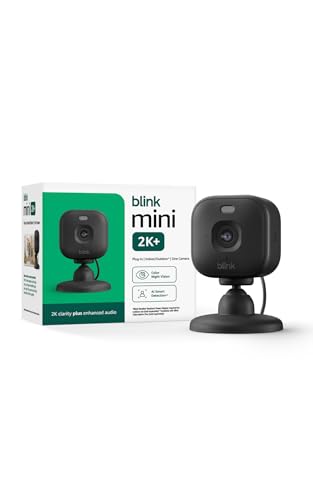
Blink Mini 2K+ Plug In Indoor Camera, 2K Video, Two Way Talk
2K videoPlug in4x zoomNight vision
Check price on Amazon
Best for: Small rooms and first time buyers who want a cheap, tiny plug in camera.

The Blink Mini 2K+ is the third generation of a very small plug in camera. It records in 2K, offers up to four times zoom, includes night vision and two way talk with noise cancellation, and the body is small enough to hide on a bookshelf or a window ledge. It is the cheapest camera in the lineup and the easiest to place.

Simplicity is the selling point. There is no pan and tilt motor, so it watches a single fixed view, and storage options are limited compared with a model with a card slot. It costs less than the Ring Indoor Cam 2K and the Tapo pair, and the compromise is that recorded video and some alerts rely on the Blink subscription plan, so check the cost of the plan against your needs. Live view is available without one.

Because the camera is small and light, it can be knocked off a shelf or nudged out of position. Use the stand's mount or a little putty to fix it, and aim it at a doorway or a pet area rather than at a window with glare. Keep it on a good signal and update the app when it asks.

What works

  • Lowest cost in the guide, so a camera in every room is affordable
  • Compact body hides easily on a shelf or window ledge
  • A 2K picture with up to 4x zoom shows detail across a room
  • Two way talk with noise cancelling helps talk to a pet or child

Watch out for

  • Fixed lens covers one view, with no pan or tilt motor
  • Recorded history and some alerts rely on a paid Blink plan

Specs

Resolution
2K
Zoom
Up to 4x
Audio
Two way talk, noise cancelling
Power
Plug in, compact
Cost tier
Lowest in this guide
03
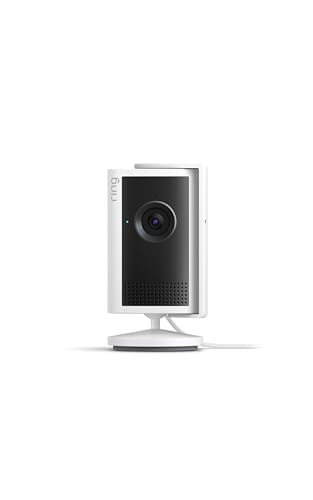
Ring Indoor Cam 2K with Retinal 2K Video and 6x Enhanced Zoom
Retinal 2K6x zoomLow light colourPlug in
Check price on Amazon
Best for: Households already using Ring or Alexa who want a well supported fixed camera.

The Ring Indoor Cam 2K has what the brand calls Retinal 2K video, up to six times enhanced zoom and a Low Light Sight feature that gives colour video when there is a little ambient light. It sits in the Ring ecosystem, so it works with the Ring app and with Alexa devices, which is the main reason to choose it over a no name brand.

The zoom is the standout: six times enhanced zoom is more than the Blink Mini 2K+ at four. The tradeoff is platform lock in. Ring cameras are best used with a Ring plan for recorded video and person alerts, and without it you mostly get live view. It costs a little more than the Blink and less than the Tapo two pack per unit, so it is a middle choice for a person who wants a well known app.

Place it with a clear view of the area you care about and avoid pointing at a bright window, which makes the picture hard to read. A fixed camera should sit above head height, and a small cable cover keeps the cord tidy.

What works

  • Up to 6x enhanced zoom gives the most reach of the fixed cameras
  • Low Light Sight returns colour video when there is some ambient light
  • Works with the Ring app and Alexa devices for easy control
  • Well supported platform with regular app updates

Watch out for

  • Recorded history and person alerts generally need a paid Ring plan
  • Fixed lens has no pan or tilt, so one view only

Specs

Resolution
Retinal 2K
Zoom
Up to 6x enhanced
Night
Low Light Sight, true colour in ambient light
Platform
Ring app, Alexa support
Cost tier
Lower mid
04
eufy Security 4K Indoor Camera E30, Pan Tilt, AI Tracking, No Subscription
4K videoPan and tiltAI trackingNo subscription
Check price on Amazon
Best for: Buyers who want 4K, smart tracking and no recurring plan, and will pay for it.

The eufy E30 is a 4K pan and tilt camera that the listing sells as subscription free. It records 24 hours a day, has a 360 degree panoramic view, colour night vision and on device AI that tells people, pets, sounds and a crying baby apart, and it can track a moving subject automatically. The AI runs on the camera, which means less data goes to the cloud for basic detection.

That combination makes it the most capable camera here and the most expensive. Resolution at 4K gives more room to zoom into a picture, but it also means larger files, so a big storage card or a home base is wise. Against the Anona 4K, a similar spec with a less established app, the eufy has a longer brand record. Against the Tapo C211 it offers more pixels and smarter tracking at a higher cost.

On device AI is a maker claim, and accuracy varies with light and distance, so do not treat it as a security guarantee. Auto tracking is useful for a pet and distracting for a still room, so switch it off when you do not need it.

What works

  • 4K video gives the sharpest picture for zooming into detail
  • On device AI tells people, pets and sounds apart without a plan
  • Pan and tilt with auto tracking follows a pet around a room
  • Marketed with no subscription, so the base features have no recurring cost

Watch out for

  • Highest cost in the lineup for a plug in indoor camera
  • 4K files are large and AI accuracy depends on light and distance

Specs

Resolution
4K
Coverage
360 degree panoramic view
AI
On device human, pet and baby cry detection
Night
Colour night vision
Cost tier
Highest in this guide
05
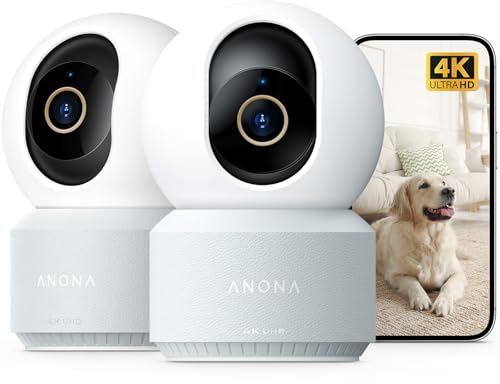
Anona 4K UHD Indoor Camera, 360 Pan Tilt, Wi-Fi 6, Pet and Baby Alerts
4K video360 pan, 110 tiltDual bandAI alerts
Check price on Amazon
Best for: People who want 4K pan and tilt at a lower cost and accept a smaller brand.

The Anona is another 4K pan and tilt camera, with a 360 degree pan, a 110 degree tilt and dual band Wi-Fi 6. The listing says its AI algorithms can detect pets, people and a crying baby and send you a different alert for each. The wider dual band support helps if your 2.4 GHz network is crowded.

It costs a little less than the eufy E30, which makes it a decent alternative for a buyer who wants 4K at a lower cost. The compromise is the ecosystem: Anona is a smaller brand than eufy, Ring or Tapo, so the app and long term firmware support are less certain. A camera that stops getting updates becomes a security risk, which is the main reason to choose a larger brand if you plan to keep it for years.

Before buying, check which storage options the listing supports, since our data does not give the details, and whether it works with your voice assistant. Place it on a stable shelf, because a pan motor moves the whole head, and avoid pointing it at a window.

What works

  • 4K UHD video at a lower cost than the eufy E30
  • 360 degree pan and 110 degree tilt cover an open plan room
  • Dual band Wi-Fi 6 helps in a crowded home network
  • Separate alerts for people, pets and a crying baby

Watch out for

  • Smaller brand means less certain long term app and firmware support
  • AI detection is a maker claim and storage details are less clear

Specs

Resolution
4K UHD
Coverage
360 degree pan, 110 degree tilt
Wi-Fi
Dual band 2.4 and 5 GHz, Wi-Fi 6
AI
Detects people, pets and baby crying
Cost tier
High
06
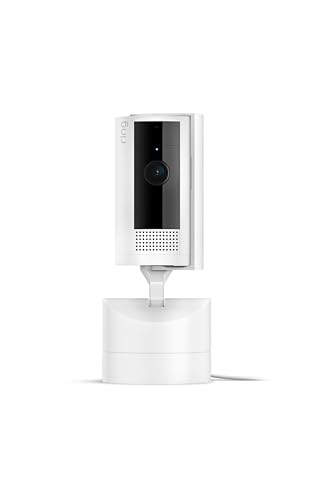
Ring Pan Tilt Indoor Cam, 1st Generation, 360 Degree Pan
HD video360 panTiltTwo way talk
Check price on Amazon
Best for: Ring households that want a camera they can steer from the app.

The Ring Pan Tilt Indoor Cam is the Ring option that moves. It offers HD video, a 360 degree pan and tilt that you control in the Ring app, live view and two way talk. If you want to scan a room from your phone and already use Ring, it is the simplest way to do it.

Its picture is the weak point, since it is HD, below the 2K of the Blink and Tapo cameras and well below the 4K cameras. It costs more than the Blink Mini 2K+ and the Tapo C100, so the price is for the pan and tilt and the brand. Against the Tapo C211 it gives up resolution and local storage, and it leans on Ring plans for recording.

The pan and tilt motor is the part to watch over time. It is a mechanical part, so keep the unit on a flat, stable shelf and do not turn the head by hand. Plan for the power cord, and consider a camera off schedule.

What works

  • Pan and tilt controlled from the Ring app covers a room from one place
  • Live view and two way talk work with the Ring ecosystem
  • Well known brand with regular app updates and support
  • Compact body fits a shelf or table in a living room

Watch out for

  • HD video is below the 2K and 4K picture of rival cameras
  • Costs more than the Blink, and recording relies on a paid Ring plan

Specs

Resolution
HD
Coverage
360 degree pan with tilt, app controlled
Audio
Live view and two way talk
Platform
Ring app
Cost tier
Mid
07
Tapo C100 1080P Indoor Security Camera, Wired, Siren, Night Vision
1080P videoWiredSiren2 way audio
Check price on Amazon
Best for: Single rooms, hallways and pet corners on a tight budget.

The Tapo C100 is the basic, low cost camera in the group. It records in 1080P, sends push notifications for motion or a detected person, has two way audio, a built in siren and infrared night vision. The listing says it can double as a baby monitor or a camera for a dog, which tells you what it is designed for.

It is a fixed camera, so it watches a single view, and the picture is plainly lower than the 2K Blink and Tapo C211 and the 4K models. In return, it is among the least expensive options and comes from a brand that offers local storage on other models. Against the Blink Mini 2K+, it is a bit larger and wired, with a loud siren as a feature. For a single room, a hallway or a pet corner, it is enough.

Because it is a basic camera, think about the details. Mount it high, keep the cable tidy and plugged into a surge protector, and test the siren volume before a neighbour does. Sirens are a feature to use carefully in a flat or a terrace house.

What works

  • Low cost means a camera in each of several rooms is practical
  • Person detection alerts help cut out pet and shadow motion
  • Built in siren and two way audio come in the box
  • Infrared night vision covers a dark room

Watch out for

  • 1080P is the lowest resolution here, and the lens is fixed
  • The siren can disturb neighbours in an attached home

Specs

Resolution
1080P
Alerts
Motion and person push notifications
Audio
Two way audio, siren
Night
Infrared
Cost tier
Low

Spec decoder

What the listing measurements really mean

The numbers brands lead with, translated into what they tell you about fit, comfort and wear at home.

Resolution (1080P, 2K, 4K)

The number of pixels in the picture.

Watch forThe Tapo C100 is 1080P, the Blink and Tapo C211 are 2K, and the eufy and Anona are 4K.

Pan and tilt range

How far the motorised head turns horizontally and vertically, in degrees.

Watch forThe Tapo C211 lists 360 and 114 degrees, and the Anona lists 360 and 110 degrees.

microSD capacity

The size of memory card the camera accepts for local recording.

Watch forThe Tapo C211 supports up to 512GB, and the card is not included.

On device AI

Detection that runs inside the camera instead of in the cloud.

Watch forThe eufy E30 uses it, and accuracy remains a maker claim.

Dual band Wi-Fi

A camera that can use both 2.4 GHz and 5 GHz networks.

Watch forThe Anona lists dual band Wi-Fi 6, and many budget cameras are 2.4 GHz only.

Methodology

How We Evaluated These Indoor Security Cameras

Video and coverage

We evaluated each camera by resolution and field of view, from the 1080P Tapo C100 to the 4K eufy E30. We compared pan and tilt ranges.

Storage and cost of ownership

We checked which cameras take a microSD card and which lean on a paid plan. We noted the Tapo C211 card capacity.

Privacy controls

We looked for privacy zones, schedules and a camera off mode, and for account security options. We considered the risk of cloud storage.

Ecosystem and support

We compared Ring, Blink, Tapo and eufy against a smaller brand like Anona for app and update support. We noted Alexa links.

Owner feedback patterns

We looked at patterns in owner feedback on setup, false alerts and Wi-Fi drops. We did not copy ratings or counts.

Decision guide

How to Choose the Right Indoor Security Cameras

By Storage

PriorityPickWhy
Local card recordingTapo C211 two packmicroSD up to 512GB
No subscription 4Keufy E30Marketed subscription free
Cloud and AlexaRing Indoor Cam 2KRing app and plans
Cheapest startBlink Mini 2K+Live view with no plan
Pan and tilt with RingRing Pan TiltApp controlled head

By Budget

TierPickWhy
Lowest costBlink Mini 2K+Tiny and cheapest
LowTapo C100Basic 1080P wired
Lower midRing Indoor Cam 2KRetinal 2K and 6x zoom
Mid to upper midRing Pan Tilt or Tapo C211Motorised coverage
HighAnona 4K or eufy E304K video

Pan and Tilt vs Fixed

Pan and tilt

The Tapo C211, eufy E30 and Anona sweep a room and follow a pet. They cost more, have a motor that can wear and watch only one angle at a time.

Fixed

The Blink Mini 2K+ and Ring Indoor Cam 2K watch one view always. They cost less and suit a doorway or a pet bed.

Choose pan and tilt for an open plan living room and fixed for a doorway or a single corner.

By Resolution

NeedPickWhy
Maximum detaileufy E304K video
Good detail at lower costTapo C2112K with pan and tilt
Zoom reachRing Indoor Cam 2K6x enhanced zoom
Basic monitoringTapo C1001080P is enough
Small and discreetBlink Mini 2K+2K, compact

For Living Rooms and Pets Specifically

Look for

Wide coverage or pan and tilt, local storage or a plan you accept, privacy modes for when you are home, and person or pet alerts. Mount high and away from windows.

In this comparison

The Tapo C211 and eufy E30 cover a room best, and the Blink Mini 2K+ is the cheapest way to start. The Ring cameras suit Alexa homes.

When to Spend More

Spend more if

You want 4K detail, smart tracking and no plan, or you plan to keep the camera for years. The eufy E30 costs more but avoids monthly fees.

Save if

You only need a basic view of a small room or a hallway. The Blink Mini 2K+ and Tapo C100 cost the least and do the job.

Ownership

Maintenance schedule

The upkeep that decides whether a piece still looks good in year five.

TaskIntervalWhy it matters
Update the app and firmwareEvery 3 monthsUpdates fix security flaws.
Check the microSD cardEvery 6 monthsCards wear out with constant writing.
Wipe the lensMonthlyDust and fingerprints blur the picture and cause glare at night.
Review account securityTwice a yearChange passwords, check connected devices and keep two step sign in on.
Retest alerts and the sirenEvery few monthsSettings can reset after an update.

FAQ

Frequently Asked Questions

Do indoor cameras need a subscription?

Not always. Live view is usually free, and cameras with a microSD slot like the Tapo C211 record locally. Recorded history and person alerts on Ring and Blink usually need a plan.

Is 4K worth it for an indoor camera?

Only if you zoom into recordings. 2K is sharp enough for most rooms, and 4K files are larger and need more storage.

Is a pan and tilt camera better?

It covers more of a room from one spot, but it watches only one angle at a time. A fixed camera is better for a doorway.

How do I protect my privacy?

Use a strong, unique password, two step sign in and the camera off mode when you are home. Choose local storage if you do not want footage in the cloud.

Where should I put the camera?

High, with a clear view of the entry or the pet area, and away from windows that cause glare. Do not film neighbours or public spaces.

Will it work during a power cut?

No, these plug in cameras stop when the power goes out. A card helps only while the camera has power, so consider a small backup supply.

Bottom line

The short version

Browse more indoor security camerason Amazon →
Elena Hart, Lead Home Editor

About the author

Elena Hart

Lead Home Editor, SweetLivingRoom

Elena Hart leads SweetLivingRoom's buying guides, turning product dimensions, material specs and owner feedback into clear verdicts on sofas, rugs, lighting, storage and decor.

More from Elena →