
Amazon affiliate links - we earn a commission.Affiliate disclosure

Buying guide · 13 min read · Updated 2026-11-21

Best Digital Photo Frames (2026)

Six WiFi digital photo frames compared on screen size, resolution, app sharing, storage, subscription needs and glare for living room shelves and walls.

Elena Hart, Lead Home EditorBy Elena HartLead Home Editor6 picks comparedSpec-sheet verified
Best Digital Photo Frames

At a glance

Our top picks

Side by side

Spec comparison

PieceSharingCost tierScreenApp
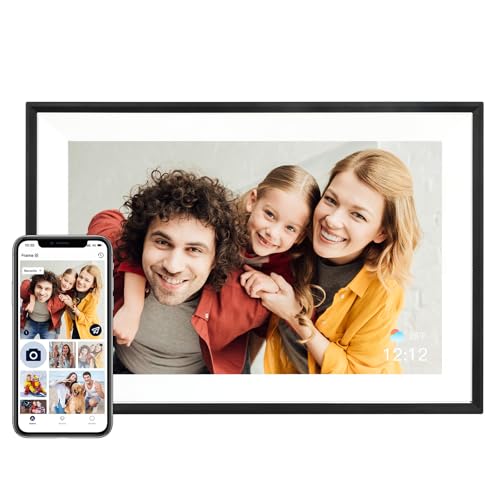
Aura Digital HD Picture Frame, 10 Inch, Carver Black, Gifting EditionBest OverallAura Digital HD Picture Frame, 10 Inch, Carver Black, Gifting EditionApp for sending photosTop of the groupn/an/a
Skylight Digital Picture Frame, 10 Inch, Load from Phone, No Subscription RequiredBest No SubscriptionSkylight Digital Picture Frame, 10 Inch, Load from Phone, No Subscription Requiredn/aUpper middle of the groupn/an/a
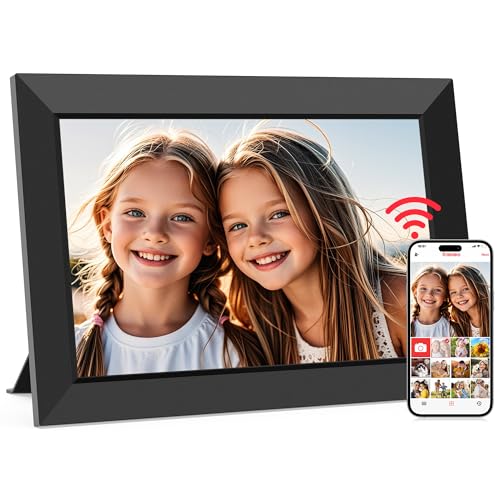
Frameo 10.1 Inch WiFi Digital Picture Frame, 32GB, 1280 by 800 IPS Touch ScreenBest Value 10 InchFrameo 10.1 Inch WiFi Digital Picture Frame, 32GB, 1280 by 800 IPS Touch ScreenSend photos and videos up to 15 seconds from anywhereLower middle of the group10.1 in IPS touch, 1280 by 800Frameo app
Frameo 10.1 Inch WiFi Digital Picture Frame, Wood, IPS HD, No Social Media Account NeededBest Wood Frame LookFrameo 10.1 Inch WiFi Digital Picture Frame, Wood, IPS HD, No Social Media Account Neededn/aMiddle of the group10.1 in IPS HDFrameo, free
Frameo 15.6 Inch WiFi Digital Picture Frame, 64GB, 1920 by 1080, Large DisplayBest Large ScreenFrameo 15.6 Inch WiFi Digital Picture Frame, 64GB, 1920 by 1080, Large DisplaySend photos and videos via the Frameo appTop of the group15.6 in, 1920 by 1080n/a
AEEZO Digital Picture Frame, 10.1 Inch, 1280 by 800 HD IPS Touchscreen, AiMOR AppBest Budget TouchAEEZO Digital Picture Frame, 10.1 Inch, 1280 by 800 HD IPS Touchscreen, AiMOR Appn/aLowest of the group10.1 in IPS touchscreen, 1280 by 800AiMOR app for instant sharing

A digital photo frame turns a shelf into a rotating gallery of family photos, with new pictures arriving from anyone who has the app. It is one of the few gadgets that older relatives enjoy without learning anything, which is why it is a popular gift.

Screens, apps and storage limits vary more than the prices suggest. Some frames need an account, some limit video length and some only support one Wi-Fi band. This guide compares six frames on those points, so you choose the one that will actually be used rather than switched off in a drawer.

Before you buy

6 Criteria to Look For Before Buying a Digital Photo Frame

  1. 01

    App and account model

    Most frames depend on an app to send photos, and the app is the part that can disappear if a company changes plans. Check whether the app needs an account, a subscription or a social login. The Skylight lists no subscription.

  2. 02

    Screen size and resolution

    A 10.1 inch frame at 1280 by 800 is common and looks sharp at a shelf distance. A 15.6 inch frame at 1920 by 1080 reads from across a room. Pick size from where you will place it, and expect low resolution on bigger screens.

  3. 03

    Storage and video limits

    32GB holds a large library, while the 15.6 inch frame lists 64GB or about 100,000 photos. Frameo frames cap shared videos at 15 seconds. Check storage and limits if you share long clips.

  4. 04

    Wi-Fi band

    Some frames only support 2.4 GHz Wi-Fi, as the 15.6 inch frame lists. A router that merges bands can make setup awkward. Check your network before buying.

  5. 05

    Glare and placement

    A glossy screen mirrors windows and lamps. Place the frame away from direct light, at about eye level, and use auto brightness if available. Matte or anti-glare screens help.

  6. 06

    Power and cables

    Frames need a cable and an outlet, and cords on show spoil the look. Plan the route behind the frame or furniture. Battery frames are rare.

Detailed reviews

The 6 best digital photo frames, explained

01
Aura Digital HD Picture Frame, 10 Inch, Carver Black, Gifting Edition
10 inHD displayApp sharingCarver frame
Check price on Amazon
Best for: Gifts and living rooms that want the most polished display and simple sharing.

Aura's 10 inch HD frame in a black Carver surround is pitched as a gifting frame, with an app that lets family members send photos and the listing quoting a reviewer who called it the best digital photo frame. The display and the app are the reasons people buy Aura: the screen looks like a print and the setup is simple enough for a grandparent.

The tradeoff is cost and the usual cloud story: it sits at the top tier of the group, and a frame that depends on an app and an account is only as good as the service behind it. Compared with the Frameo frames, it costs more and is more refined. Against the Skylight, it has a stronger display but more ecosystem lock-in.

Plug it in, join the home Wi-Fi and invite family to the app. Place it where it will not catch glare from a window, at about eye level on a shelf. In year three, expect to keep the app and firmware updated, to wipe the screen with a dry microfibre cloth and to check what the maker offers if the service changes.

What works

  • A refined HD display looks closer to a print than budget frames
  • App sharing lets family send photos from anywhere
  • A framed surround looks like furniture, not a gadget
  • Setup is simple enough for non-technical users

Watch out for

  • Top cost tier is the highest in the group
  • Depends on an app and an account that the maker controls

Specs

Size
10 in HD display
Frame
Carver black, wood-look
Sharing
App for sending photos
Positioning
Pitched as a gifting frame
Cost tier
Top of the group
02
Skylight Digital Picture Frame, 10 Inch, Load from Phone, No Subscription Required
10 inLoad from phoneNo subscriptionWi-Fi
Check price on Amazon
Best for: Buyers who want an easy frame with no subscription.

Skylight's 10 inch frame loads photos from a phone, requires no subscription according to the listing, and sets up by plugging in, connecting to Wi-Fi and selecting photos. The no-subscription point matters: some frames charge for cloud storage or extra features, and a frame that works without a monthly fee is a better gift.

The tradeoff is feature depth: a simple frame offers fewer tools than a premium one, and the display is not the sharpest in the group. Compared with Aura, it costs less and has no fees, but looks plainer. Against the Frameo frames, it uses its own app and an established brand.

Set up the frame, add the family to the app and pick a few albums. Place it away from glare. In year three, check that the app still works with your phone's update, wipe the screen gently and keep the cable out of sight.

What works

  • No subscription is required per the listing
  • Photos load from a phone with a simple setup
  • A familiar brand with a straightforward app
  • Upper middle cost tier for a 10 inch frame

Watch out for

  • Fewer tools and a plainer display than premium frames
  • Relies on the maker's app and servers for sharing

Specs

Size
10 in, black
Loading
Load photos from a phone
Cost model
No subscription required per the listing
Setup
Plug in, join Wi-Fi, pick photos
Cost tier
Upper middle of the group
03
Frameo 10.1 Inch WiFi Digital Picture Frame, 32GB, 1280 by 800 IPS Touch Screen
10.1 in32GB1280 by 800Touch screen
Check price on Amazon
Best for: Households that want a 10 inch frame and touch control at a lower cost tier.

This Frameo 10.1 inch frame has a 1280 by 800 IPS touch screen, 32GB of storage and sharing through the Frameo app, where family can send photos and videos of up to 15 seconds from anywhere. The same panel resolution as the Aura makes it a competitive value pick, and the touch screen lets you swipe through pictures.

The tradeoff is polish and the 15 second video cap: build quality and screen finish vary between frames sold under the Frameo software, and clips longer than 15 seconds are cut. Compared with Aura, it costs much less but is less refined. Against the Skylight, it uses a different app and a touch screen.

Unbox, connect to Wi-Fi and pair the family app with the code on screen. Place the frame on a shelf with the cable routed behind. In year three, expect to check that the touch screen stays responsive, and keep the app updated for security.

What works

  • A 1280 by 800 IPS panel matches the resolution of premium frames
  • 32GB holds a large library of photos
  • Touch control makes browsing easy
  • Lower middle cost tier for a 10.1 inch frame

Watch out for

  • Build and finish vary between sellers of Frameo frames
  • Videos are limited to 15 seconds

Specs

Screen
10.1 in IPS touch, 1280 by 800
Storage
32GB
Sharing
Send photos and videos up to 15 seconds from anywhere
App
Frameo app
Cost tier
Lower middle of the group
04
Frameo 10.1 Inch WiFi Digital Picture Frame, Wood, IPS HD, No Social Media Account Needed
10.1 inWood surroundIPS HDNo social account
Check price on Amazon
Best for: Living rooms that want a wood frame look at a mid cost tier.

This Frameo frame has a 10.1 inch IPS HD screen in a wood surround, with an app that is free and needs no social media account. A real wood surround looks more like furniture than a plastic bezel, and the no-account setup keeps photos out of social platforms.

The tradeoff is that the wood surround adds weight and cost compared with a plastic frame, and the underlying software is the same as the cheaper Frameo frames. Compared with the plain 10.1 inch model, it looks better but costs more. Against Aura, it has a similar frame look at a lower cost tier.

Place it on a console or shelf and connect to Wi-Fi. Keep it out of damp areas, since wood can swell. Dust the surround with a dry cloth. In year three, expect small marks on the wood and a check of the app for updates.

What works

  • A wood surround looks more like furniture than a gadget
  • No social media account is needed to use the app
  • A 10.1 inch IPS HD screen suits a shelf or console
  • A free app for sharing photos with family

Watch out for

  • Same software as cheaper Frameo frames, so you pay for the look
  • Wood can swell in damp rooms

Specs

Screen
10.1 in IPS HD
Surround
Wood
Account
No social media account needed
App
Frameo, free
Cost tier
Middle of the group
05
Frameo 15.6 Inch WiFi Digital Picture Frame, 64GB, 1920 by 1080, Large Display
15.6 in64GB1920 by 10802.4 GHz Wi-Fi
Check price on Amazon
Best for: Larger walls and shelves where a bigger screen reads from across the room.

This Frameo frame has a 15.6 inch 1920 by 1080 display and 64GB of built-in storage, which the listing says holds about 100,000 photos, and supports only 2.4 GHz Wi-Fi. The larger screen reads from across a room, which suits a living room wall or a bigger shelf, and the storage is enough for a lifetime of photos.

The tradeoff is cost and the 2.4 GHz limit: it sits at the top tier of the group, and a 2.4 GHz-only connection can be an issue on a router that has merged bands. Compared with the 10.1 inch frames, it is much bigger and sharper. Against Aura, it has a larger screen and a lower polish.

Place it on a wall mount or a sturdy shelf and connect to a 2.4 GHz network. Check the router settings if it will not connect. In year three, expect to clean the large screen with a dry microfibre cloth and to keep the mount secure.

What works

  • A 15.6 inch 1920 by 1080 screen reads from across a room
  • 64GB holds around 100,000 photos per the listing
  • Photo and video sharing through the app
  • A large display suits a wall or console

Watch out for

  • Top cost tier is the highest in the group
  • Supports only 2.4 GHz Wi-Fi, which can cause setup issues

Specs

Screen
15.6 in, 1920 by 1080
Storage
64GB, about 100,000 photos
Wi-Fi
2.4 GHz only
Sharing
Send photos and videos via the Frameo app
Cost tier
Top of the group
06
AEEZO Digital Picture Frame, 10.1 Inch, 1280 by 800 HD IPS Touchscreen, AiMOR App
10.1 in1280 by 800TouchscreenAiMOR app
Check price on Amazon
Best for: Tight budgets that still want a 1280 by 800 touchscreen.

AEEZO's 10.1 inch frame has a 1280 by 800 HD IPS touchscreen with adjustable brightness and shares photos through the AiMOR app. At the lowest cost tier in the group, it offers the same panel resolution as pricier frames, which is the main reason to consider it.

The tradeoff is brand maturity: AEEZO and the AiMOR app are newer names with a shorter record than Aura or Skylight, so long-term app support is less certain. Compared with the Frameo frames, it uses a different app. Against Aura, it lacks the polish and track record.

Set it up with the app and test the sharing with a family member before gifting it. Place it away from glare. In year three, check that the app is still maintained, and wipe the screen with a dry cloth.

What works

  • A 1280 by 800 IPS touchscreen at the lowest cost tier
  • Adjustable brightness suits day and evening
  • App sharing lets family send photos remotely
  • A common gift choice with a simple setup

Watch out for

  • A newer brand and app with a shorter record
  • Less polish and support than established frames

Specs

Screen
10.1 in IPS touchscreen, 1280 by 800
App
AiMOR app for instant sharing
Brightness
Adjustable
Use
Gift for family and friends
Cost tier
Lowest of the group

Spec decoder

What the listing measurements really mean

The numbers brands lead with, translated into what they tell you about fit, comfort and wear at home.

Resolution

The number of pixels. 1280 by 800 is common on 10 inch frames and 1920 by 1080 on larger ones.

Watch forThe Frameo 15.6 lists 1920 by 1080; the 10 inch frames list 1280 by 800.

IPS panel

A screen type with wide viewing angles and good colour. It looks good from the side.

Watch forThe 10.1 inch frames list IPS.

Storage in GB

Built-in memory for photos and clips. More means more photos without deleting.

Watch forThe Frameo 15.6 lists 64GB; the 10.1 inch models list 32GB.

2.4 GHz Wi-Fi only

The frame supports only the older band. It travels further but is slower and may not connect to merged networks.

Watch forThe Frameo 15.6 lists 2.4 GHz only.

Subscription

A paid plan for cloud storage or features. Some frames work without one.

Watch forThe Skylight lists no subscription required.

Methodology

How We Evaluated These Digital Photo Frames

Screen and resolution

We compared 10.1 and 15.6 inch screens and 1280 by 800 and 1920 by 1080 resolutions. We matched them to viewing distance. We did not test any display.

App and sharing

We read app names, account needs and video limits such as 15 seconds. We noted that apps are a dependency. We favoured clear account and subscription statements.

Storage

We compared 32GB and 64GB storage and the photo counts claimed. Storage is rarely the limit for most households. We noted the cloud caveat.

Build and look

We looked at the black Carver frame, the wood surround and plain bezels. A frame on a shelf should look like furniture. We favoured real materials.

Owner feedback patterns

We researched common themes: setup problems on merged Wi-Fi bands, glare and app support. These shaped our cons. We did not use ratings or review counts.

Decision guide

How to Choose the Right Digital Photo Frames

By Use

SituationPickWhy
Polished giftAura Carver 10 inchRefined display and app
No subscriptionSkylight 10 inchNo subscription required
Wood look at a mid tierFrameo wood 10.1 inchReal wood surround
Budget 10 inchFrameo 10.1 or AEEZOTouch screen at lower tiers
Big wall or shelfFrameo 15.6 inch1920 by 1080

By Budget

SituationPickWhy
Lowest tierAEEZO 10.1 inchLowest cost touchscreen
Lower middleFrameo 10.1 inch32GB and touch
MiddleFrameo wood 10.1 inchWood surround
Upper middleSkylight 10 inchNo subscription
Top of the groupAura or Frameo 15.6Polish or size

10 Inch vs 15.6 Inch

10 inch

The Aura, Skylight, Frameo 10.1 and AEEZO suit shelves and consoles. They cost less and look good up close.

15.6 inch

The Frameo 15.6 reads from across a room and suits a wall. It costs more and has a 2.4 GHz limit.

Pick 10 inch for a shelf and 15.6 inch for a wall or a big room.

By Sharing Needs

SituationPickWhy
Family sends photos oftenAura or SkylightEstablished apps
Short video clipsFrameo framesUp to 15 seconds
No social accountFrameo woodNo account needed
Phone loadingSkylightLoad from phone
Gift to a relativeAura CarverSimple setup

For Living Room Use Specifically

Look for

A frame that looks like furniture, a screen size that suits the spot, an app you trust and a placement away from glare.

In this comparison

The Aura and wood Frameo suit styled shelves, while the 15.6 inch Frameo suits a wall.

When to Spend More

Spend more if

The frame is a gift, stays on show or needs a bigger screen, as with the Aura or Frameo 15.6.

Save if

You want a simple frame for a shelf, where the Frameo 10.1 or AEEZO is enough.

Ownership

Maintenance schedule

The upkeep that decides whether a piece still looks good in year five.

TaskIntervalWhy it matters
Wipe the screenMonthlyFingerprints and dust dull the picture. A dry microfibre cloth is enough. Skip glass sprays, since liquid can seep behind a touch panel and cloud the IPS layer over time.
Update the app and firmwareAs promptedUpdates fix sharing bugs and security issues.
Refresh the photo albumQuarterlyNew photos keep the frame interesting.
Check the cable and plugTwice a yearLoose plugs cause restarts. Re-seat and tidy cables.
Back up photosYearlyA frame is not a backup. Keep originals elsewhere. The 32GB and 64GB internal storage is a convenience copy, and a failed frame takes its photos with it.

FAQ

Frequently Asked Questions

Do digital photo frames need Wi-Fi?

Wi-Fi frames need it to receive photos from the app. Some can also be loaded by USB or card, so check the listing. Without a network you lose the main convenience, which is family members sending pictures from their own phones. For a frame in a grandparent's home, make sure the router reaches the spot where the frame will sit before you buy.

How much does a digital photo frame cost?

Prices move, so check the current listing. The AEEZO sits at the lowest tier and the Aura and Frameo 15.6 at the top. Size and brand drive cost. The 15.6 inch Frameo is the largest screen here and carries the top tier for that reason, while the 10.1 inch models cluster lower. Paying more for a bigger panel makes sense only if the frame will be viewed from across a room.

Is a subscription required?

Some frames need one for cloud features. The Skylight lists no subscription, and Frameo frames use a free app. Read the listing for any paid cloud storage tier before you commit, because a frame that depends on a monthly fee becomes a poor gift once the fee lapses. Stored photos on the frame itself, such as the 32GB and 64GB Frameo units, keep working offline.

Can I share video?

Many allow short clips. Frameo frames cap videos at 15 seconds. Longer videos usually need trimming first, and clips eat storage faster than stills, so the 32GB and 64GB frames have the advantage if you plan to share many.

Why will my frame not connect?

Some frames support only 2.4 GHz Wi-Fi. Check your router's bands and move the frame closer. The 15.6 inch Frameo lists 2.4 GHz Wi-Fi, which is common for these frames but means a dual-band router set to a combined name can confuse setup. Temporarily switching your phone to the 2.4 GHz network often fixes pairing.

Where should I place a digital frame?

Away from direct sun and bright lamps, at about eye level. A shelf or console beside a wall works well. A 10 inch screen reads best within about 3 metres, while the 15.6 inch model suits a longer living room. Avoid placing any frame next to a radiator or directly over a heat source.

Bottom line

The short version

Browse more digital photo frameson Amazon →
Elena Hart, Lead Home Editor

About the author

Elena Hart

Lead Home Editor, SweetLivingRoom

Elena Hart leads SweetLivingRoom's buying guides, turning product dimensions, material specs and owner feedback into clear verdicts on sofas, rugs, lighting, storage and decor.

More from Elena →