
Amazon affiliate links - we earn a commission.Affiliate disclosure

Buying guide · 13 min read · Updated 2026-11-26

Best Budget Laptop Tables (2026)

Budget laptop tables and lap desks for sofa and bed use, compared on surface size, leg stability, tilt, heat and storage, with honest tradeoffs.

Elena Hart, Lead Home EditorBy Elena HartLead Home Editor6 picks comparedSpec-sheet verified
Best Budget Laptop Tables

At a glance

Our top picks

Side by side

Spec comparison

A laptop table turns a sofa or bed into a workable seat, and the cheapest versions do the job if you choose the right type. There are three: a cushioned lap desk that sits on your legs, a folding table with legs that straddles them, and a tray that is mostly for meals with an occasional laptop.

This guide covers the lower half of the price range. We compare surface size, leg stability, tilt and heat, and we are honest about what a cheap folding table gives up. We also explain the posture issue, because a table at the wrong height will make your neck and wrists hurt.

Before you buy

6 Criteria to Look For Before Buying a Budget Laptop Table

  1. 01

    Lap desk or legged table

    A cushioned lap desk, like the AboveTEK, sits on your legs and moves with you. A legged table, like the SONGMICS or Frpufi, straddles your lap and stays put. Choose a table if you work for hours and a lap desk if you want portability. A good test is to sit with your laptop closed on the table and see if your shoulders stay relaxed, because raised shoulders mean the surface is too high.

  2. 02

    Surface size

    A 20 inch wide surface holds a laptop and a mouse. A 23.6 inch surface adds room for a notebook. A 17 inch laptop needs about 16 inches of width, so check the laptop footprint before buying. Remember that a 15 inch laptop is wider than its screen size suggests, so measure the base before you compare surface widths.

  3. 03

    Height and tilt

    The surface should let your forearms sit roughly level, with the screen near eye level. The SONGMICS adjustable desk offers six heights and a 120 degree tilt, and fixed models do not. Buyers often ignore posture until their neck hurts. Look for rubber feet on the legs, since bare metal slides on a polished floor and scratches a wood bed frame.

  4. 04

    Leg stability

    Folding legs are the weak point of a cheap table. Metal legs, as on the BUYIFY, flex less than thin bamboo. Test the table with the laptop off, and check that the legs lock before every use. If you game or edit video, prefer a table with a ventilated surface, because a solid top can raise fan noise.

  5. 05

    Heat and ventilation

    Laptops vent heat through the bottom or the sides, so a solid wood surface can trap it. A heat shield, as on the AboveTEK, protects your legs, and a surface with a raised edge lets air flow. Avoid placing a laptop on a pillow. Storage matters too: a table that folds to about two inches thick slides under a sofa, while a rigid tray does not.

  6. 06

    Extras that matter

    A cup holder, tablet slot and drawer are convenient but can be a spill risk. Use a lidded mug, and keep the drawer for pens. Extras add weight, which matters if you carry the desk daily. Always unplug the charger when you move the table, since a snagged cable can pull a laptop off the edge.

Detailed reviews

The 6 best budget laptop tables, explained

01
SONGMICS Adjustable Laptop Bed Desk, 6 heights, 120 degree tilt, 20.5 x 11.8 in
6 heights120 degree tilt20.5 x 11.8 in
Check price on Amazon
Best for: Working on a laptop from a sofa or bed with an adjustable angle.

This is the most adjustable desk in the group, with six height settings and a stepless tilt up to 120 degrees. The adjustable height matters because a seated person on a sofa and a person lying in bed need different surface heights, and the tilt lets you angle the surface for reading or typing. The frame is metal, and the desktop measures 20.5 by 11.8 inches.

The tradeoff is surface area. At 20.5 inches wide and 11.8 deep, it holds a laptop and a mouse but not a laptop plus a notebook plus a mug. Compared with the 23.6 inch SONGMICS foldable, it is smaller but more adjustable. If you need a larger surface, choose the wider model, but you lose the tilt.

Set the height so that your forearms are roughly level when typing, and keep the screen near eye level, which usually means a laptop stand or a stack of books. Check the legs lock firmly at each height before placing a laptop on the surface. Pair it with a small laptop riser or a firm cushion behind the screen if the display sits too low for your neck.

What works

  • Six height settings suit a sofa, a bed or a chair
  • Stepless 120 degree tilt helps with typing and reading
  • Metal frame holds a laptop steady
  • Folds for storage between uses

Watch out for

  • Smaller 20.5 by 11.8 inch surface leaves no room for a notebook
  • Adjustable joints can loosen with heavy use

Specs

Desktop
20.5 x 11.8 in
Heights
6 settings
Tilt
120 degrees, stepless
Frame
Metal
Cost position
Fifth cheapest of 10
02
SONGMICS Foldable Lap Desk Bed Table Tray, 23.6 x 15.7 in, cup holder
23.6 x 15.7 inCup holderTablet slot
Check price on Amazon
Best for: Working with a laptop and notes at once in bed or on a sofa.

This foldable desk has a wide surface of about 23.6 by 15.7 inches, plus a cup holder, a tablet slot and a small storage drawer. The width allows you to fit a laptop, mouse and notebook together, and the tray edge keeps items from sliding. It folds flat for storage.

The compromise is that you give up adjustable height and tilt, so you have to adapt your posture to the desk. Compared with the adjustable SONGMICS, this one is simpler and larger. The cup holder is useful but a spill could reach a laptop on the same surface, so use a lidded mug.

Set it across your lap on a sofa or over a bed, and check that the legs are fully open before loading it. Keep the tablet slot clear of loose cables. Wipe the surface with a damp cloth, since crumbs and drink rings are the common marks. If the desk slides on a silky duvet, lay a thin non-slip mat underneath it to keep the legs from creeping.

What works

  • 23.6 by 15.7 inch surface fits a laptop, mouse and notebook
  • Cup holder and tablet slot add everyday convenience
  • Small drawer keeps pens and a charger close
  • Folds flat for storage in a closet or beside a sofa

Watch out for

  • No adjustable height or tilt
  • A cup holder next to a laptop is a spill risk

Specs

Surface
23.6 x 15.7 in
Extras
Cup holder, tablet slot, drawer
Style
Foldable bed table
Colour
Black
Cost position
Sixth cheapest of 10
03
Frpufi Folding Wood Lap Desk, 23.6 x 15.7 x 10.6 in, cup holder
23.6 x 15.7 inWood topCup holder
Check price on Amazon
Best for: A budget friendly desk for a large laptop with a wood look.

This is a folding wood laptop desk about 23.6 inches wide, 15.7 inches deep and 10.6 inches high, with a cup holder. The listing says it holds laptops up to 17 inches along with a mouse and notes. At 10.6 inches high, it suits a bed or a sofa with a normal seat height.

The tradeoff is typical of a low-cost folding table: no adjustment, and the legs are the weak point. A wood top looks nicer than plastic but can show scratches. Compared with the BUYIFY 23 inch, it has a similar footprint, and the wood top gives a more furniture-like look. The cup holder is useful, but check that it is secure.

Open the legs fully until they lock. Keep it away from damp, since wood can swell, and wipe spills quickly. If the legs feel wobbly, place a thin rubber mat under them for grip on a duvet. Wipe the legs with a dry cloth now and then, because sticky fingerprints on a hinge can make it stiffer to open.

What works

  • Second lowest cost, with a large 23.6 inch surface
  • Fits laptops up to 17 inches with a mouse and notes
  • Wood top looks warmer than plastic
  • Cup holder keeps a drink within reach

Watch out for

  • No height or tilt adjustment
  • Wood top can scratch and swell in damp

Specs

Surface
23.6 x 15.7 in
Height
10.6 in
Laptop size
Up to 17 in
Material
Wood top
Cost position
Second cheapest of 10
04
BUYIFY 23 Inch Foldable Lap Desk, metal legs, cup holder, 17 inch laptop
23 in wideMetal legsReady to use
Check price on Amazon
Best for: A quick, no-assembly desk for a large laptop on a sofa or bed.

This is a ready-to-use folding desk with a 23 inch wide surface and metal legs that simply open. The listing says it holds laptops up to 17 inches, and the desk doubles as a breakfast tray or a reading table. There is no assembly, which makes it a good gift or a quick fix.

The compromise is that the listing gives few details on tilt or height. Compared with the Frpufi wood desk, it is similar in size but with a plainer look. The metal legs add a bit of sturdiness over plastic, and the cup holder adds convenience.

Unfold the legs until they click, and test the desk with the laptop off before you load it. A slightly raised lip helps keep a mouse on the surface. Check periodically that the leg joints are tight. Because it folds, keep it behind a sofa or beside a bed so you are not tempted to leave it open and trip over the legs.

What works

  • No assembly, just open the legs and use it
  • 23 inch width holds a 17 inch laptop
  • Metal legs add rigidity over plastic
  • Third cheapest of ten in the data set

Watch out for

  • Few listed details on height or tilt
  • Plain look is functional, not decorative

Specs

Width
23 in
Laptop size
Up to 17 in
Legs
Sturdy metal, fold
Setup
No assembly
Cost position
Third cheapest of 10
05
AboveTEK Portable Lap Desk, retractable mouse pad tray, heat shield, anti-slip
Mouse pad trayHeat shieldAnti-slip top
Check price on Amazon
Best for: An upright seat on a sofa or armchair where legs would get in the way.

This is a cushioned lap desk, not a table with legs, so it rests directly on your lap. The surface is anti-slip, there is a retractable mouse pad that slides out to the left or right, and the listing describes a heat shield made of thick material to protect your legs from laptop heat. It suits people who sit upright and want a portable surface.

The tradeoff is that a lap desk has no legs, so your lap is the support, and the desk moves when you shift. Compared with the foldable tables, it is easier to carry and store but less stable. The heat shield is a real benefit if your laptop runs warm.

Place it across your knees and keep the screen at a comfortable angle. Avoid blocking vents, and use a flat surface if you play games. Wipe the surface with a damp cloth. Treat the heat shield as comfort, not cooling, and still keep the laptop vents clear of the cushion.

What works

  • Retractable mouse pad works for left or right hands
  • Heat shield protects your legs from laptop warmth
  • Anti-slip surface keeps a laptop in place
  • Lightweight and easy to carry between rooms

Watch out for

  • Rests on your lap, so it moves when you shift
  • Smaller surface than a folding table

Specs

Style
Cushioned lap desk
Mouse tray
Retractable, left or right
Heat
Heat shield layer
Surface
Anti-slip
Cost position
Fourth cheapest of 10
06
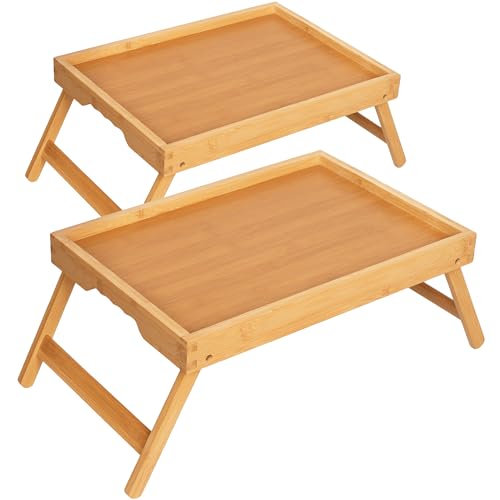
Lorveina 2 Pack Bamboo Bed Tray Tables with Folding Legs, medium, natural
2 packBambooFolding legs
Check price on Amazon
Best for: Occasional laptop use plus breakfast in bed for two.

This is a set of two bamboo bed trays with folding legs and wave-shaped side handles, meant for meals, reading and light laptop use. It is the cheapest option in the data set, and getting two lets you share breakfast in bed. Raised edges contain plates and cups.

The tradeoff is that it is primarily a tray. The listing says light laptop use, so a heavy laptop or a long work session will test the folding legs. Compared with the SONGMICS desks, it has no tilt or heat shield. For occasional use, though, it is a charming and cheap piece.

Lift it by the handles and open the legs fully. Keep liquids away from the edges, and wipe bamboo with a damp cloth, drying it afterwards. Do not leave it in a damp bathroom. Bamboo can splinter at a rough edge when new, so run a hand over the rim before first use and sand any burr lightly.

What works

  • Lowest cost, and you get two trays
  • Bamboo looks warm and wipes clean
  • Raised edges keep plates and cups in place
  • Side handles make it easy to carry

Watch out for

  • Listed for light laptop use only
  • No tilt, no cooling and no storage

Specs

Pack
2 trays
Material
Bamboo
Legs
Folding
Handles
Wave-shaped side
Cost position
Cheapest of 10

Spec decoder

What the listing measurements really mean

The numbers brands lead with, translated into what they tell you about fit, comfort and wear at home.

Surface dimensions

The width and depth of the working area. A wider surface holds more than a laptop.

Watch forThe SONGMICS adjustable is 20.5 by 11.8 inches, and the foldable is 23.6 by 15.7.

Stepless tilt

A tilt that stops at any angle, not just fixed steps. It helps with typing and reading.

Watch forThe SONGMICS adjustable lists 120 degrees of stepless tilt.

Heat shield

A layer that insulates your legs from laptop heat. It does not cool the laptop.

Watch forThe AboveTEK lists a heat shield.

Laptop compatibility

The largest laptop the desk is rated for. It is a size guide, not a weight rating.

Watch forThe BUYIFY and Frpufi list up to 17 inches.

Folding legs

Legs that fold flat for storage. They add convenience but can wobble.

Watch forThe Lorveina bamboo tray uses folding legs and is listed for light use.

Methodology

How We Evaluated These Budget Laptop Tables

Stability and legs

We evaluated each product on leg material and joint design. Metal legs on the BUYIFY and SONGMICS rank above bamboo. We worked from published specifications. Where a listing did not state a dimension, we left it out of our comparison.

Surface and fit

We compared surface size and laptop compatibility. The Frpufi and BUYIFY list up to 17 inches, and the SONGMICS adjustable is the smallest. We assumed a typical laptop of 14 to 16 inches. We kept the focus on how each table behaves with a typical 15 inch laptop, since that is the most common size.

Ergonomics

We looked at height and tilt options. Only the SONGMICS adjustable offers both. Owner feedback patterns mention neck and wrist strain from low tables.

Heat and extras

We looked at heat shields, cup holders and drawers. The AboveTEK is the only one with a heat shield. We do not publish ratings or review counts.

Value framing

All six sit in the lower half of the price range. The Lorveina is the cheapest, and the SONGMICS adjustable gives the most flexibility. We say what each gives up.

Decision guide

How to Choose the Right Budget Laptop Tables

By Use

UsePickWhy
Working for hoursSONGMICS adjustableSix heights and a tilt
Laptop and notesSONGMICS foldableLarge surface and drawer
Large laptop on a budgetFrpufi23.6 inch surface
Quick ready-to-useBUYIFYNo assembly
Breakfast and light laptopLorveinaTwo trays

By Budget

SituationPickWhy
Lowest costLorveinaCheapest of 10
Low cost, large surfaceFrpufiSecond cheapest
Low cost, metal legsBUYIFYThird cheapest
Low cost, lap cushionAboveTEKFourth cheapest
A bit more, adjustableSONGMICS adjustableSix heights

Lap Desk vs Folding Table

Lap desk, like AboveTEK

Portable and good for upright seats. It moves with your legs and has a smaller surface.

Folding table, like SONGMICS

Stable and spacious. It needs room over your lap and takes space to store.

Choose a lap desk for short sessions and a folding table for long work.

By Seat

SeatPickWhy
Sofa, uprightAboveTEKSits on your lap
Sofa, reclinedSONGMICS adjustableTilt and height
BedLorveinaTray for meals
ArmchairBUYIFYStraddles your lap
Bed with a laptopSONGMICS foldableLarge surface

For Sofa Use Specifically

Look for

A surface height that keeps your forearms level, legs that straddle a sofa cushion, and a surface wide enough for a laptop and a mouse.

In this comparison

The SONGMICS adjustable is the clearest sofa pick, with the foldable model as a large-surface alternative.

When to Spend More

Spend more if

You work at a laptop for hours daily, and want a proper adjustable stand, a side table with a stand, or a desk with a wireless charger.

Save if

You use a laptop occasionally on the sofa. A basic folding table works.

Ownership

Maintenance schedule

The upkeep that decides whether a piece still looks good in year five.

TaskIntervalWhy it matters
Check the leg jointsMonthlyJoints loosen with folding. A wobble can tip a laptop. Tighten any visible screws while you are at it, since loose screws are the usual cause of wobble.
Wipe the surfaceWeeklyCrumbs and drink rings mark the surface. Use a damp cloth. Open the legs fully before you wipe, so the hinges are cleaned too.
Dry bamboo and woodAfter spillsMoisture swells wood and bamboo. Wipe and dry quickly.
Check the hinge locksBefore heavy useA hinge that does not lock can collapse.
Clean the vents areaEvery few monthsDust from a laptop builds up under the desk.

FAQ

Frequently Asked Questions

Is a laptop table bad for my posture?

If it is too low, yes. Keep forearms roughly level and the screen near eye level, with a stand if needed. A thin towel between the laptop and your lap can help if heat is the main problem.

Do lap desks stop heat?

A heat shield protects your legs, but it does not cool the laptop. Keep vents clear. If the table feels unstable, check whether the legs are fully extended before blaming the product.

Can I use a bed tray for work?

For short sessions. A tray is meant for meals and may flex under a long session.

What size laptop fits?

Most listed 23 inch desks fit up to 17 inches. Check the footprint.

Are folding legs stable?

They can be if locked and made of metal. Test it before use.

Do I need adjustable height?

For long work yes. For short sessions, a fixed height is fine.

Bottom line

The short version

Browse more budget laptop tableson Amazon →
Elena Hart, Lead Home Editor

About the author

Elena Hart

Lead Home Editor, SweetLivingRoom

Elena Hart leads SweetLivingRoom's buying guides, turning product dimensions, material specs and owner feedback into clear verdicts on sofas, rugs, lighting, storage and decor.

More from Elena →

Keep reading

Related guides