
Amazon affiliate links - we earn a commission.Affiliate disclosure

Buying guide · 12 min read · Updated 2026-11-26

Best Budget Cable Management (2026)

Budget cable management that actually hides living room cords: straps, clips, sleeves and J channels compared by what they fix and where they fail.

Elena Hart, Lead Home EditorBy Elena HartLead Home Editor5 picks comparedSpec-sheet verified
Best Budget Cable Management

At a glance

Our top picks

Side by side

Spec comparison

Cable management is one of the cheapest upgrades in a living room, and one of the easiest to get wrong. Most budget products are small bags of plastic parts, so the real question is which parts match the mess you actually have: a TV stand tangle, a sofa side table charger, or a desk in the corner.

This guide focuses on the lower half of the price range and is honest about the compromises. Adhesive holds depend on the surface, cheap sleeves can look bulky, and a large piece count says little about how many parts you will use. We explain what each style fixes so you buy one kit, not three.

Before you buy

6 Criteria to Look For Before Buying a Budget Cable Management

  1. 01

    Match the tool to the mess

    Cable problems come in three types: bundles of cords that need holding, runs that need to follow an edge, and cords that need hiding. Straps such as the fansto set solve the first, clips such as the 65 in the ELII kit solve the second, and sleeves such as the four 20 inch NOROCME sleeves help with the third. Buyers often pick the biggest bag and discover they only needed one tool.

  2. 02

    Adhesive versus screws

    Self-adhesive mounting is the default at this price and works well on clean, smooth, painted or laminate surfaces, but it struggles on textured walls, fabric and dusty wood. Wipe with alcohol, let it dry, and press for about 30 seconds. Where a cord carries weight, such as a thick power strip, screws or a clamp outperform tape every time, which is why you should not hang a strip from a J channel like the Yecaye set.

  3. 03

    Sleeve width and cord count

    A sleeve that is 0.4 inch wide when flat opens to a bundle of perhaps three to five thin cords, but a thick power cable plus HDMI will not close. Count your cords and check the thickest plug before buying. The 20 inch lengths in the NOROCME and ELII kits suit a TV to power strip drop, but a taller wall setup may need two sleeves joined.

  4. 04

    Reusable versus single use

    Zip ties are cheap but you cut them off to add a device. Hook-and-loop, like the fansto holders, can be opened a hundred times. If you change devices often, such as a game console or streaming box, reusable fasteners save frustration and avoid scratching cord insulation with a cut-off tie end.

  5. 05

    Colour and visibility

    A black clip on a white baseboard is more visible than the cord it holds. Choose colours to match the surface, and favour clips that sit behind furniture, not along a visible wall line. Black suits TV stands and desk undersides, but a white wall almost always calls for white or clear parts.

  6. 06

    Piece count versus usefulness

    A 327 piece kit sounds better than a 192 piece one, but the real count that matters is how many clips and sleeves you will place. Most living rooms use between 15 and 40 pieces. The extra parts are only valuable if you plan a second room, so compare clip and sleeve counts rather than the headline number.

Detailed reviews

The 5 best budget cable management, explained

01
Atticus Goods 314 Piece Cord Organizer Kit, sleeves, clips, ties
314 piecesClips and sleevesDesk and TV use
Check price on Amazon
Best for: A first-time tidy of a TV wall or desk where several kinds of mess overlap.

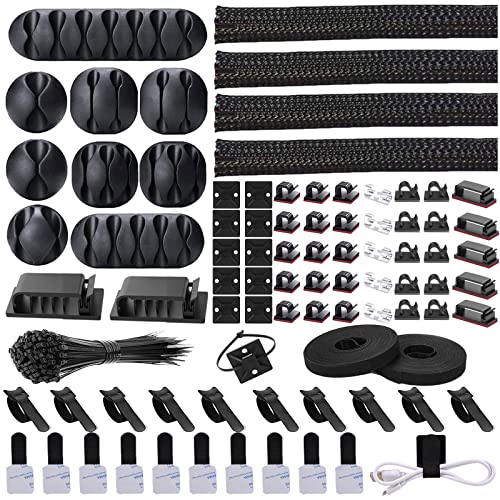
This is the broadest kit in the lineup, built around the idea that a media area needs several tools at once. It combines adhesive cord clips, split sleeves for bundling, and ties for loose slack, so a single box can cover a TV stand, a desk and a charging corner. The listing describes labeled cable routes, which is useful when a power strip serves six devices and you forget which plug is which.

The tradeoff is the same one every large kit has: piece count is not the same as useful pieces. Of 314 items, a large share are small clips and ties, and a typical living room setup might use perhaps a third of them. Compared with the 327 piece ELII set, it is similar in scope, so the choice comes down to which sleeve and clip mix suits your wall and desk better.

In ownership terms, plan for an hour of work. Clean the surface first, press each clip for several seconds, and route cords before you stick anything down. Black plastic suits dark furniture, and the adhesive can leave residue on painted drywall if removed in a hurry.

What works

  • Mix of clips, sleeves and ties covers most living room cable situations
  • Large piece count leaves spares for the next device you add
  • Labeling approach helps when one strip feeds many devices
  • One purchase replaces buying clips and sleeves separately

Watch out for

  • Many pieces will go unused in a typical living room setup
  • Adhesive clips can struggle on textured or dusty surfaces

Specs

Piece count
314
Style
Mixed kit
Includes
Clips, sleeves, ties
Mounting
Adhesive clips
Best area
Desk and media wall
02
fansto Under Desk Cable Organizer, 20 hook-and-loop holders
20 holders120 x 40 mmHook-and-loop
Check price on Amazon
Best for: Bundling cords behind a desk or console where cables already run one way.

This is the cheapest option here and also the most single-minded. It is a set of reusable hook-and-loop holders, each about 120 by 40 millimetres, and the listing says each one can hold up to 15 cables. The segmented design lets you adjust part of a run without taking the whole bundle apart, which is the usual annoyance of a fixed sleeve.

The compromise is that it only bundles and holds. It will not hide cords behind a wall or give you an adhesive channel along a baseboard, so it works best where cords are already routed in one direction, such as under a desk or behind a console. Compared with the 192 piece NOROCME kit, it has far fewer parts, but the parts it has are reusable, which matters when you swap a device twice a year.

Hook-and-loop straps do not loosen with age the way some zip ties do, but dust and pet hair can clog the loop side after a year or two. Brush it out with a stiff brush and it recovers. For a desk with a power strip, a monitor and a phone charger, this is usually all you need.

What works

  • Reusable straps let you add or remove a device without cutting anything
  • Segmented design adjusts one section without redoing the whole bundle
  • Lowest cost in this lineup for a very specific job
  • Soft strap material will not dent cable insulation like a tight tie

Watch out for

  • Bundles cords but does not hide them or route them along a wall
  • Loop side collects dust and pet hair over a year or two

Specs

Holders
20
Holder size
120 x 40 mm
Capacity
Up to 15 cables each
Style
Segmented strap
Cost position
Cheapest in this guide
03
ELII 327 Piece Cable Management Kit with sleeves and clips
327 pieces65 clips25 zip ties
Check price on Amazon
Best for: People tidying a whole entertainment wall with many short cord runs.

This kit stands out for the sheer number of adhesive clips, 65 in several shapes, plus 13 cord holders and 25 zip ties. It also includes four split cord protectors, each 20 inches long, which is enough to wrap the cords from a TV down to a power strip. The listing says the clips grip clean surfaces like desks, walls and baseboards without nails.

The tradeoff is that a kit this large rewards patience rather than speed. You will spend time choosing between clip shapes, and the sleeves are narrow, so a thick power cable plus an HDMI lead may not close fully. Against the Atticus Goods kit, the ELII set offers a few more pieces and a clearer clip count, but neither is meaningfully different in what it fixes.

Ownership is straightforward if you prepare the surface. Wipe with alcohol, let it dry and press each clip for about 30 seconds. Painted drywall can lose a flake of paint when a clip comes off, so use it where you do not plan to repaint soon.

What works

  • 65 clips in several shapes route cords along edges and baseboards
  • Four 20 inch sleeves bundle the thickest runs near the TV
  • Includes ties for slack as well as adhesive holders
  • Good spare count means a re-do does not require another kit

Watch out for

  • Narrow sleeve width limits how many thick cords fit in one
  • Choosing among many clip shapes slows the first install

Specs

Piece count
327
Cord protectors
4, 20 in long
Clips
65 adhesive
Zip ties
25
Sleeve width
0.4 in
04
NOROCME 192 Piece Cord Management Kit, sleeves and clips
192 pieces4 split sleeves36 clips
Check price on Amazon
Best for: A single TV or desk setup that needs sleeves and a modest number of clips.

This is the smaller NOROCME kit, with four 20 inch split sleeves and 36 self-adhesive clips in black. The clips are described as polyamide 66, a tougher nylon than the polypropylene used in some bargain bags, and that tends to show up as fewer snapped tabs when you press cords in. It suits a simpler setup than the 327 piece ELII kit.

The weakness is lower clip volume, so a long baseboard run may use up your supply quickly. Compared with the fansto hook-and-loop set, it hides more, since sleeves cover cords instead of just holding them. The sleeves are self-wrapping, which means you can open them to add a cord later without cutting anything.

In use, black clips against a white baseboard look obvious, so match the colour to the surface before you commit. The sleeves can look bulky on a thin wall-mounted TV with only two cords, where a single clip run would be neater. It is a sensible mid-sized choice when you want sleeves and clips without a drawer full of extras.

What works

  • Split sleeves open to add or remove a cord later without cutting
  • Polyamide clips feel firmer than the thinnest bargain clip bags
  • Smaller kit means less sorting before you start
  • Black finish blends with dark TV stands and cabinet backs

Watch out for

  • Only 36 clips, so a long baseboard run can use them all
  • Black clips are very visible on white or light walls

Specs

Piece count
192
Cord protectors
4, 20 in long
Clips
36 black
Material
Polyamide 66 clips
Mounting
Self-adhesive
05
Yecaye 6 Pack J Channel Cable Raceway, adhesive, no drill
6 J channelsPre-applied tapeNo drill
Check price on Amazon
Best for: Neat cord rows under a desk, side table or console edge.

This set takes a different approach: rigid J-shaped channels with pre-applied adhesive tape that stick under a desk or along a table edge and hold cords in a tidy line. Because the channel is a fixed shape, cords sit in a neat row instead of a loose bundle, which looks better under a glass or open-frame table than a ball of strap-wrapped wire.

The tradeoff is that channels hold only so much. Thick power bricks do not fit, and the adhesive depends on the surface staying clean and flat. Compared with the fansto straps, the channels give a more finished look, but you cannot reconfigure them easily once stuck.

Before sticking, dry-fit the channel against the edge and mark the position. Press firmly and give the adhesive a day before loading it with cords. Adhesive behaves poorly on textured laminate, so a smooth desk underside is ideal. It is a good small purchase for a laptop table or a side table with a charging strip.

What works

  • Rigid channel keeps cords in a tidy row instead of a loose bundle
  • Pre-applied tape means no screws and no drilling into furniture
  • Six channels cover several desk edges or one long run
  • Holds thin charging and HDMI cords in a clean line

Watch out for

  • Thick power bricks and plugs do not fit inside the channel
  • Adhesive hold is weaker on textured or dusty surfaces

Specs

Channels
6
Style
J channel raceway
Mounting
Pre-applied adhesive
Install
No tools
Colour
Black

Spec decoder

What the listing measurements really mean

The numbers brands lead with, translated into what they tell you about fit, comfort and wear at home.

Piece count

The total number of parts in the bag, including tiny clips, ties and sometimes labels. It is a marketing number more than a performance number.

Watch forThe 314 and 327 piece kits sound far larger than the 20 piece fansto set, but the useful difference is mostly clip and sleeve count.

Sleeve length and width

Length sets how far one sleeve reaches, and flat width sets how many cords fit. A 20 inch by 0.4 inch sleeve fits a few thin cords.

Watch forCheck that the NOROCME and ELII sleeves, both 20 inches, are long enough for your TV to strip run.

Adhesive type

Most kits use acrylic foam tape pre-applied to the clip. It bonds well to smooth clean surfaces and poorly to texture.

Watch forThe Yecaye channels depend entirely on the pre-applied tape, so surface preparation matters more there than with straps.

Material

Clips are usually polyamide or polypropylene; sleeves are usually PET or a woven fabric. Stiffer clips hold cords better but crack if bent hard.

Watch forThe NOROCME kit lists polyamide 66 clips, which is a point in its favour, but the listing does not state a temperature rating.

Reusability

Whether a fastener can be opened and closed repeatedly. Hook-and-loop and split sleeves can; zip ties cannot.

Watch forThe fansto set is reusable, while the 25 zip ties in the ELII kit are single use.

Methodology

How We Evaluated These Budget Cable Management

Fit to a real living room

We evaluated each product against three common setups: a wall-mounted TV with a media shelf, a desk in a corner, and a sofa-side charging corner. Kits that only suited one of these were marked down. The Yecaye channels fit desk edges well, while the Atticus kit covered the widest range.

Spec sheet and listing details

We worked from published specifications and listing text, not from physical trials. Sleeve lengths, clip counts and mounting methods were compared on paper. The 20 inch sleeve length shared by the ELII and NOROCME kits was the most useful common measure.

Owner feedback patterns

We looked at the kinds of comments owners tend to make about adhesive clips, such as failure on textured walls or residue on removal. These patterns informed the cons sections. We do not republish any ratings or review counts.

Relative cost position

Everything here sits in the lower half of the price range, and the fansto set is the cheapest of the group. We looked at what each product gives up, not just its relative cost. The ELII kit gives more parts, while the fansto set gives reusability.

Honesty about limits

No cable kit hides cords inside a wall, and none of these products does so. Where a product only holds cords, we say so. The 314 piece Atticus kit is the best generalist, but it will not replace a wall plate or a cable box.

Decision guide

How to Choose the Right Budget Cable Management

By Problem

SituationPickWhy
Tangle behind a deskfansto holdersReusable straps bundle cords without hiding them
TV wall with many cordsELII 327 piece kit65 clips and four sleeves cover a long run
General first purchaseAtticus Goods 314 pieceMixed clips, sleeves and ties in one box
Neat row under a table edgeYecaye J channelsRigid channel holds thin cords in a line
One TV, modest setupNOROCME 192 pieceFour sleeves and 36 clips are enough

By Budget

SituationPickWhy
Lowest spendfansto holdersCheapest here and reusable
Low spend with varietyELII 327 pieceLarge count for a small outlay
Middle of this groupNOROCME 192 pieceSleeves and clips with fewer extras
Slightly higher spendYecaye J channelsA more finished look under furniture
Best all-round valueAtticus Goods 314 pieceWidest coverage per box

Straps vs Sleeves

Straps, like fansto

Reusable and quick to adjust. They bundle cords but leave them visible, so they suit spaces behind furniture where nobody looks.

Sleeves, like NOROCME and ELII

They cover a bundle and look tidier. They need cords of similar thickness, and adding a thick cable later can force a redo.

Choose straps if you change devices often; choose sleeves if the cords are visible from the sofa.

By Surface

SurfacePickWhy
Smooth desk undersideYecaye J channelsFlat, clean surface suits pre-applied tape
Painted baseboardELII clips65 clips follow a long run
Textured wallfansto holdersStraps do not rely on the wall for grip
Glass or metal edgeAtticus Goods kitClips bond well to clean smooth surfaces
Behind a TV standNOROCME 192 pieceSleeves tidy the visible vertical drop

For a Media Wall Specifically

Look for

Sleeves of 20 inches or more, clips in a colour that matches the wall, and a plan for a power strip location before you stick anything.

In this comparison

The ELII kit and Atticus kit both give you sleeves plus many clips, so either handles the typical TV-to-strip run with parts to spare.

When to Spend More

Spend more if

You want cords hidden inside the wall, a ventilated box for a power strip, or a screw-mounted tray that can carry a heavy strip.

Save if

Your problem is a handful of visible cords. A single strap set such as fansto or one sleeve kit solves it for very little.

Ownership

Maintenance schedule

The upkeep that decides whether a piece still looks good in year five.

TaskIntervalWhy it matters
Check clip adhesionEvery 6 monthsAdhesive loosens with heat from electronics and seasonal humidity. A clip that sags can let a cord pull free.
Vacuum behind furnitureEvery 3 monthsDust collects on cords and strips, and dusty cords can heat more. Unplug before cleaning near a strip.
Brush hook-and-loop strapsOnce a yearPet hair and lint clog the loop side. A stiff brush restores the grip.
Re-route after adding devicesWhen changing devicesA new console or streamer often disturbs a neat bundle. Open split sleeves or straps rather than forcing a cord in.
Remove adhesive cleanlyWhen movingWarm the clip with a hair dryer and slide dental floss behind it. This reduces paint peeling.

FAQ

Frequently Asked Questions

Do adhesive cable clips damage walls?

They can lift a layer of paint if pulled off quickly. Warm the clip with a hair dryer and slide floss behind it to reduce the risk. Avoid fresh paint, which can take weeks to cure.

Is a big kit better than a small one?

Not automatically. The extra pieces only help if you plan to cover several rooms. For one TV wall or desk, a smaller kit such as the NOROCME 192 piece set is usually enough.

Can cable clips hide cords entirely?

No. Clips and straps tidy and route cords, but they do not hide them inside a wall. For that you need a cable raceway cover or an in-wall kit installed to local code.

Will sleeves make cords run hot?

For normal low-power cords like HDMI and chargers, no. Do not bundle a coiled or heavily loaded extension cord tightly, because bundles trap heat on high-draw devices.

Straps or zip ties?

Straps if you change gear often, since zip ties must be cut. Zip ties are fine for a permanent bundle behind a desk where nothing will change.

How long do adhesive clips last?

On a clean smooth surface, often years. On texture, dust or heat sources, they can fail within months. Re-check them after a warm season.

Bottom line

The short version

Browse more budget cable managementon Amazon →
Elena Hart, Lead Home Editor

About the author

Elena Hart

Lead Home Editor, SweetLivingRoom

Elena Hart leads SweetLivingRoom's buying guides, turning product dimensions, material specs and owner feedback into clear verdicts on sofas, rugs, lighting, storage and decor.

More from Elena →